Knowing how to use templates for faster social media post design starts with an honest admission. A template system only saves time when it is built around the content you really publish. Audit two months of real posts to find your six or seven recurring types. Build a template for each one, in every ratio you use. Lock the brand elements inside the file so they stay put. Name templates after the content type instead of a number. Review the set every quarter.
Social media templates usually fail for one of three reasons, and each one makes building brand awareness on social media harder.
First, teams create templates for big announcements but none for the routine posts they publish every week, so those still start from scratch. Second, a library of twenty templates means people spend more time choosing than designing, and six is enough. Third, when fonts, colors, and logo positions can be edited, people tweak them post by post, and the designs slowly stop looking like the brand.
This guide shows you how to audit your posts, build and lock a small set of templates, and keep them current, so your team designs faster and stops starting from a blank canvas.
Let's get into it and make your next post faster to design than your last!
How to use templates for faster social media post design
Templates make social media post design faster when you build the system in a deliberate order. The first decision is what the templates are for, and every later decision protects that foundation. Skip the sequence and the set gets abandoned. Follow it, and each post becomes a simple swap of text and images.
The eight steps below explain how to use templates for faster social media post design, so you set up the system once and save time on every post you publish afterward.
Step 1: Audit what you actually post before building anything
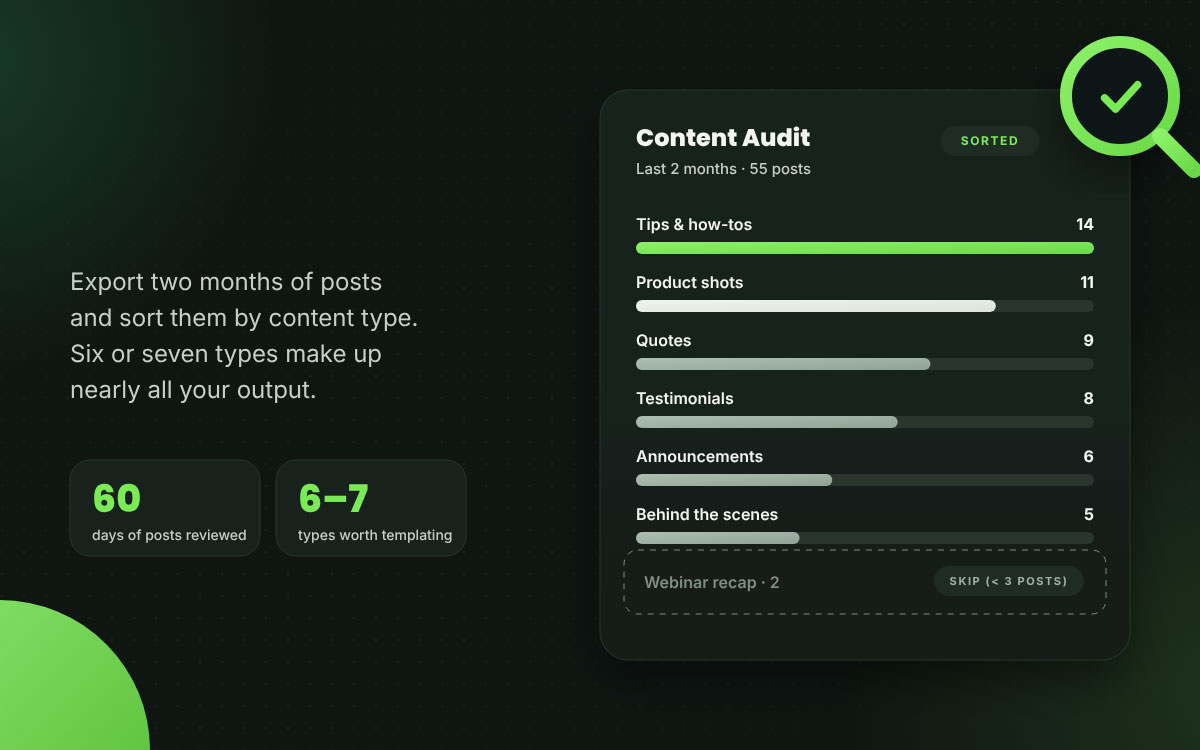
Export your last two months of posts and sort them by content type. Think announcements, tips, testimonials, product shots, quotes, and behind-the-scenes.
Why it matters: Most teams build for the content they wish they were making. The audit works like a mirror, and it can be a little humbling. You'll find that six or seven types make up nearly all of your output. Those are the only ones worth templating.
Practical note: If a content type shows up fewer than three times in two months, it doesn't need a template yet.
Step 2: Build six to eight templates, not twenty
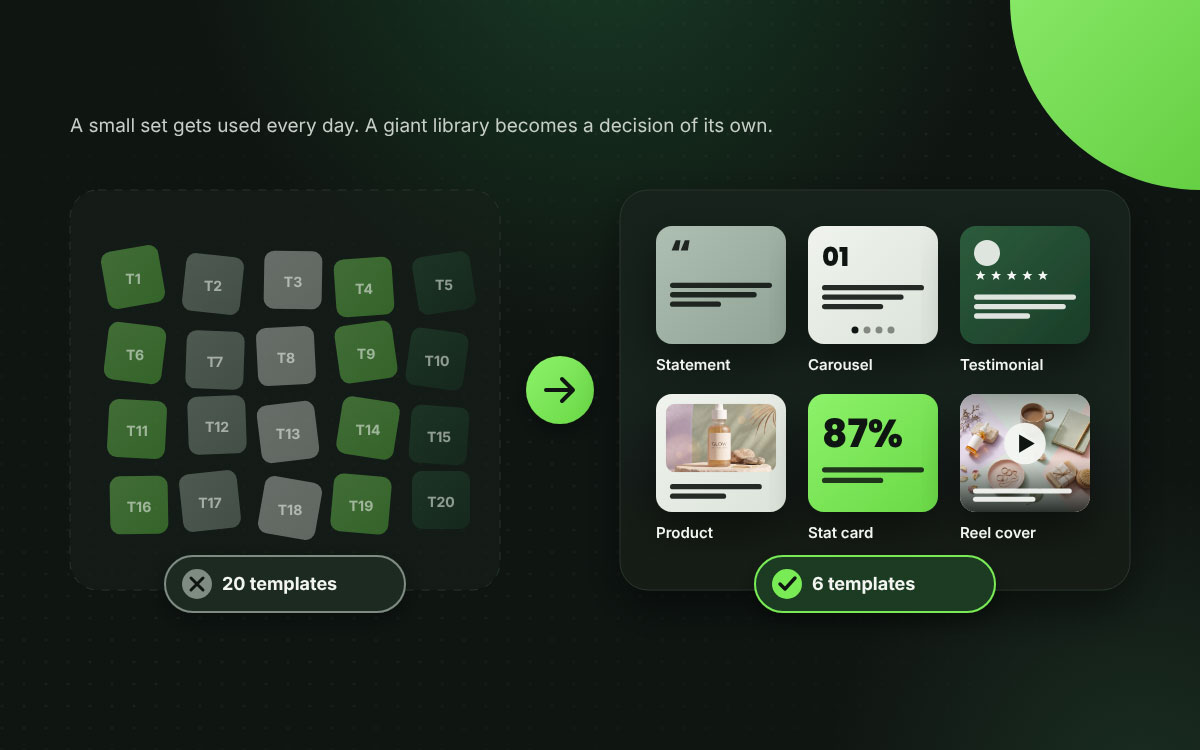
Build templates only for the recurring post types your audit turned up. A small set gets used every day. A giant one turns into a library nobody wants to wander through. A professionally built social media design set earns far more value as six templates in daily use than as twenty sitting unopened.
Why it matters: Template systems fail more often because they grow too big than because they stay too small. Once picking a template becomes its own decision, the speed you built the system for quietly slips away.
Practical note: If you can't name every template in your system from memory, it has already grown too big.
Step 3: Produce each template in every ratio you publish
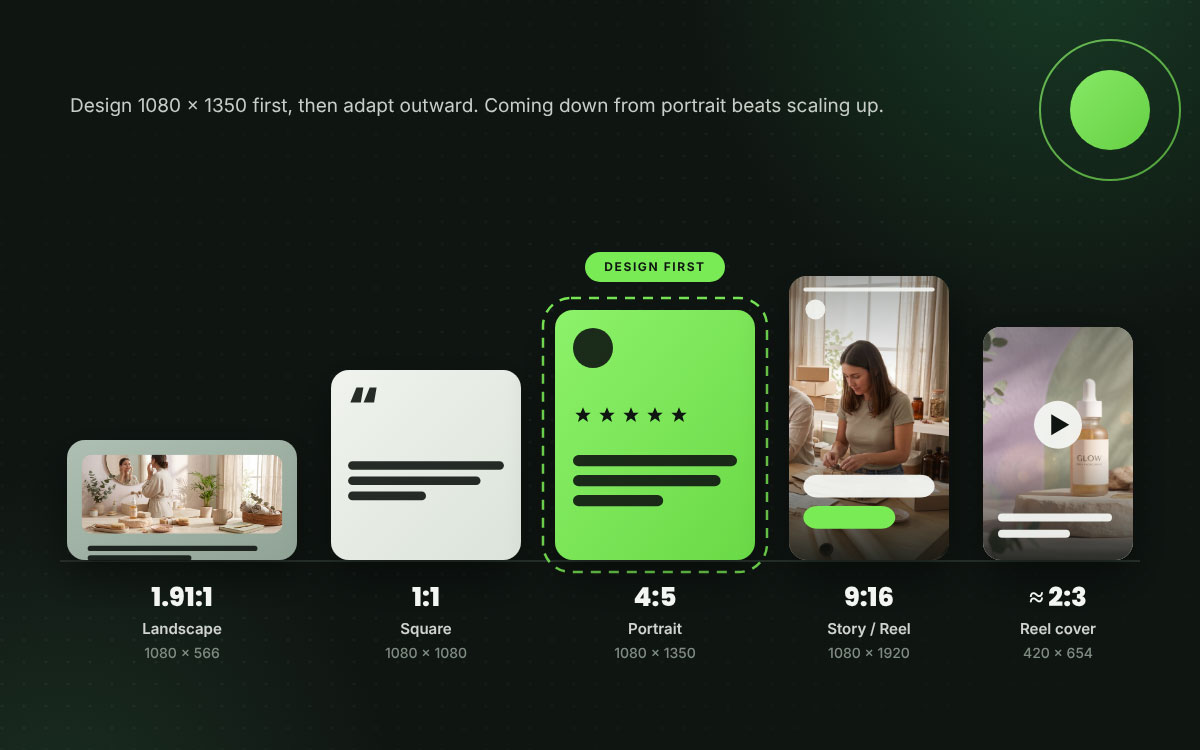
Create variants for the placements you actually use. Instagram still photos handle aspect ratios from 1.91:1 up to 3:4, with a width of up to 1080 px. Reels support aspect ratios from 1.91:1 to 9:16. Reel covers follow their own guidance, and the recommended size is 420 × 654 px. Before you publish, give the preview crop a quick look so nothing important gets trimmed.
Why it matters: Most teams skip this step, and it's where the real time savings live. Without it, every post still comes with a resize-and-recompose decision, which is the slowest and dullest part of the job. These sizes also cover the range of Instagram post templates most accounts end up needing across feed, portrait, and Stories.
Practical note: Design the 1080x1350 first, then adapt outward. Coming down from portrait is far easier than scaling up from square.
Step 4: Lock colors, fonts, and logo placement inside the file
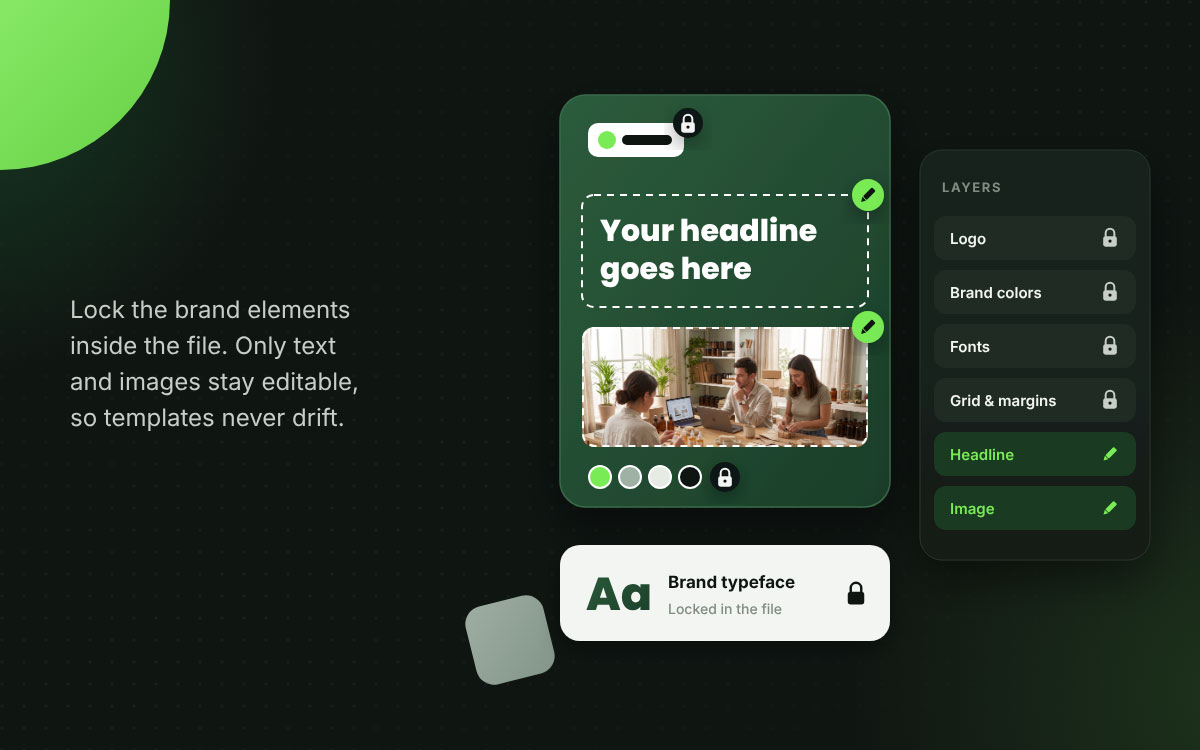
Use your design tool's lock function to prevent brand elements from being moved or changed by accident. Only text and images should stay editable.
Why it matters: Locking turns a template into a real standard. Without it, a template starts to drift within weeks, one small and well-meaning tweak at a time. Settle your brand colors before you lock the files, and you remove the most common source of that drift.
Practical note: In Canva, use the lock function on brand elements. In Figma, use component properties to make intended editable fields easy to find; they guide edits but do not lock other layers.
Step 5: Name templates by content type, never by number
Call them Testimonial Card and Educational Carousel instead of Template 4 and Template 7.
Why it matters: Someone building a post is thinking about what they need to say, and your numbering system rarely crosses their mind. Naming templates by content type saves a little mental translation right when they're already feeling the squeeze.
Practical note: Name them the way a colleague would ask for them out loud.
Step 6: Include a designed reels or video cover template
Build a cover template so your video content has a planned spot on the grid. When publishing a Reel, you can choose a frame from the video or upload a separate cover image. Choose the cover before posting and check its preview.
Why it matters: This gap shows up in template systems more than any other, and it stands out the most. Default video frames break grid cohesion faster than anything else. They are also the top reason a polished Instagram feed falls apart even when everyone on the team is doing their job.
Practical note: A single cover template with a fixed spot for hook text will cover every video you publish.
Step 7: Write usage notes inside the template file
Add a locked text layer outside the export area. Use it to state the maximum character count, the intended use, and any rules that matter.
Why it matters: Templates often land in the hands of people who weren't around when they were designed. Think new hires, freelancers, or an intern covering for someone on vacation. Notes travel with the file, while briefings, no matter how thorough, tend to wander off.
Practical note: One line per template does the job. Say what it's for and give the character limit.
Step 8: Set a review date and actually keep it
Set up a quarterly review to retire unused templates, add new types that keep coming up, and update anything a platform has changed.
Why it matters: Template systems fade quietly. Platforms adjust their specifications, brands evolve, and content types shift over time. An outdated system can do real damage. It teaches your team that the system can't be trusted, and that lesson is very hard to unlearn.
Practical note: Put the review on the calendar and give it a named owner. Systems with no owner end up abandoned.
The 8 templates most accounts genuinely need
Most business accounts can handle their recurring content with just eight templates, one for each kind of post that shows up month after month. Start with these in the ratios listed. Add anything more specialized only after that, so that a coherent branding design foundation can give the whole set a single identity to express.
The table below sets out the 8 templates most accounts need and gives you a core set to check your own audit against, so you build only what you will use and never a library you abandon.
Template
Primary Use
Ratios Needed
Statement card
Quotes, positioning, announcements
1:1, 4:5
Educational carousel
Frameworks, tutorials, step-by-step
1:1 or 4:5, all slides matching
Testimonial card
Reviews, client feedback, social proof
1:1, 4:5
Product or feature card
Launches, features, restocks
1:1, 4:5, 9:16
Data or stat card
Research findings, results, impact
1:1, 4:5
Reels or video cover
Grid presence for all video
9:16 Reel video; 420 × 654 px recommended cover.
Story template
Daily Stories, polls, reshares
9:16
Announcement banner
Events, launches, deadlines
1:1, 4:5, 9:16
Social media template FAQs
The social media template FAQs below provide standalone answers, so you can set up your system with confidence and avoid common mistakes. If you have more questions that aren’t covered below, leave a comment or contact us directly.
Templates take the settled decisions off your plate. Typeface, palette, logo placement, and headline size no longer need to be chosen for every post. Production becomes a simple text-and-image swap rather than a full design project. Building each template at 1:1, 4:5, and 9:16 also removes the resize step, which is usually the slowest step in the process.
Most accounts do well with six to eight templates that cover their truly recurring content types. Bigger libraries tend to backfire because choosing a template becomes a decision in its own right, and that takes time. If you can't name every template in your system from memory, your library has already grown too big to work efficiently.
Start with the content types your audit shows you publish most often. That usually means a statement card, an educational carousel, a testimonial card, a product card, a data card, a video cover, a Story template, and an announcement banner. Build for the content you actually make today and leave the content you hope to make someday for later.
Templates actually cut down on repetition. They handle the settled design decisions so your attention can go to the idea and the imagery, which is where variety really counts. When a feed feels repetitive, the culprit is usually repeated content and rarely the layout. A consistent layout is exactly what helps people recognize your brand.
Lock the colors, fonts, and logo placement inside the file so only the text and images can be edited. Add usage notes on a locked layer outside the export area, and schedule a quarterly review with a named owner. Unlocked templates start to wander within weeks, since different people keep making small tweaks that each seem perfectly reasonable.
Endnote
Finally, our guide ends here, and so does the habit of starting from scratch!
Learning how to use templates for faster social media post design comes down to a simple plan. Build your system around the posts you actually publish. Take a look at your real content first, then create a small set of templates for the types that show up again and again. Make each one in the sizes and ratios you already use. Lock the brand elements so everything stays consistent. Name each template by content type, add usage notes directly in the file, and review the entire set every quarter to keep it from going stale.
Key takeaway: Templates save time only when you keep them few, focused, and protected. Speed comes from fewer decisions, and piling on more files will never get you there.
If you would rather skip the setup, the team at Graphic Design Eye can design a ready-to-use set of social media templates tailored to your brand and the content you publish.
Thank you for reading. We hope your next post turns out to be the easiest one you have ever made!
Graphic Design Eye LLC is a full-service creative agency built for brands that demand more than design — they demand vision. From strategic branding to complete visual identity, we partner with startups, agencies, and growing businesses as a dedicated creative force. With flexible subscription and project-based models. Let's start with us today!