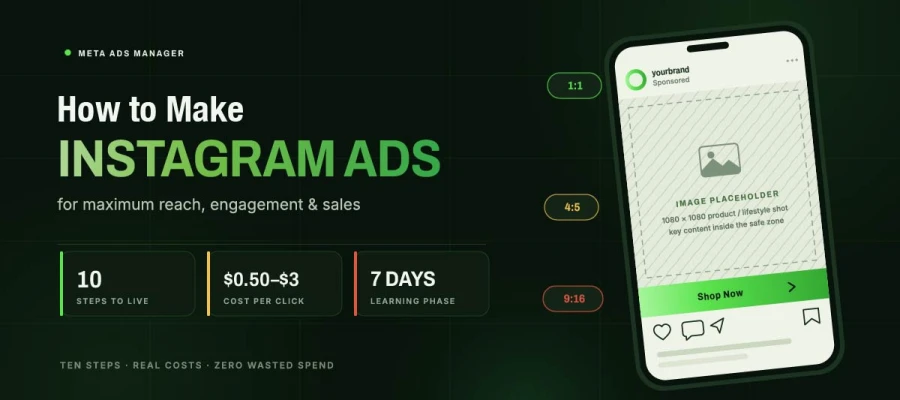
Learning how to make Instagram ads properly means using Meta Ads Manager rather than the boost button. First, get four things ready: a Business Manager account, an ad account with the right currency and time zone, a working Meta Pixel, and your Instagram linked to a Facebook Page. Then follow ten steps: objective, audience, placements, budget, creative, copy, publishing, and checking results.
Most guides stop at "click Create" and leave you to figure out the rest by trial and error. This one doesn't. Every setting below comes with the reason it matters, not just the click path, because knowing why a budget floor exists or why editing mid-campaign resets your data is what actually prevents the mistakes that quietly drain ad spend.
You'll find the exact creative dimensions for every placement, so nothing gets auto-cropped into an unusable ad. You'll find realistic cost benchmarks, so you know whether your numbers are normal or a warning sign. And you'll find the one rule almost every advertiser breaks in their first week, the one responsible for more wasted budget than any targeting mistake.
Walk through the ten steps below, and the whole process will make sense by the time you publish your first campaign. Let’s dive now!
How to make Instagram ads
Can’t wait to know how to make Instagram ads? Set up the four prerequisites. Then choose boosting or Ads Manager. Pick a campaign goal. Define your audience and placements. Set a realistic budget. Upload correctly sized creative. Write text for each field. Publish. Wait through the learning phase. Then read results and adjust one thing at a time.
Once the structure is familiar, the whole process takes under an hour, and the prerequisites only need to be done once. Keep reading!
Step 1. Set up the four prerequisites before you touch a campaign
You need four things before running an Instagram ad. A Meta Business Manager account. A Meta ad account with billing set up. The Meta Pixel installed on your site. And your Instagram linked to a Facebook Page.
Why it matters: Business Manager holds everything else. Inside it, you make the ad account. That's where you set currency and time zone. You can't change these later, so get them right. The Pixel tracks what happens after someone clicks. Without it, Meta's algorithm is guessing blind.
Do this: Go to business.facebook.com and make a Business Manager account. Link your Facebook Page and Instagram. Create an ad account with the right currency and time zone. Install the Meta Pixel on your site. Check that it works. Set aside 30 to 45 minutes for all this.
Skip the Pixel, and every campaign becomes a guess. That gap separates real advertising from wasted spending.
Step 2. Decide between boosting and Ads Manager
You can run Instagram ads two ways. Boosting promotes a post straight from the app in a few taps. Ads Manager builds a full campaign, giving you control over goals, audiences, placements, and testing.
Why it matters: Boosting works well for one thing: quickly pushing a post that's already doing well. It costs as little as $1 a day in the US. But it has limited goals, no real audience control, no A/B testing, and no campaign structure. That makes it a bad fit for anything you want to scale or measure well.
Do this: Only use boosting for posts that already work organically. Use Ads Manager for anything with a real budget or business goal. If you're reading a guide on making Instagram ads, Ads Manager is almost always the right choice.
Boosting is a button. Ads Manager is a system. Only one can improve over time.
Step 3. Choose the campaign objective that matches your actual goal
In Ads Manager, click Create and pick an objective. Meta sorts these into awareness, consideration, and conversion. Your choice decides which options, formats, and bidding strategies you get.
Why it matters: This is the most important setting in your campaign. It tells Meta's algorithm what result to aim for. Pick Traffic when you want sales, and you get clicks with no buyers. Pick Sales without enough conversion data, and delivery suffers. The objective must match what you'll judge success by.
Do this: Pick Awareness to reach new people. Pick Traffic for website visits. Pick Engagement for interactions and video views. Pick Leads for form fills. Pick Sales for purchases tracked by the Pixel. Choose the goal you'll actually report on, not the one that sounds most impressive.
The algorithm gives you exactly what you ask for. Ask carefully.
Step 4. Set the audience, and consider going broad
At the ad set level, you pick who sees the ad. This includes location, age, gender, interests, behaviors, and custom or lookalike audiences from your own data.
Why it matters: 2026 practice is different from older advice, in step with the broader social media trends shaping paid and organic alike. Meta's AI has gotten so good that broad targeting often beats narrow interest targeting. The algorithm finds responsive users faster than a marketer can. Advantage+ audiences do this automatically.
Do this: Start broad. Use a location, a wide age range, and turn on Advantage+ audience expansion. Let the algorithm find responders. Use custom audiences from your customer list or website visitors for retargeting. Use lookalikes from purchasers for prospecting. Don't stack six interest layers.
Over-targeting is now more common than under-targeting. It also costs more.
Step 5. Select placements, manually if you want Instagram only
Placements decide where your ad shows up. Advantage+ placements let Meta spread ads across Facebook, Instagram, Messenger, and Audience Network on its own. Manual placements let you limit where ads go.
Why it matters: Advantage+ placements usually cost less per result, since the algorithm can find cheap impressions across more spots. But if your campaign is really Instagram only, either because the creative is made for it or your audience is there, use manual placements and uncheck Facebook.
Do this: For most campaigns, keep Advantage+ placements enabled and use the right-size creative for each format. For Instagram-only campaigns, pick Manual placements and uncheck all Facebook and Audience Network options.
Automatic placements save money. Instagram-only placements give more control. Choose on purpose, not by default.
Step 6. Set budget and schedule realistically
You set a budget for the ad set or campaign. It's either daily or a total for a set time period.
Why it matters: Instagram clicks cost about $0.50 to $3.00. This depends on industry and targeting. A good start is $20 to $50 per day. That gives enough data in a week. Budgets under $10 a day often fail. The algorithm can't learn properly.
Do this: Start with $20- $50 per day. Use daily budgets while learning. They're easier to adjust. Wait at least 7 days. Get around 50 conversions before judging results.
A low budget doesn't save money. It just gives you no useful data.
Step 7. Build creative sized for every placement
At the ad level, you upload the creative, write text and a headline, pick a call to action, and set the link.
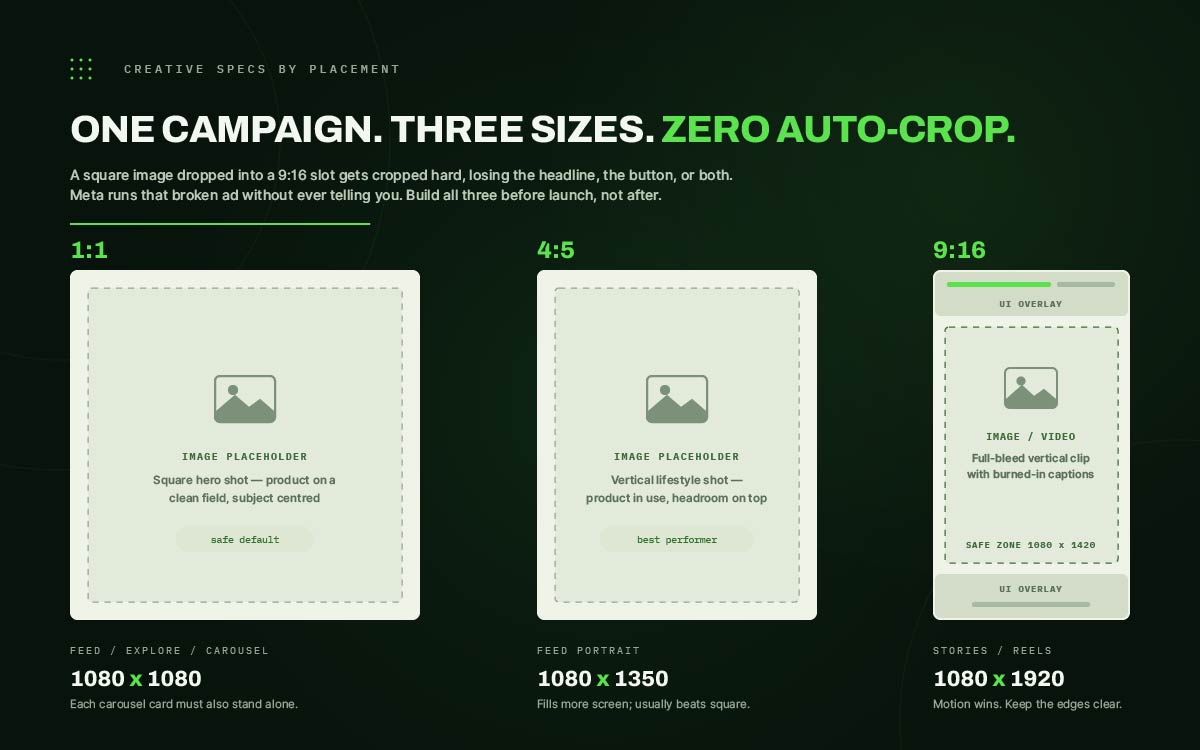
Why it matters: Auto cropping wastes a lot of Instagram ad budget. A square image placed into a 9:16 Stories slot gets cropped hard. It often loses its headline or button. Meta runs that broken ad without warning you.
Do this: Upload sizes made for each spot. Use 1080x1080 or 1080x1350 for feed, and 1080x1920 for Stories and Reels. Keep key content inside the center 1080x1420 safe zone. Add captions to every video, since most people watch without sound. The same design rules that stop scrolls in organic posts apply here too. That's why strong ad creative starts from social media post design ideas that already work in feed posts.
The platform will run a broken ad without complaint. Nothing tells you it's broken.
Step 8. Write primary text and headline that do different jobs
The primary text sits above the creative. It cuts off after about two lines. The headline sits below it in bold. The call-to-action button is drawn from a fixed list.
Why it matters: Since primary text gets cut off, the first sentence carries most of the weight. Only people who tap to expand read the rest. The headline shouldn't repeat the creative or primary text. It should add what's missing, usually the offer or the result.
Do this: Put the key point first in the primary text, so the first sentence stands alone. Use the headline for the offer or result. Match the button to the real next step. Use "Learn More" for cold audiences and "Shop Now" for warm ones.
Three text fields, three jobs. Repeating the same message in all three wastes two of them.
Step 9. Publish, then leave it alone through the learning phase
After you publish, the ad gets reviewed. This usually takes under 24 hours. Then it enters Meta's learning phase. The algorithm collects data during this time.
Why it matters: The biggest mistake in Instagram ads is editing during learning. Big changes to budget, audience, creative, or goal reset learning. This deletes the data collected so far. Campaigns edited every two days never improve.
Do this: Publish and leave the campaign alone. Wait at least 7 days or 50 conversions, whichever comes later. Watch the data. Don't act on it yet. Only make changes after learning ends.
Impatience is the costliest habit in paid social. The algorithm needs time you don't want to give it.
Step 10. Read the results and change one variable at a time
After the learning phase, check cost per result, click rate, and frequency. Then adjust with purpose.
Why it matters: Frequency over 3 means the same people keep seeing your ad. That means the creative is stale or the audience is too small. A dropping click rate at steady spend means the same thing. High clicks but low conversions means the ad works but the landing page fails. No budget change fixes a page that loses people. That's a landing page design service problem, not an ad problem.
Do this: Change one thing per test, creative, audience, or offer. That way you know what caused the result. Have your next creative ready before the current one wears out. Rotate on schedule, not when costs start rising.
A test that changes three things teaches nothing. A test that changes one builds an advantage.
Creative requirements for every Instagram placement
Instagram ads need different-sized creatives for each placement, much like the range covered in these social media advertising examples. Feed, Stories, Reels, Explore, and Carousel all use different dimensions and ratios. Most campaigns need at least three versions: 1:1 for feed and Explore, 4:5 for feed portrait, and 9:16 for Stories and Reels. Build these before launch, not after.
Take a look at this chart to learn how to make Instagram ads perfectly:
Placement
Dimensions
Aspect ratio
Notes
Feed, square
1080 x 1080
1:1
The safe default, though it occupies less screen than portrait
Feed, portrait
1080 x 1350
4:5
Fills more of the mobile screen and generally outperforms square
Stories
1080 x 1920
9:16
Keep critical content within the central 1080 x 1420 safe zone
Reels
1080 x 1920
9:16
Interface elements overlay the lower portion, so leave it clear
Explore
1080 x 1080
1:1
Inherits feed creative in most campaigns
Carousel
1080 x 1080
1:1
Each card must stand alone as well as in sequence
Video needs its own thought. Reels and Stories reward motion. A still image in a full-screen vertical slot can't compete with content built to move. Adding simple animation to a static concept, whether in-house or through a motion design service, usually boosts performance more than another round of copy edits.
Most advertisers underestimate the production load. One campaign across feed, Stories, and Reels needs at least three sized versions. Real testing needs two or three creative concepts on top of that. Teams running ongoing campaigns usually build a template system first. Then they hand variant production to a designer or a social media design service, so creative rotation never becomes the bottleneck.
Instagram ad costs and benchmarks
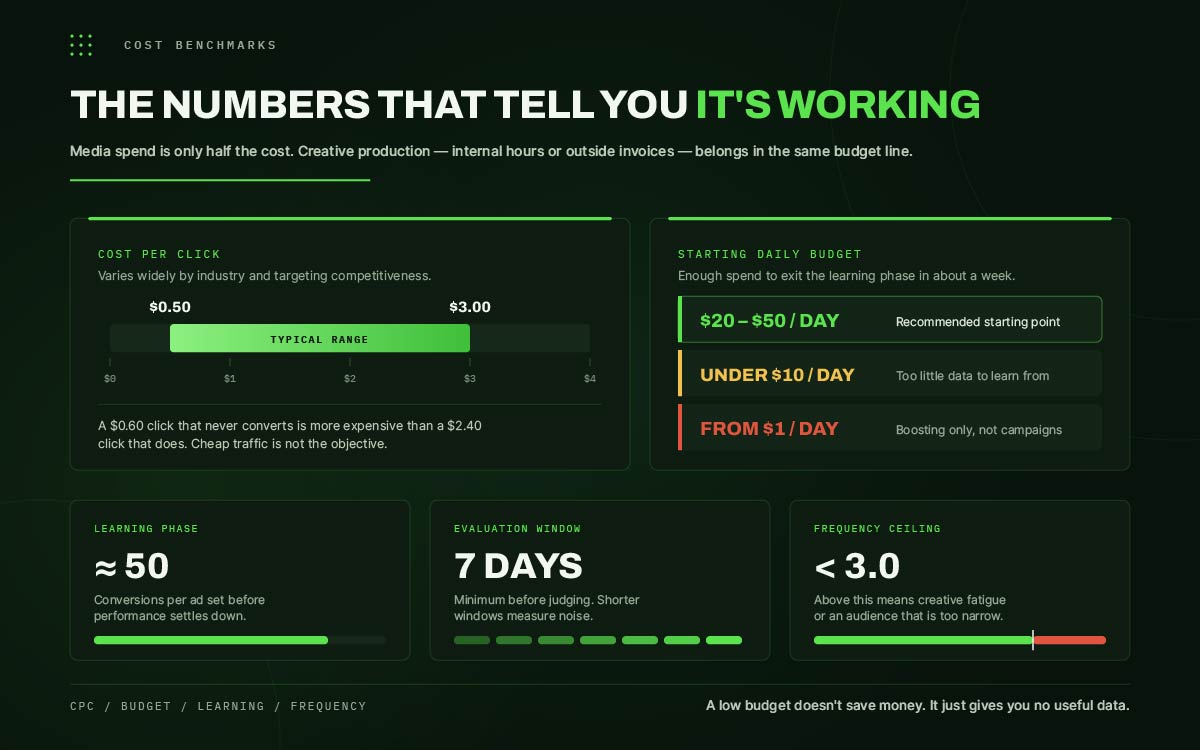
Instagram ads usually cost $0.50 to $3.00 per click. Most advertisers start with a $20 to $50 daily budget. This helps exit the learning phase in about a week. Ad sets need about 50 conversions to stabilize. Judge performance over at least seven days, not daily ups and downs.
Metric
Typical range
What it means
Cost per click (CPC)
$0.50 to $3.00
Varies widely by industry and targeting competitiveness
Recommended starting daily budget
$20 to $50
Enough to exit the learning phase within roughly a week
Minimum boost spend
From $1 per day (US)
Boosting only, not sufficient for structured campaigns
Learning phase requirement
Around 50 conversions
Per ad set, before performance stabilizes
Evaluation window
7 Days minimum
Shorter windows measure noise rather than performance
Frequency ceiling
Below 3.0
Above this indicates creative fatigue or a narrow audience
Media spend is only half the Instagram ad cost. Creative production, whether it's internal hours or outside invoices, belongs in the same budget. A campaign without fresh assets stalls, no matter how good the cost per click looks. When building a yearly plan, it helps to know what social media design costs before committing to a posting schedule you can't keep up with creatively.
Instagram ads FAQs
People eager to learn how to make Instagram ads ask about setup, cost, image sizes, and how long to wait before checking results. Most confusion comes from settings you don't see the effects of until you've already spent money. Things like linking your Facebook Page, learning phase resets, and budget limits. Below are direct answers to each one.
If you’re struggling with other concerns that aren’t answered in this section, feel free to reach out to us. We’re happy to provide free consultations on this matter.
To make Instagram ads, set up Meta Business Manager with a connected Facebook Page, ad account, and Meta Pixel, then open Meta Ads Manager and click Create. Choose a campaign objective, set audience and budget at the ad set level, upload sized creative at the ad level, and publish. Review usually clears within 24 hours.
Instagram ads typically cost $0.50 to $3.00 per click, depending on industry and targeting competitiveness. A practical starting daily budget is $20 to $50, which is enough to generate useful performance data in about a week. Boosting a post can start at $1 per day but offers far less targeting control.
Yes. A connected Facebook Page is required, since Instagram advertising runs on Meta's ad infrastructure. Your Instagram business account must be linked to a Facebook Page in Business Manager before you can create campaigns, and you must also have an ad account and the Meta Pixel.
Boosting promotes an existing post from inside the Instagram app, with limited objectives and minimal targeting control. Running an ad through Meta Ads Manager Instagram gives full control over objectives, audience, placements, and A/B testing. Boosting suits quick amplification; Ads Manager suits any campaign with a real budget.
Run an Instagram ad for at least 7 days and about 50 conversions before judging or editing it. Meta's algorithm needs that much data to finish learning and settle down. Editing a campaign while it's still learning resets it and wipes out the data. That's the most common mistake in paid social.
Use 1080 x 1080 pixels for feed and Explore, 1080 x 1350 for feed portrait, and 1080 x 1920 for Stories and Reels. Keep critical content inside the central 1080 x 1420 safe zone on vertical formats, since interface elements overlay the top and bottom edges.
Yes. Objectives such as Engagement, Leads with instant forms, and Traffic to a Meta destination all function without a website. However, without a website, you cannot install the Meta Pixel, which means conversion tracking and purchase optimization are unavailable, and the algorithm has considerably less signal to work with.
The most common causes are an ad still in review, a budget too low to compete in the auction, an audience narrowed to the point of exhaustion, or a rejected ad awaiting appeal. Check the delivery column in Ads Manager first, as it states the specific reason rather than leaving you to guess.
Endnote
Knowing how to make Instagram ads requires sequence, patience, and creative built for the placement it's landing in. The steps above get a campaign live and learning correctly. What determines whether it keeps performing past week one is whether fresh, correctly sized creative continues to arrive on schedule, which is where most in-house teams quietly fall behind.
The steps above get your campaign live and learning. But what keeps it working past week one is fresh, right-sized creative arriving on time. This is where most in-house teams fall behind.
That's the gap Graphic Design Eye LLC's social media design service fixes. Our social media designers make feed, Stories, Reels, and Carousel creative sized right from day one. You get unlimited revisions and full commercial rights. So testing new ideas never waits on the next asset.
If you have the budget and strategy but your creative pipeline can't keep up, fix it now. Don't let it stall your results. Give your campaigns the creative library they deserve.
Great ads aren't found in a hurry; they're built by those patient enough to get it right.
Graphic Design Eye LLC is a full-service creative agency built for brands that demand more than design — they demand vision. From strategic branding to complete visual identity, we partner with startups, agencies, and growing businesses as a dedicated creative force. With flexible subscription and project-based models. Let's start with us today!