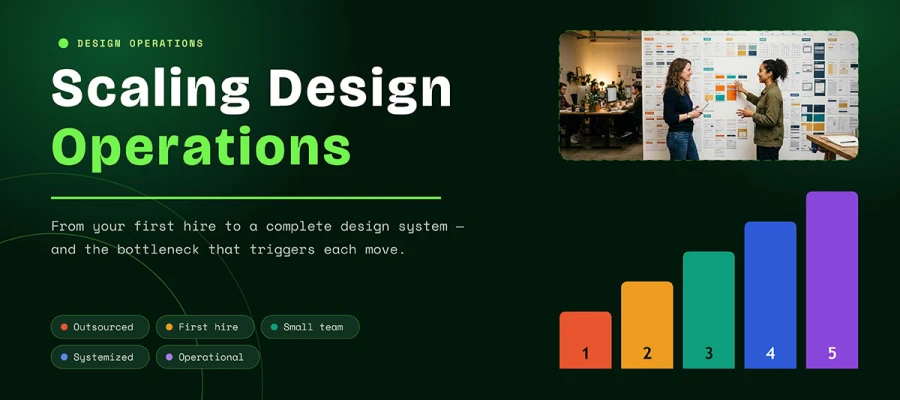
Scaling design operations happens in five stages, and each one begins when a real bottleneck appears. This guide shows what to build at every stage, what to postpone, and the signal that says it is time to move on, from writing down your brand to a first hire, intake and triage, a design system, and finally a dedicated operations role. You will also learn how to tell when you need another designer and when you need a better process.
There’s a quiet panic that sets in when design stops being simple. Requests arrive as direct messages. Two people build the same social template in the same week. A deck goes out with last year’s logo, and nobody notices until a client does.
Your team has outgrown its old way of working, which is exactly what growth feels like. The hard part is knowing what to build next, because the wrong answer costs months. Many teams jump ahead and build a design system before their patterns settle. Others hire a second designer to solve what is, in fact, a briefing problem.
This guide walks you through the five stages of growing a design function, from your first outside freelancer to a working design system. For each stage, you will see what to build, what to skip, and the signal that it is time to move on.
So, let’s dive in!
Scaling design operations
Scaling design operations at each stage means building the minimum amount of structure needed to remove your current bottleneck. The most common failure is building too much, too early.
A contribution model for a component library is excellent operational hygiene at stage four and pure ceremony at stage two, when you have one designer and eleven other things to do. At every stage, build what solves today’s problem and save tomorrow’s problem for later.
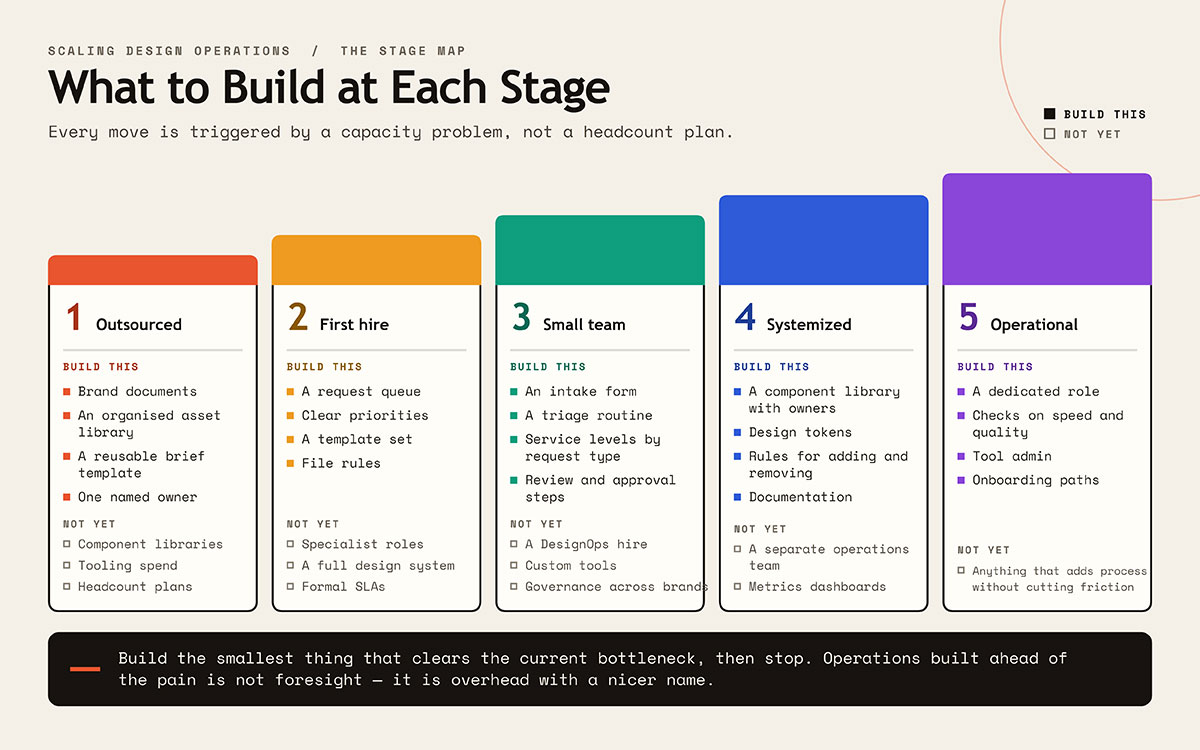
The table below shows what to build at each stage of scaling design operations, and what can wait. Keep reading!
Stage
Build this
Hold off on this
1. Outsourced
Brand documents, an asset library, a reusable brief template, and a named owner
A request queue, clear priorities, a template set, and file rules
Specialist roles, a full design system, formal SLAs
3. Small team
An intake form, a triage routine, service levels by request type, and review and approval steps
A DesignOps hire, custom tools, governance across brands
4. Systemized
A component library with owners, design tokens, rules for adding and removing parts, and documentation
A separate operations team, elaborate metrics dashboards
5. Operational
A dedicated role, checks on speed and quality, tool administration, and onboarding paths
Anything that adds process without cutting friction
One rule saves you months of wasted work: build the smallest thing that clears the current bottleneck, then stop. Operations built ahead of the pain amount to overhead with a nicer name.
Stage 1: Outsourced design, before your first hire
At stage one, the most valuable work is writing your brand down, and it costs only time. You have no designer on staff. Work goes to freelancers or an agency, then comes back and gets used. Outside help covers your capacity, yet every project still starts from zero because nothing about your brand is written down.
Here is what to have ready before you spend more on design:
Approved logo files in every format you might need
Color and font specifications with exact values
A short guide covering what to do and what to avoid
An organized asset library, which becomes more important once several teams use it
A reusable brief template, so briefing gets faster each time
The asset library matters most. Organizing your brand assets pays off every week, because without it a designer ends up redoing a file that already sits in someone’s downloads folder.
Name one internal owner, even without a designer on staff. Someone must be responsible for consistency, or no one will be. Give the responsibility to a real person with real time to do it, since that choice determines whether your brand stays consistent or drifts apart.
For getting the work done, you have three main options: project freelancers, agency retainers, or design subscriptions. Each differs in volume, speed, and continuity, so compare freelancers, agencies, internal teams, and AI tools side by side before you commit.
A design subscription gives you fixed monthly access to a team, priced as a plan with no separate quote for each project. It suits steady, predictable volume and avoids the cost of a hire. Cost depends on your volume, so treat a subscription as a different way to buy capacity and compare it on that basis.
Stage one ends when you commission design work at least once a week, or when briefing takes longer than the work itself.
Stage 2: Your first design hire
Your first design hire should be a generalist who can handle brand, marketing, product, and print in the same week. Teams often get this hire wrong by hiring only for the work in front of them.
Value process instinct as much as skill. A strong portfolio shows what someone can create, and it says little about whether they will build the templates, rules, and file setups that others rely on later. Ask candidates how they organized their last team’s files, because that answer tells you more than another case study.
Define the role by outcomes and skip the output count. If the job description reads like a quota, you have hired a production line, and you will feel the difference within six months.
Set the reporting line on purpose. Design under marketing focuses on campaigns, and design under product focuses on consistent interfaces. Neither choice is wrong, but each shapes what follows. Drifting into one by accident leaves you with a designer whose goals clash with their own brief.
What a graphic designer costs
Public wage data gives you a grounded starting point for what a designer costs, so here are the latest US figures.
Measure
Figure
Source note
Median yearly pay, graphic designers (US)
$62,960
US Bureau of Labor Statistics, May 2025
10th percentile
Under $39,520
Same source
90th percentile
Over $104,910
Same source
Employment, 2025
253,100
Same source
Expected job change, 2025 to 2035
A 2% decline
Same source
Yearly openings expected
About 16,000
Same source
Two things in this table stand out. First, the spread between the 10th and 90th percentile is huge, so a national median tells you little about your market, seniority level, or city. Second, salary is far from the full cost of a hire. Tools, licenses, recruiting, onboarding, management time, and equipment all add on top. The total varies so much by market that a single number would mislead more than it would help.
When you are ready to source candidates, review portfolios, and make offers, remember that hiring a graphic designer is a skill with pitfalls of its own.
Stage 3: Design intake, briefs, and triage
Design intake is the most valuable build in the whole sequence, and it is also the one teams delay longest. The problem is familiar to anyone who has run a design team. Requests arrive through messages, meetings, and hallway chats, and nobody sees the full queue. Worst of all, nobody can say no, because nobody knows what saying yes would bump.
An intake form fixes this by moving the thinking to the start of a project, where it is cheap.
Design intake form fields worth requiring
A good intake form needs only eight fields. Resist adding a ninth. Each field should either change the design or prevent a delay later, and that is the only test a field has to pass. Ask for more, and people rush their answers, which costs you the accuracy you wanted.
Field
Why it earns a spot
Requesting team and named owner
Gives you one person to go back to with questions
Business goal
Separates a real need from a preference, and often changes the deliverable completely
Audience
Drives every design choice that follows
Deliverables and formats
Prevents scope surprises halfway through production
Deadline and the reason for it
Tells a real constraint from an assumed one
Copy status
Design stuck waiting on unwritten copy is the most common hidden delay
Existing assets and references
Prevents you from recreating work that already exists
Approver
Names the person who signs off, agreed before work begins
The reason the deadline field looks fussy is that you haven't used it yet. A surprising share of urgent requests turn out to be urgent only because urgency is the requester’s default setting.
Triage and service levels
Triage means sorting requests by type so each one gets a turnaround that fits how hard it really is. Split requests into four groups: template use, adapting old work, new work in an existing system, and fully new creative direction. These jobs differ enormously, and putting them in a single queue means simple requests wait behind hard ones.
Share the expected turnaround time for each type, then stick to it. A slow but predictable answer beats a fast but unpredictable one, because people plan around reliability. Uncertainty makes them escalate.
Hold a short weekly triage meeting with one named prioritizer. Without this routine, priority goes to whoever asks loudest, which is a poor way to judge business value.
Finally, let requesters see the queue. Most escalation comes from people who cannot see progress. When they can see where a request stands, they wait. Without that view, they follow up again and again, and eventually go to your CEO.
Scope creep after work begins is a related problem with a similar fix. The way revision rounds are structured and billed matters as much as intake in a healthy process.
Stage 4: From style guide to design system
Moving from a style guide to a design system means turning written brand rules into a working library that makes those rules real. It is the most misunderstood move in the whole sequence, because many companies mix up the two and believe they have a system when all they have is a PDF. The difference changes what you build, who maintains it, and what it costs.
Style guide vs design system
The difference between a style guide and a design system comes down to enforcement. A style guide asks people to apply your rules correctly from memory, while a design system hands them parts that are already correct, so there is nothing to remember. The table shows how that single distinction plays out across six areas that matter in daily work.
Designers and developers, and increasingly people outside design, through templates
Maintenance
Occasional updates
Ongoing. It is a product with real users.
Failure mode
Ignored because it is a PDF nobody opens
Abandoned because nobody owns it
Look at the enforcement row, because it captures the whole idea. A system builds your rules into the parts themselves, so mistakes become much harder to make, and that shift from telling to building is what you are buying.
Before building the system, be clear about what belongs in the underlying brand style guide, since a system built on shaky ground only encodes the confusion faster.
What actually makes a design system work
A design system works when it has an owner, a way to add parts, a way to remove them, useful documentation, and design tokens. Here is what each one involves:
A named owner with real time set aside for it. Systems without an owner tend to decay within two quarters.
A contribution model. How does a team suggest a new part, who reviews it, and how does it get added? Without an answer, teams build their own parts, and the system splits apart.
A removal model, which almost nobody builds. Parts must be removable, or the system only ever grows. A library with four hundred parts has become a landfill.
Documentation that explains when to use a part along with what it looks like. A screenshot covers appearance, and only written guidance covers timing and reasoning.
Design tokens for color, spacing, and type so changes spread automatically and nobody has to redo them by hand across 40 screens.
There is one honest catch. A design system is an investment that pays off over years. Building one at stage two is too early, because your patterns have not settled and the parts would be wrong. You cannot systematize a decision you have not yet made.
The need for this discipline is most evident in product and interface design work, where the same button is rebuilt across a dozen screens until someone finally owns it.
Stage 5: When design operations becomes someone’s job
Design operations becomes someone’s job once coordinating the work starts consuming real senior time. The role gives that coordination a clear owner, and the table shows the four versions you will meet most often.
Delivery across projects, dependencies, timelines, coordination between teams
Design system owner or lead
The component library, adding and removing parts, documentation, adoption
Creative operations (brand and marketing focus)
Campaign output, asset production, rights management, agency coordination
Watch how much senior design time goes to coordination and how much goes to design, since that is the real trigger. When your most expensive designer spends Tuesday chasing approvals, that is an operations problem dressed up as a staffing issue.
The role often starts inside an existing job. Formalize the responsibility first, and you'll learn what the role truly needs before you hire, rather than relying on a job description you invented.
One warning applies here. An operations role that only adds process does more harm than having none. Use a simple test: does friction go down? If it has not dropped after two quarters, what you have built is paperwork.
How to choose a design operating model at each stage
Scaling design operations model at each stage means matching your mix of internal staff and outside partners to where you are in the scaling sequence, as your need for outside capacity shifts with growth. No single setup works forever. Each stage calls for a different balance of staff and outside support. The table shows how to choose a design operating model at each stage:
Stage
Usually fits best
Why
1. Outsourced
Freelance, agency, or subscription
Volume is uneven and does not justify a fixed cost
2. First hire
One generalist on staff, plus overflow help
Continuity and context matter more than peak capacity
3. Small team
A core team on staff, plus outside specialist support
Specialties like motion, packaging, or illustration are needed only at times
4. Systemized
A team on staff, with set outside partners on standing work
The system defines the work well enough for partners to plug in
5. Operational
A mix, managed on purpose as a portfolio
Operations exists to route work to the right capacity
Outside capacity shows up at every stage and never stops being useful. What changes is its shape: loose and tied to single projects early on, then tightly scoped and matched to your system later.
At stage four especially, a fully documented system makes outside partners far more effective, because missing context is what usually makes outsourcing painful. When the system carries that context, an external team handling brand and identity work can plug straight into your process without you having to explain it every time.
How many designers do you need, and when should you add the next?
How many designers you need depends on your bottlenecks, and no reliable formula exists to replace that judgment. Anyone who gives you a number is selling something.
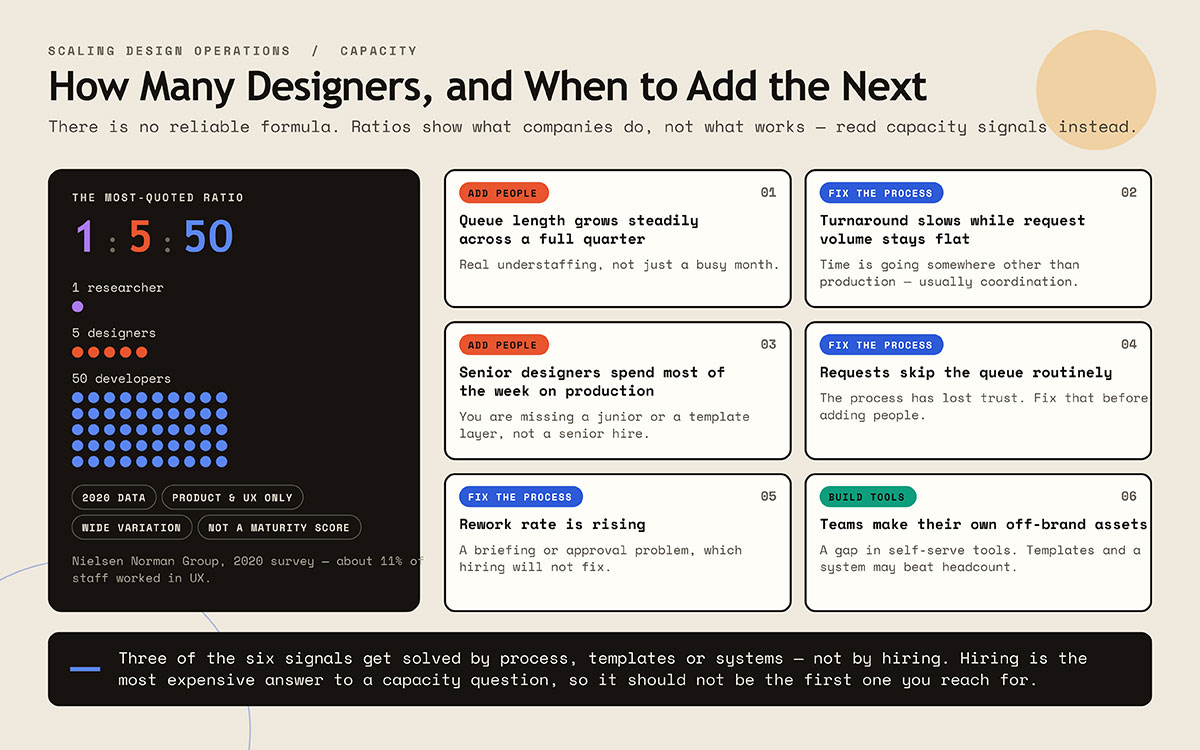
The most quoted research deserves an honest look. Nielsen Norman Group’s 2020 survey found the most common ratio was 1 researcher, 5 designers, and 50 developers. Half of the people surveyed had at least one designer for every ten developers. That works out to roughly 11 percent of staff working in UX, including research and design.
Now for the catches, which matter just as much. The data dates from 2020 and covers only product and UX teams, so it says little about brand and marketing teams. Ratios also varied widely across companies, and NN/g itself cautioned against judging a team’s maturity by role ratios alone.
A ratio describes what companies currently do, which reveals little about what works. Capacity signals give you something easier to act on.
Signals it is time to add design capacity
Six signals indicate that a design team needs more capacity, and several of them suggest a fix other than hiring. Treat them as clues to investigate. Which signal you see matters more than how many.
Signal
What it shows
Queue length grows steadily across a full quarter
Real understaffing that a single busy month cannot explain
Turnaround times get longer while request volume stays flat
Time is going somewhere other than production, usually coordination
Senior designers spend most of their week on production
You are missing a junior role or a template layer, so a senior hire would add little
Requests routinely skip the queue
The process has lost trust, and fixing that comes before adding people
Rework rate keeps rising
A briefing or approval problem that hiring will not fix
Teams make their own assets that clash with the brand
A gap in tools people can use on their own, where templates and a system may beat headcount
Read the table again and count. At least three of the six signals point to process, templates, or systems as the fix. This is the part most advice on how to scale a design team gets wrong, because it treats every capacity problem as a headcount problem. Rising rework points to thin briefs or an unclear approval chain, and adding a person to a broken process only gives you two people doing rework.
Hiring is the most expensive answer to a capacity question, so try the process and template fixes before you open a job posting.
Scaling design operation FAQs
The most common scaling design operations FAQs are when to hire, how many designers you need, and whether a design system is worth building. Good answers depend on where your bottlenecks sit, and each one below leads with the direct response. If you have more questions, knock on our door anytime. We will be glad to help.
Scale a design team in five stages, with each step following a real bottleneck. First, document your brand. Second, hire a generalist. Third, add intake and triage. Fourth, turn the style guide into a design system. Fifth, formalize operations. Plan around bottlenecks and set aside headcount targets.
Hire your first designer when design requests arrive more than once a week, when briefing takes longer than the work itself, or when consistency breaks down across channels. These signs matter more than revenue because request volume varies widely even among companies of similar size.
Design operations, often called DesignOps, is the practice of making design work repeatable. It covers four areas: people, meaning hiring, onboarding, and capacity; process, meaning intake, briefs, review, and approval; platform, meaning tools, files, and systems; and practice, meaning standards, documentation, and craft. Every company already does this work informally, and DesignOps gives it a name and an owner.
No reliable formula exists, so use capacity signals to decide. A 2020 Nielsen Norman Group survey found a typical ratio of one researcher to five designers to fifty developers, but that data is old and reflects only product companies. Watch queue growth over a quarter, turnaround times at steady volume, and rising rework.
Hire a generalist. Your first designer will cover brand, marketing, product, and print in a single week, so a specialist would sit idle half the time and be out of their depth the rest. A company that only builds product is the exception, and it should hire specifically for interface work.
You need a design system when the same parts keep getting rebuilt, and consistency keeps failing despite a style guide. Wait until your patterns settle, because building too early locks in wrong decisions, and undoing them costs more than the system saves.
Yes, many companies do this, because outside help works at every stage. Use freelancers early on, a retained partner or subscription once volume steadies, and defined outside scopes once a system exists. The tradeoff is continuity, since outside teams need documentation to understand context an employee would simply know.
A design operations manager owns intake, workflow, tools, vendor management, onboarding, and capacity planning. This work exists at every stage, with or without the title. The role gives that work a clear owner.
Measure cycle time by request type, rework rate, and adoption of templates and components, as these indicate whether friction is decreasing. Deliverable counts make a poor measure, because a team producing more assets might simply be absorbing more badly briefed requests.
Endnote
And that brings us to the end of this guide on scaling design operations!
Design operations grows in five stages, and each one begins with a real bottleneck. You start by writing your brand down, then make a generalist first hire, add intake and triage, turn your style guide into a design system, and finally give operations an owner. Along the way, capacity signals tell you more than headcount ratios, and several of them point to better briefs, templates, or systems before they point to another hire.
Outside partners stay useful at every stage, so you may decide never to build a full internal department. One rule applies at every stage: build the smallest thing that clears your current bottleneck, then wait for the next one. If you take a single step today, write down what you already have, because documentation supports every later stage. Wherever you are in the sequence, build the next small thing, and that is really all scaling design operations asks of you.
Some teams build this function in-house, while others pair a small internal team with an external partner. Most companies shift between the two as their needs change. The agency behind Graphic Design Eye works with companies at every stage, and we usually fit into your process and work alongside your team. If you would like a partner for brand, identity, or interface work, explore our branding and UI/UX design services, or simply reach out and let us know where you are in the process.
Until then, take care, and may your creative work continue to bring a little more beauty into the world!
Graphic Design Eye LLC is a full-service creative agency built for brands that demand more than design — they demand vision. From strategic branding to complete visual identity, we partner with startups, agencies, and growing businesses as a dedicated creative force. With flexible subscription and project-based models. Let's start with us today!