Knowing how to organize and store brand assets can save your team hours of searching and spare you the panic of a logo file nobody can find. From master artwork to templates, photography, fonts, and license documents, a well-built library keeps every file findable, up to date, and safe for anyone to use.
Suppose it’s 4:47 on a Friday. A message arrives. Someone needs the logo. They want it horizontal, white, and in vector form, within the hour. You open the drive. There is logo_final.png. Also logo_FINAL_v2.ai. And LOGO-use-this-one.jpg. It sits in a folder named after a designer who left two years ago. A real source file exists somewhere. Nobody is sure which one it is.
Every brand reaches this moment. Files land one at a time. Each one gets filed as quickly as possible. Soon that fast way becomes the only way. The real problem is a system nobody wrote down.
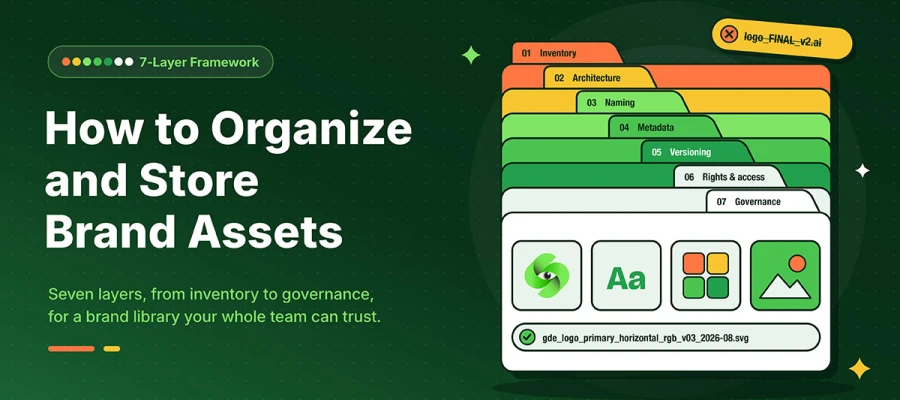
Lucky for you, this guide gives a 7-layer framework for organizing brand assets. You can build it step by step, starting this week. No vendor list, no borrowed statistics.
Let's start with what you already have!
How to organize and store brand assets
To organize and store brand assets, create one clear system that makes every logo, image, and file easy to find, control, and reuse, the same discipline that strengthens brand identity in the first place.
Here's how to organize and store brand assets in seven layers, starting with inventory.
Layer
What it answers
Output
1. Inventory
What do we actually have, and where is it?
A single spreadsheet of every asset, location, and owner
2. Architecture
How is the library shaped?
A folder tree, or a tag-first structure, chosen deliberately
3. Naming
What is this file, without opening it?
One written naming formula everyone uses
4. Metadata
How does someone find this without knowing the name?
A required-field list and a controlled vocabulary
5. Versioning
Which file is the real one?
Master, derivative, and deprecated states with clear rules
6. Rights and access
Who may use this, and until when?
Permission tiers plus a license expiry register
7. Governance
Who keeps this true?
A named owner and a scheduled review cadence
Read that table as a build order, not a menu. Layers one to three cost almost nothing. They give you most of the value. Layers four to seven stop that value from fading.
Layer one: Audit what you already have
An asset audit is one written record of every brand file you have. It shows where each file lives, who owns it, and whether it should stay. You cannot organize what you have not counted. Almost nobody has counted.
Start by listing locations rather than files. Assets hide in more places than people expect. Look in shared drives, personal cloud folders, and design tool libraries. Check email threads with an agency, the website CMS, and a printer's FTP. Also, check laptops belonging to people who no longer work there.
Then build the sheet. Nine columns are enough. Use asset name, class, current location, format, and last modified. Add owner, status, license, and a keep, archive, or delete decision.
Set a time limit: A first look should take days, not months. You can add details later. Momentum does not come back once lost.
Expect duplicates and contradictions: Write them down and move on. Fixing them mid-audit is how audits die at 40 percent.
Flag anything with no source file: That gap list is the most useful part of this exercise. It shows exactly what needs rebuilding. You'll also know what to request back from a design partner.
Decide the cutoff early: Move assets from retired campaigns to archive. Keep them out of the live library. A library with everything in it is just a search problem in disguise.
One note that saves arguments later. Your logo, color values, and type rules belong in a core set governed by the document that governs how these are used, not spread across campaign folders.
Layer two: Folder architecture or tag-first structure
Library architecture decides how assets get found. That could be by location, by attribute, or both. Choose this on purpose, one time. Changing the structure later, once people use it, is much harder than getting it right at the start.
Here is the decision rule instead of "it depends." How to choose a structure:
Approach
Works when
Breaks when
Folder-first hierarchy
A small team, a shared drive, and assets that belong in one obvious place
An asset belongs in three places at once, so copies pile up
Tag-first (flat store, metadata-driven)
A real DAM, many contributors, and assets used across many contexts
Nobody enforces the vocabulary, so tags split apart and search gets worse
Hybrid: shallow folders plus tags
Most mid-sized teams
The folder layer is allowed to grow deeper than three levels
A folder tree worth publishing
Most teams do not need a description of a good structure. They need one they can copy on Monday. Here is a top level kept deliberately shallow:
Two rules keep that tree in shape. Never go deeper than three levels. Use numbered prefixes too, so sort order is on purpose, not alphabetical.
Depth is the enemy here. Every level you add makes a colleague guess. People who guess wrong twice stop searching and start asking. That is how the design inbox fills up. Notice how fast 02_Templates grows once template sets that get reused across channels show up. Notice too how a full identity system produces files across every one of these classes rather than staying in just one.
Layer three: One file naming convention
A file naming convention is a written formula. It tells you what a file is without opening it. This is the most useful layer in the whole framework. Yet most articles cover it in a single bullet point.
Some systems care about case and some do not. Lowercase is safe everywhere.
Hyphens inside a segment, underscores between segments
Makes the name easy for a machine to read. Then a DAM can map segments to metadata fields on its own.
No spaces, ampersands, slashes, or accented characters
They break URLs, scripts, and older systems
Dates as YYYY-MM or YYYY-MM-DD
Sorts by date automatically and works the same in every region
Padded versions (v01, not v1)
Keeps sort order correct past version nine
Never "final", "final2", "FINAL-real", or initials
Version state belongs in the version segment, not in adjectives
Color space in the name for assets going to print
Prevents an RGB logo reaching a press
Keep total length under about 60 characters
Path length limits, and easier reading in narrow file panes
This discipline pays off more than just tidiness. A consistent file name serves as metadata on its own. Since the segments sit in a predictable order, a DAM can read the name on upload. It then fills in tags on its own. The naming convention you write today does your tagging work later, on every file, forever.
There is a quieter benefit too. A written formula ends the daily debate over what to call things. Nobody has to decide. People just follow it. The library stays easy to read, and nobody feels policed.
Layer four: Metadata and a controlled vocabulary
Metadata is information stored about an asset. It lets you find a file without knowing its name. It comes in three kinds. Descriptive metadata says what the asset is. Administrative metadata says who owns it and what rights apply. Technical metadata records dimensions, format, color space, and the device that made it.
Three standards are worth knowing, because they change how you handle files. IPTC Photo Metadata is the standard for descriptive and rights information on images. XMP is the framework from Adobe that embeds metadata right into the file. EXIF carries technical data from the camera. Most DAM platforms can read, write, and update all three.
Embedded metadata matters for one big reason. It travels with the file. A folder structure only shows where a file is located on your system. The moment someone emails that file to a printer, or a partner downloads it, that description disappears. Embedded rights and ownership data goes with the file wherever it goes.
Required metadata fields:
Field
Type
Example value
Title
Descriptive
Primary logo, horizontal lockup
Asset class
Descriptive
Identity
Keywords
Descriptive
Logo, horizontal, primary, RGB
Campaign or project
Descriptive
Q3 launch
Creator
Administrative
Studio or individual name
Rights holder
Administrative
Company name
Usage rights
Administrative
Unlimited internal and external use
License expiry
Administrative
2027-03-31, or "none"
Status
Administrative
Master / Approved / Deprecated
Color space
Technical
CMYK, GRACoL 2006 Coated1v2
Dimensions and format
Technical
1200 x 750, SVG
Controlled vocabulary
A controlled vocabulary is a set list of allowed values for a field. People search by these values. Use dropdowns instead of free text. Skip this once, and you will see why. You might end up with "Instagram", "instagram", "IG", and "insta" as four separate tags. None of them returns the full set. The assets are still there. They are just impossible to find, which feels the same as missing to a searching colleague.
Keep the vocabulary short at launch. Twelve well-used tags beat two hundred fancy ones. Use words your team already says. If people call it a "pitch deck", tag it that way, not "sales enablement collateral". Borrowed taxonomies get ignored, quietly and for good.
Layer five: Versioning and master files
Versioning is a set of rules. It tells anyone, right away, which file is the real one. Every asset sits in one of four states. That state decides who may touch it and where it lives.
State
Definition
Who may edit
Where it lives
Master
The main editable source file, layered and uncompressed
Owner or design partner only
Brand-Core, locked
Derivative
An export produced from the master for a specific use
Nobody. Make a new one instead of editing it.
Alongside the master, in a Derivatives subfolder
Working
Files still in progress, not yet approved
The active contributor
A working area outside the live library
Deprecated
Replaced but kept for reference or legal reasons
Nobody
Archive, clearly marked
The core rule fits in one sentence: derivatives are generated, never edited. If a derivative needs a change, change the master and export the derivative again. The moment someone edits a PNG directly, you get two versions of the truth. Then nobody can tell which one is current.
Keep one master file per asset, not one per format. The master is the source. PNG, JPG, WebP, and PDF are all output formats produced from it.
Move and mark deprecated assets. Do not delete them. Deleting the 2023 logo feels like tidying up, until someone asks what the brand looked like that year. It also feels fine until a legal question comes up about a campaign that ran under it.
If your design work happens outside your office, the master file question is a contract question, not a filing one. Make sure you receive editable source files, not just exports. Be specific about which files you should be receiving in the first place before the project ends, not months later.
Layer six: Permissions, usage rights, and license expiry
Permissions define who may do what inside the library. Rights define what your organization is legally allowed to do with each asset. These are two separate questions. Most libraries only answer the first one.
Tier
Can do
Typical holders
Owner/administrator
Structure, permissions, vocabulary, deletion
One or two named people
Contributor
Upload, tag, propose new versions
Design team and agency partners
Approver
Move an asset from working to master or approved
Brand owner or marketing lead
Consumer (internal)
Search, view, download approved assets
Everyone else in the company
External / guest
Download a curated subset via a share link with an expiry
Press, partners, resellers, freelancers
The rights layer nobody documents
This is where quiet risk builds up. Nothing looks broken until it breaks in public.
Stock imagery often comes with limits on territory, duration, media, and print run. Record all four against the asset. Read your own license instead of assuming the usual rules apply.
Fonts often need separate desktop, web, app, and embedding licenses. These get counted per workstation or per monthly pageview. Terms vary a lot by foundry.
Model and property releases must sit with the image itself. Do not file them in a legal folder nobody opens at 4:47 on a Friday.
Commissioned work has its own ownership terms. Check whether copyright transferred to you or was only licensed. These are two very different things.
Maintain a license expiry register with a calendar reminder 60 days before each one runs out. In most asset libraries, this is the riskiest gap. It is also the cheapest one to close.
The clean version of this problem is commissioned identity work with the ownership terms written down right at delivery. Then nobody has to rebuild an agreement from an old email thread years later.
Layer seven: Governance and maintenance cadence
Governance means a named owner plus a set review schedule. This layer decides whether the other six survive a busy quarter.
Frequency
Task
Weekly
Clear the upload queue. Tag and file anything sitting in the inbox.
Monthly
Check for duplicates and untagged assets. Review the failed search log if your platform keeps one.
Quarterly
Mark old assets as deprecated. Review permissions and remove users who have left. Check upcoming license expiries.
Twice yearly
Review the taxonomy against how people actually search; retire unused tags and add missing ones.
Annually
Run a full audit against the inventory sheet. Archive retired campaigns. Check that backups restore correctly.
Four practices make that cadence stick:
Name one accountable owner. A library owned by a whole team is owned by nobody. This person needs power to approve and to deprecate things, not just tidy them.
Write the rules down in one page and keep that page inside the library itself. Put it at the top level, where nobody can miss it.
Onboard new joiners and new agency partners on the rules before they upload anything. Do not wait until you find their files.
Measure adoption with the only metric that matters. Can someone outside the marketing team find the right logo in under a minute, with no help? If not, the structure is the problem, not the person.
Here is a starting sequence for organizing and storing brand assets. In week one, do the inventory. In week two, write the folder tree and naming formula, and share them. In week three, rename and refile only the brand core. In week four, name the owner and put the schedule on a calendar. That is the first 30 days. It gives you about 80 percent of the benefit.
The three storage tiers and the 3-2-1 backup rule
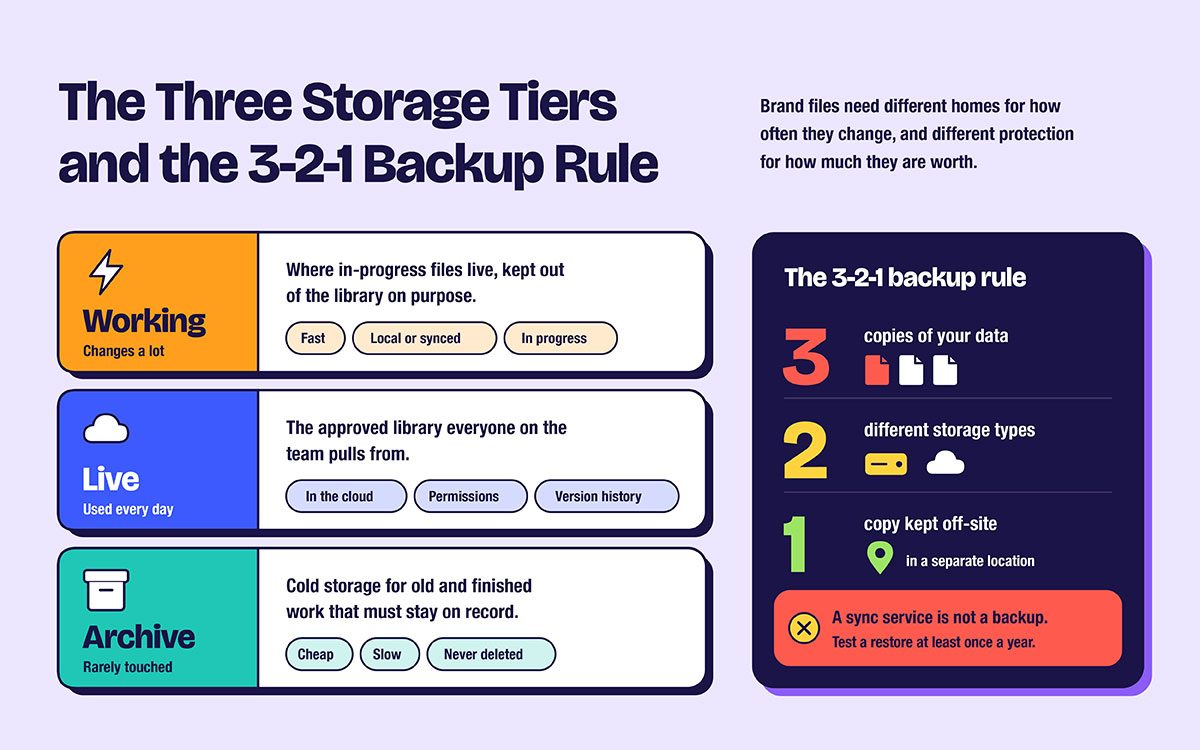
Brand files need different homes. This depends on how often they change. They also need different protection based on their value. One folder for everything causes clutter and data loss. Here are the three storage tiers. Also, here's the 3-2-1 backup rule. This system keeps your assets organized and safe from loss.
Working Tier: fast, local or synced storage, where files still in progress live. It changes a lot, and stays out of the library on purpose.
Live Tier: the approved library everyone uses. It sits in the cloud, with permissions and version history.
Archive Tier: cold storage for old and finished work. It is cheap, slow, rarely touched, and never deleted.
The 3-2-1 backup rule means three copies of your data, on two different types of storage, with one copy kept off-site. This advice has stood for years, and it still holds true.
The one detail most articles skip is important: a sync service is not a backup. Sync copies deletions and corruption to every copy you own, fast. A real backup has version history and a restore point from before the mistake.
Test a restore at least once a year. A backup nobody has restored from is just a guess.
Do you actually need a DAM platform?
A DAM platform solves distribution and rights problems at scale — it's a different category from a general-purpose design tool. It does not fix disorder. Buying one to fix disorder just hosts the same mess at a higher cost.
Shared drive/cloud folder
Design tool library
DAM platform
Best for
Under about 15 users, simple asset set
Design-led teams working in one tool
Many contributors, many brands or markets, external distribution
Search
Filename and folder only
Within the tool
Metadata, faceted filters, often visual and AI-assisted search
Metadata
Minimal; whatever is embedded in the file
Limited
Full schema with controlled vocabularies
Permissions
Folder-level, coarse
Tool seats
Role-based, asset-level, expiring share links
Rights tracking
Manual, in a spreadsheet
None
Built in, with expiry alerts
Cost
Included in existing subscriptions
Included in tool seats
Meaningful annual commitment plus implementation effort
Main risk
Structure decays without discipline
Non-designers cannot access assets
Paying for a system nobody adopts
The decision rule: Move to a DAM when at least two of these are true. More than about 15 people need to help themselves to files. You send assets out to partners or press. You manage more than one brand or market. Licensed content with expiry dates gets used often. Or the same asset request reaches the design team more than once a week.
If only one is true, the framework above works better. A well-run shared drive will serve you and cost nothing. The platform is like an amplifier. It makes whatever system you already have louder, even if you have no system at all.
What to ask a design partner so assets arrive organized
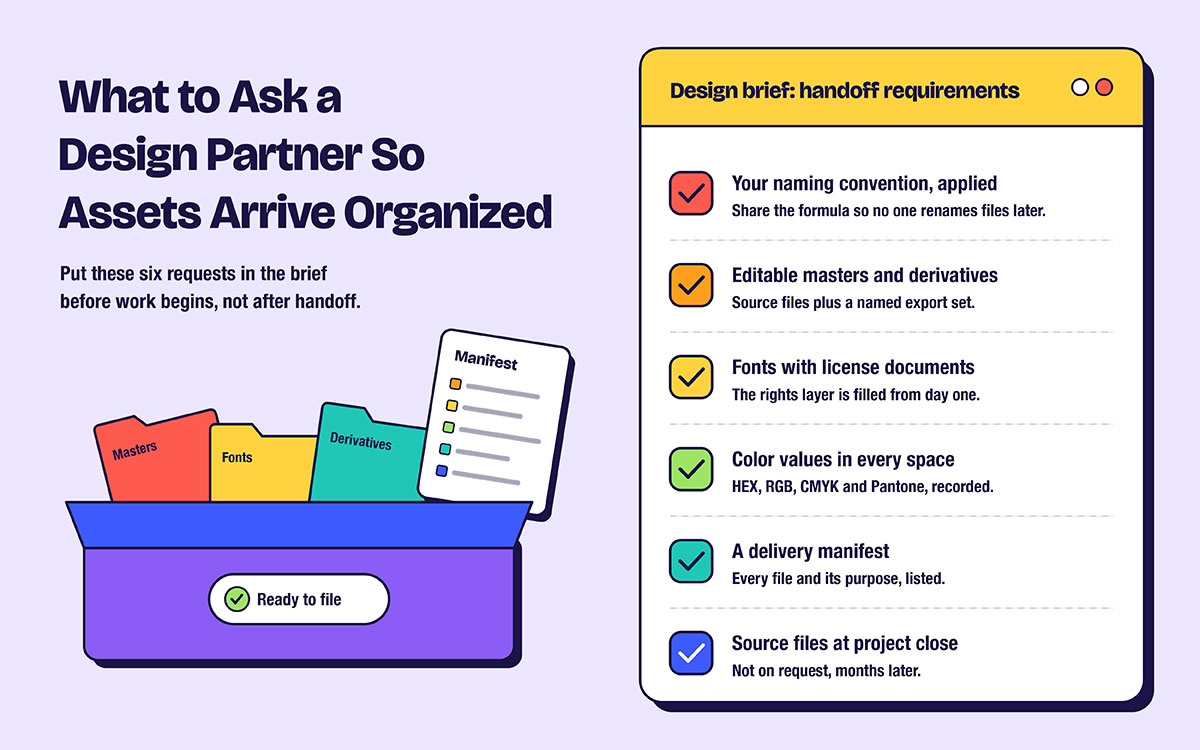
To keep brand assets organized from delivery onward, set your requirements in the design brief before work begins. A clear brief prevents messy handoffs and costly cleanup later. Here's what to ask a design partner so assets arrive organized, in six requests worth putting in writing.
Ask for the naming convention to be applied at delivery. Give your formula in the brief. That beats renaming hundreds of files later.
Ask for editable masters plus a named derivative set, not a folder of exports that cannot be changed.
Ask for fonts to be delivered with their license documents, so the rights layer is filled in from day one.
Ask for color values in every space you will use, such as HEX, RGB, CMYK, and Pantone. These are the color values that need to be recorded in every space instead of being converted under pressure later.
Ask for a delivery manifest that lists every file and its purpose. It becomes the first set of rows in your inventory sheet.
Ask that source files be delivered at project close, not on request, months later, once the freelancer has moved on.
It also helps to review how brands document their systems before you write the brief. Seeing a clearly documented delivery makes it much easier to ask for one.
Building an asset library FAQs
Some building an asset library FAQs only come up once you need the file. Right after a printer asks for a vector, say. The answers below cover what teams ask most, from folder depth to who owns the library. Read them now and spot the gaps early. Still something your setup cannot answer about how to organize and store brand assets? Reach out to us anytime.
The short answer is to work in layers, not just folders. List what you have, pick a shallow structure, and write one naming formula. Add required metadata, and keep masters separate from derivatives. Set permissions and rights, and name an owner with a review schedule. Build it all in that order.
In a locked Brand-Core area of the live library. Only the asset owner or design partner can edit it, with derivatives in a subfolder next to it. Masters should never sit in a personal drive, an email thread, or a campaign folder that will one day get archived.
For small teams, a shared drive is enough, as long as the naming convention and governance layers are in place. It stops working once you have many contributors. It also stops working with outside distribution to press or partners, or licensed content whose expiry dates need tracking.
Use brand_asset-type_descriptor_variant_version_date. Four rules matter most. Use lowercase throughout, and no spaces or special characters. Use ISO dates as YYYY-MM-DD, and padded versions such as v01. Staying consistent matters more than which exact formula you pick.
Three or fewer. Depth tries to replace search, and it does a poor job of it. Every extra level is a guess a colleague has to get right. Metadata answers findability better than nesting folders does.
Yes. Archive old versions and mark them deprecated, instead of deleting them. You will need them for legal questions, brand history, and anniversary work. Deleting feels like the natural move, but it is the wrong one, because you cannot undo it.
Add title, asset class, keywords, campaign, creator, and rights holder. Also add usage rights, license expiry, status, color space, and dimensions. Rights and expiry are most often skipped, and skipping them is the most costly.
Make old files hard to reach, instead of sending reminders. Move deprecated files to archive, and keep only approved assets in the live library. People use whatever they can find, so fix the structure, not people's behavior.
One named person, with power to approve and deprecate files. This person usually sits in marketing or brand, not IT. A library owned by committee gets a library nobody maintains, because every decision needs a meeting.
Weekly and monthly checks stay light. Quarterly is a deeper review of deprecations, permissions, and license expiries. Once a year, run a full audit of the inventory sheet and verify that your backups actually restore.
Endnote
That brings this guide to a close! You surely now understand how to organize and store brand assets.
Organizing brand assets isn't a one-time job. It's a habit. The first three layers fix most problems. These are inventory, a shallow structure, and one naming formula. Disorder rarely costs you minutes of searching. The real cost shows up later. You pay through reshot photos, rebuilt layouts, and redesigned logos. It's a quiet bill nobody ever budgets for.
Careless people aren't usually to blame. Missing names, masters, or a manifest cause the real damage. Graphic Design Eye delivers brand work with naming and files ready. So your library builds value from day one. It won't collect problems anymore.
Start with the inventory this week! Thank you for reading! Wishing you nothing but smooth progress ahead!
Graphic Design Eye LLC is a full-service creative agency built for brands that demand more than design — they demand vision. From strategic branding to complete visual identity, we partner with startups, agencies, and growing businesses as a dedicated creative force. With flexible subscription and project-based models. Let's start with us today!