Ever wondered how AR and VR are transforming digital catalog design and changing the way people shop online? Instead of relying on static product images, brands can let shoppers see furniture in their own space, examine products from different angles, or explore a virtual store before buying. It’s a different kind of catalog experience, one that can make product discovery easier and give customers more confidence when making a purchase.
You know that moment when a customer likes a product but still hesitates to buy it? The photos look good, the details are there, and the reviews are positive. Yet one question remains: Will this product actually work for me? Will that sofa fit the living room? Will that table suit the space? Will that piece of clothing look the way they expect?
Traditional catalogs cannot always answer these questions. A product photo can show what something looks like, but it cannot always help customers understand how it will fit into their own space. Digital catalogs made browsing easier, but many still rely on flat product images on a screen.
This is where AR and VR can change the experience. AR can place a product into a real environment, while VR can create a digital space where customers can explore products from different angles. Instead of asking customers to imagine the product in their lives, immersive technology can help them experience it more directly.
But AR and VR are not right for every catalog. They can cost more, require careful planning, and may not suit every product or audience. The real question is when immersive catalog design solves a problem that a standard digital catalog cannot.
In this article, we’ll look at how AR and VR are changing digital catalog design, where they work best, what they cost, and when traditional formats may still make more sense.
So, let’s explore!
What AR, VR, and 3D actually mean in a catalog
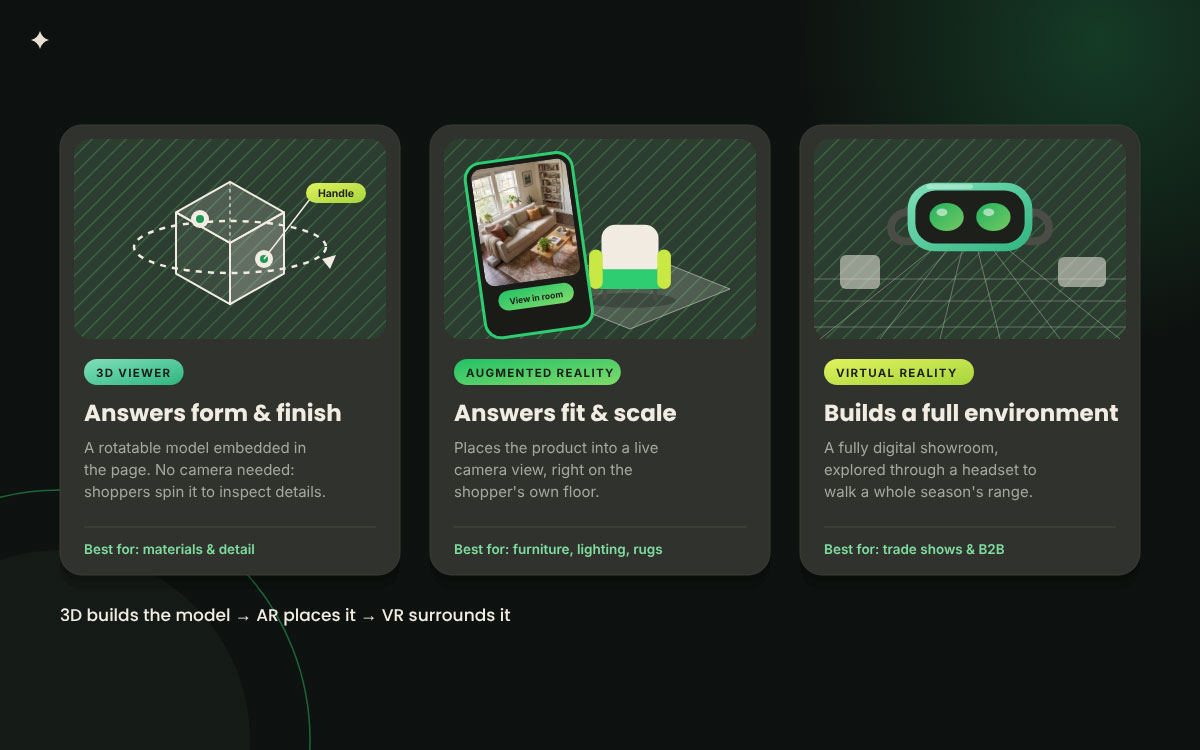
AR, VR, and 3D are different ways of presenting a product, and each solves a different customer problem. 3D creates the product model, AR places it into the customer’s surroundings, while VR creates a fully digital environment. Knowing what each one actually does helps you avoid paying for technology you do not need.
Let’s break down the differences.
Term
Plain Definition
What It Looks Like in a Catalog
Augmented reality (AR)
Digital objects placed into a live camera view of the real world
Tapping view in your room and setting a chair on the actual floor
Virtual reality (VR)
A fully digital environment entered through a headset
Walking a virtual showroom of the full season range
Mixed reality (MR)
Digital objects that respond to and pass correctly behind real surfaces
A cabinet that hides correctly behind a real wall edge
3D product viewer
A rotatable model embedded in the page, no camera required
Dragging to spin a kettle and inspect the handle join
WebAR
AR launched from a browser with no app installed
A link or QR code that opens the experience directly
Virtual try-on
AR mapped to the body or face rather than a room
Previewing frames, lipstick shades or a watch on the wrist
Product configurator
A 3D model with switchable materials, finishes and modules
Changing a sofa from linen to boucle and adding a chaise
Digital twin
A dimensionally accurate model matched to the manufactured item
A pump with correct port positions used for installation planning
The distinction that matters commercially is between the viewer and the placement. A 3D viewer answers questions about form and finish. AR answers questions about fit and scale. Most catalogs need the first far more often than they need the second, and most budgets are spent the other way around.
How AR and VR are transforming digital catalog design
AR and VR are transforming digital catalog design by changing how customers explore, understand, and interact with products. The biggest changes are not about adding flashy technology, but about improving the buying experience at key moments.
The eight shifts below show how AR and VR are transforming digital catalog design, why it matters, where it works best, and what designers need to do.
Shift 1. From flat spreads to placeable products
A catalog page is no longer something a buyer only looks at. With AR, a buyer can place the product on their own floor and see how it looks in their space. So, the product moves from the catalog page to the buyer’s actual environment.
Why it works: One of the biggest problems with online shopping is spatial doubt. You may like a product, but still have a question in your mind: Will this item actually work in my room? A photograph cannot answer that question. But, AR placement can show the product in the buyer’s space within seconds. It also removes the mental work of looking at dimensions and trying to imagine how the product will look in the room.
Best for: Furniture, lighting, rugs, large appliances, storage, and garden structures.
Design note: Make the placement option easy to find. Put it near the price or other main product controls, not as a small icon buried in the gallery. If the buyer cannot find the AR option, the feature won't do much for the catalog.
Shift 2. From size charts to true-to-scale preview
Instead of only showing product dimensions as numbers, AR or VR can show the product at its real-world scale in the buyer’s space. Now, buyers can get a better idea of the actual size before they place an order.
Why it works: Buyers can easily misjudge scale when they only see numbers on a screen. A sofa may look smaller in a product photo, while a dining table may seem like it will fit until it arrives. That's when the mistake becomes expensive for everyone. A true-to-scale preview turns the size information into something buyers can actually see and judge. So, scale accuracy matters more than visual polish here.
Best for: Sofas, dining tables, wardrobes, appliances, industrial equipment, and retail fixtures.
Design note: Scale accuracy is non-negotiable. A model can look beautiful, but if the dimensions are wrong, it can give buyers the wrong idea about the product. In fact, a wrong-scale model can be worse than having no model at all because the buyer may feel confident about a product that will not fit their space.
Shift 3. From static photography to configurable 3D
One photographed product variant can become a single 3D model with switchable finishes, fabrics, modules, and colors. So, buyers can explore different versions without needing a separate photo for every option.
Why it works: Product ranges with many variants can be difficult to photograph and keep updated. Every new fabric, finish, or color can add another item to the shoot list. Then comes the photo editing work. Over time, the product photo editing cost can become a limit on how many product options you can show. With a configurable 3D model, you can bring many of those options into one asset. Buyers can also build the version they actually want before making a purchase.
Best for: Modular seating, kitchens, joinery, vehicles, machinery, custom packaging, and jewelry with different metals and stones.
Design note: Only show the options you can actually manufacture and ship. If the configurator lets a buyer create a combination that your business cannot make, you may create a problem instead of a better shopping experience.
Shift 4. From catalog as document to catalog as environment
A page sequence can become a space that buyers can move through. This is where a virtual reality showroom can make a digital catalog feel more like a physical showroom.
Why it works: A full environment can show things that separate product pages cannot. For example, a kitchen range inside a kitchen can show the product's size, how different pieces sit together, and how the whole space looks at once. Buyers can understand the collection in context instead of looking at one product after another in a grid.
Best for: Seasonal home collections, trade show ranges, showroom-led B2B categories, hospitality, and contract furniture.
Design note: Give buyers a clear route to follow. If you place too many products and spaces together without any direction, the environment can become confusing. Start with three to five main products and build the experience around them.
Shift 5. From one linear sequence to buyer-led exploration
The fixed page order gives way to a path the buyer chooses. This is at the heart of an AR shopping experience, where buyers can explore products in the order that makes sense to them.
Why it works: Traditional catalogs expect readers to follow the editor’s sequence from one page to the next. Immersive formats hand that choice over to the buyer. So, a buyer can move between products, categories, and related items based on what catches their attention. That freedom can increase engagement, but it also means the story has to come from the products and their connections, not only from page order.
Best for: Wide ranges, multi-category retailers, and distributors with deep SKU counts.
Design note: Rebuild the merchandising logic around entry points and product relationships instead of page numbers. Every hero product needs a clear next step, whether that means viewing a related product, exploring another category, or trying it in AR.
Shift 6. From description copy to interactive annotation
Paragraphs of specifications become hotspots, exploded views, and callouts attached to the product itself. So, instead of reading a block of text below an image, buyers can interact with the part they want to understand.
Why it works: Information attached to the part it describes is easier to understand than the same information listed below the image. This can be especially useful for technical products, where buyers need to understand specific parts before making a decision. A good annotation can turn a specification that might be skimmed into something the buyer actually explores.
Best for: Machinery, medical devices, electronics, fittings, automotive parts, and technical apparel.
Design note: Keep the number of hotspots under control. Five per model is a useful starting point. Add too many, and the product can disappear under its own labels. The buyer then spends more time figuring out the interface than understanding the product.
Shift 7. From reprints to a living asset library
A catalog that was fixed at press becomes an asset library that can be updated from one central place. So, when a product model changes, you don't have to rebuild every version of the catalog from scratch.
Why it works: Print locks a product range at a specific point in time. A central 3D model library can let one corrected asset flow across the website, sales app, trade portal, and marketplace listing. This can make a large product range easier to maintain. It also changes eCommerce catalog management from a spreadsheet task into a system that needs clear rules. If the wrong model is used, that mistake can appear across several places at once.
Best for: Distributors, manufacturers, wholesalers, and brands with a long tail of product variants.
Design note: Name and version your model files with the same care you use for product photography. Keep track of which model is current, where it is being used, and who approved it. An unmanaged model library can become messy quickly, and model errors are often harder to spot than image errors.
Shift 8. From guesswork to instrumented buying behavior
Silent page views become recorded interactions that can show what buyers are actually doing with a product. Now, you can see actions such as rotating a model, changing finishes, opening annotations, or placing a product in a space.
Why it works: When a buyer rotates a model for forty seconds, switches three finishes, and places it twice, the catalog has learned something a flat page cannot show. These actions can give your team useful clues about what buyers want to explore or where they may need more information. You can then use those signals to improve merchandising, photography briefs, and even product development.
Best for: Any category where a 3D model library already exists, particularly high-consideration products.
Design note: Decide what you want to measure before building the experience. Define the important events first, then add the tracking. Trying to add analytics after an immersive catalog is already live can mean extra development work and missed data.
The file formats and tools behind an immersive catalog
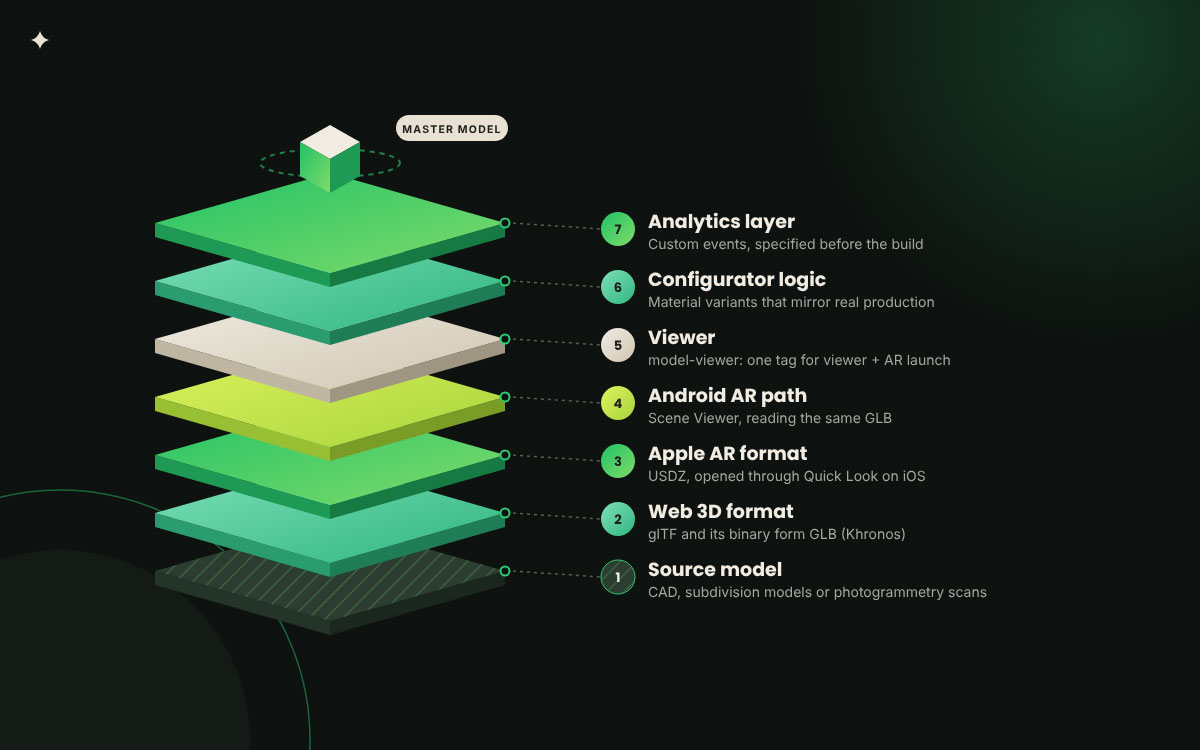
The file formats and tools behind an immersive catalog are simpler than the technology might make them sound. Standard formats let 3D products work through familiar viewers instead of requiring a custom player or app. That matters because the production setup affects cost, compatibility, and how easily customers can access the experience.
Let’s look at what you actually need.
Layer
What It Does
Common Choices
What to Watch
Source model
The high fidelity model built or scanned at production quality
Keep the source separate from the web asset, always
Web 3D format
The compressed model delivered to a browser
glTF and its binary form GLB, maintained by Khronos
Polygon count and texture size drive load time
Apple AR format
The format iOS uses for room placement
USDZ, opened through Quick Look
A second export of the same source, not a second build
Android AR path
The equivalent placement route on Android
Scene Viewer, reading GLB
Test on mid-range handsets, not flagships
Viewer
The embed that renders the model in the page
Model-viewer, the open source web component
One tag can drive both the viewer and AR launch
Configurator logic
The rules that switch materials and modules
Material variants inside glTF, or a custom layer
Rules must mirror what production can build
Analytics layer
The events that record interaction
Custom events into your existing analytics stack
Specify before build, never after
The practical consequence of glTF and USDZ for eCommerce is that one well built source model can serve a rotatable viewer, an iOS placement, an Android placement, a configurator, and the still renders your marketing team will ask for by Friday. That is the economic argument for modeling, and it is stronger than any conversion statistic. You are not buying a feature, you are buying a master asset that replaces a recurring photography line.
A note on device reality
Headset based virtual reality remains a showroom, trade show and sales enablement tool rather than a mass consumer route, because the hardware is not in most homes. Browser based AR and 3D viewers are the volume play, because the hardware is already in every pocket. Budget accordingly, and be suspicious of any proposal that inverts this.
How immersive content sits beside print and digital catalogs
Immersive content is often presented as a replacement for print and digital catalogs. But that doesn't always work. Each format has a different job, and you can use all three together instead of choosing one winner.
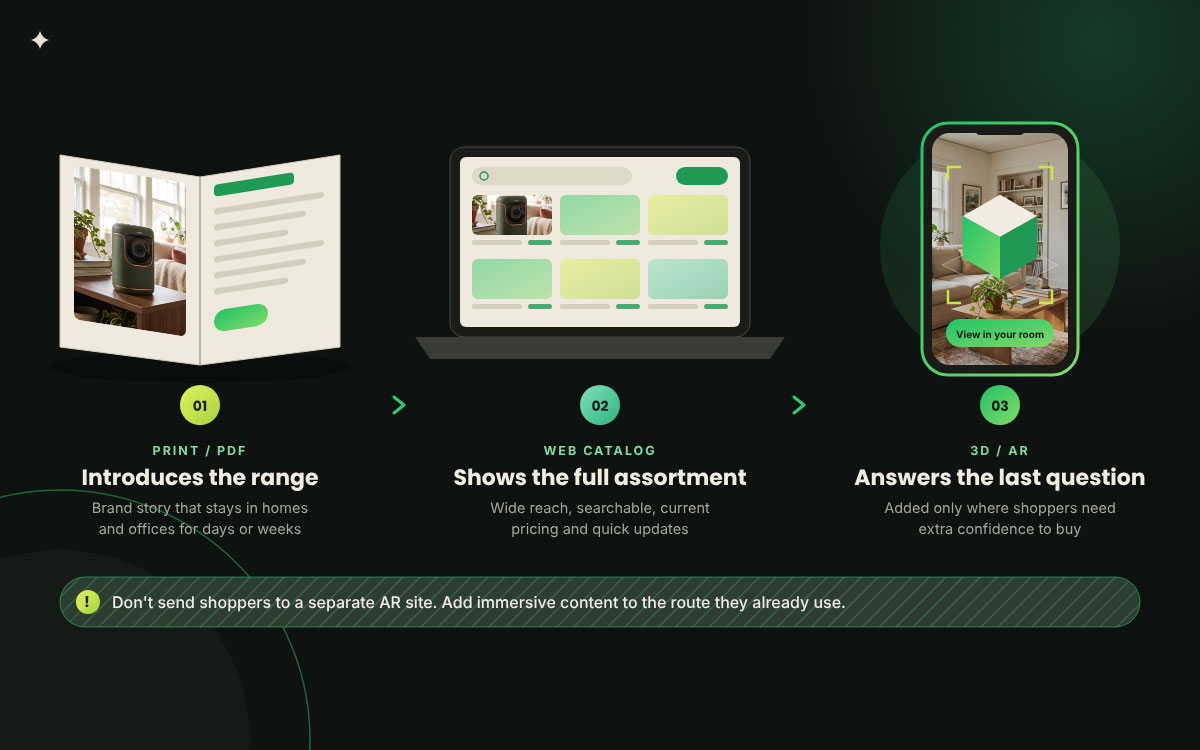
Print still does something a screen can't fully replace. It stays in a customer's home or office for days or even weeks and gives them a physical way to explore your products. A digital catalog gives you wider reach and better searchability. You can also update it quickly when a price or product detail changes. Immersive content takes care of another problem. It helps answer the last question when a customer already likes the product but still isn't sure about buying it.
So, using these formats together is more of a merchandising decision than a technical one. The comparison between print and digital catalog formats can help you decide where your customers are most likely to start. Then, you can add immersive content to the route they already use. Don't send customers to a separate AR website just to try an experience. If they have to leave the product page to find it, the technology can become a demonstration instead of helping the sale.
A practical setup is to use each format for a clear purpose. Print or PDF can introduce your product range and brand story. A web catalog can show the full assortment with current pricing. Then, you can add 3D or AR experiences to the products where customers need extra confidence before buying. You don't have to create immersive content for every product. Start with the products where seeing, placing, or trying them virtually can help customers make a decision.
7 Mistakes that sink immersive catalog projects
Immersive catalog projects usually fail because of planning and decision-making problems, not because the technology stops working. The warning signs often appear before anyone starts building the experience.
These seven mistakes show where projects go wrong, why they cause trouble, and what to check before production begins.
Building the showcase before the business case: A flagship experience should solve a clear business problem before it is built to impress anyone. Without a clear purpose, it may look impressive but fail to prove its value.
Treating the model as a picture rather than a specification: A 3D model needs accurate dimensions, not just a convincing appearance. If the details are wrong, buyers may make decisions based on information that cannot be trusted.
Burying the entry point: Buyers should be able to find placement and rotation controls without searching for them. If those controls are hard to find, low engagement may come from the layout rather than a lack of interest.
Offering combinations that cannot be manufactured: A configurator should reflect what the production system can actually make. Otherwise, it can generate orders that the business cannot fulfill.
Modeling the whole range at once: Building models for every product can spread the budget too thin. It is often more useful to start with the products where buyers need the most help before expanding the range.
Ignoring load performance: Large, uncompressed models can make a page slow, especially on mobile devices. Buyers may leave before the model loads, making the feature seem less useful than it actually is.
Letting the model library rot: Product models need regular updates when the real range changes. If old files stay in use, sales teams may stop trusting the models and avoid using them.
A practical path to your first AR-ready catalog
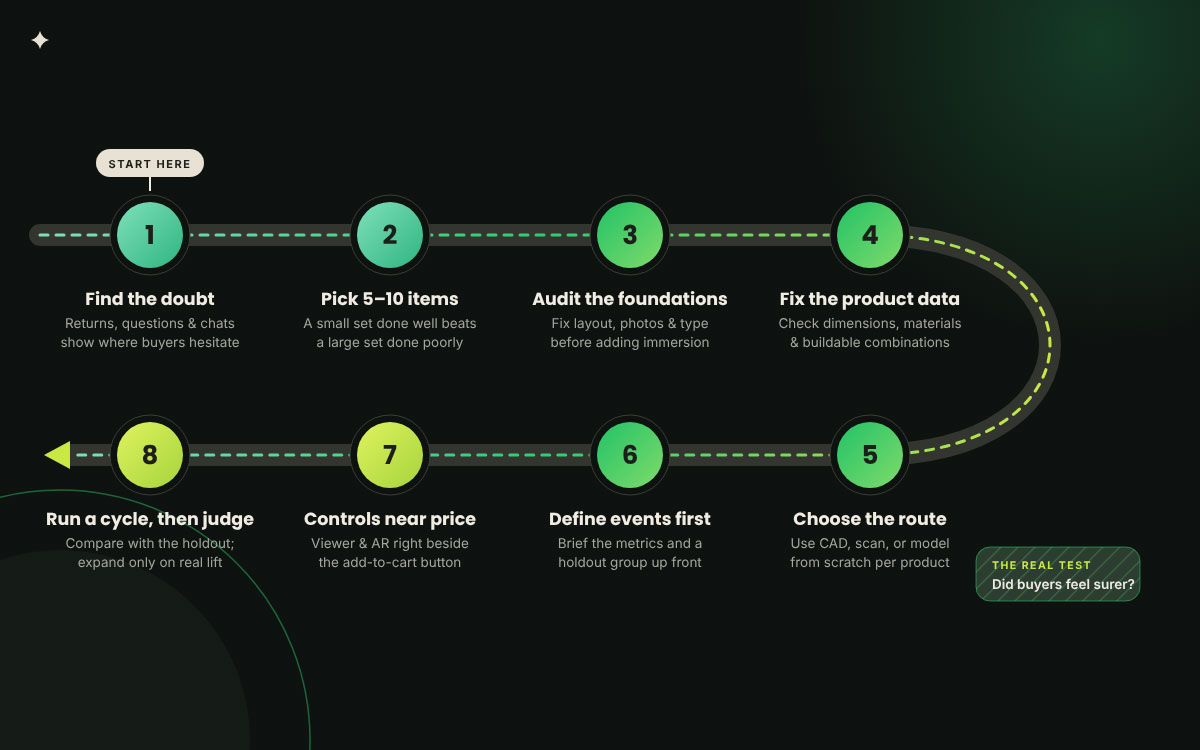
A first AR-ready catalog should start with a specific customer problem, not a platform or technology choice. From there, you can test AR and VR on a small part of your product range, measure what happens, and use that evidence before expanding.
The steps below show how to start small without losing sight of the bigger catalog.
Find the doubt: Look at return reasons, pre-purchase questions, and chat messages to see where buyers hesitate. Products that raise questions about size, fit, or clearance should be your shortlist.
Choose five to ten items: Start by modeling only five to ten products from the shortlist. A small group completed well can give you clearer evidence than a large group done poorly.
Audit the foundations first: Check the catalog layout, product photos, and typography before adding immersive content. These elements affect how well the new experience works, so fixing weak areas first can make the result easier to judge.
Fix the product data: Check the actual dimensions, materials, and available combinations before creating the models. If the product data is wrong, the model will also give buyers the wrong information.
Choose the route per product: Use existing CAD files when they are available, scan physical products when needed, and build models from scratch when neither option works. Using different methods for different products is normal and can help control the cost.
Specify the events before the build: Decide which customer actions you want to measure before development starts. Add those events to the brief and include a holdout group so you can compare the results properly.
Place the controls where the decision happens: Keep the viewer and placement controls close to the price and add-to-cart button. Buyers are more likely to use a feature when they can see it at the point where they are making a purchase decision.
Run for one full buying cycle, then judge: Let the test run through a complete buying cycle for that product category. Compare the results with the holdout group and expand the feature only when the data shows a useful difference.
Transforming catalog design FAQs
Change on this scale rarely arrives without questions, and that's exactly as it should be. As AR and VR reshape how shoppers experience products online, catalog teams naturally want to know what's proven, what's still experimental, and what is worth investing in first. The answers below cover the practical concerns that come up when brands start exploring immersive catalog design, from cost and complexity to return on investment.
AR and VR catalog design is the practice of designing product catalogs where items can be viewed in three dimensions, placed in the buyer’s own space through augmented reality, or explored inside a virtual environment, rather than presented only as flat photographs and text. It applies catalog creation to a spatial medium.
Not usually. Current browser-based approaches launch a 3D viewer or an augmented reality placement directly from a product page on both iOS and Android, using formats such as glTF and USDZ. This removes the install step that caused most earlier app-based catalogs to go unused.
Published platform data reports meaningful conversion lift for products with 3D content. Shopify’s Shop changelog reported an average 94 percent lift for merchants adding 3D content in May 2022, though that is a platform aggregate rather than a controlled trial. Treat such figures as directional and measure the difference on your own traffic.
Start with five to ten. Choose the items that generate the most returns or the most pre-purchase questions, because those are where spatial doubt is costing money and where the change will be visible in the data. A small, well finished set produces clearer evidence than a wide, average one.
No. The benefit tracks the gap between a photograph and the physical object. Furniture, lighting, large appliances, jewelry and technical equipment gain the most. Consumables, groceries and low-consideration repeat purchases rarely justify the production cost, and the budget is better spent on photography.
Yes. Models answer form, scale and configuration questions. Photography carries styling, context and emotional register, and it remains what makes a catalog feel like a brand rather than a parts list. The two formats do different jobs and the strongest catalogs use both.
Endnote
Finally, take a breath!
After all the talk of augmented reality, virtual reality, 3D views, and immersive shopping, the question underneath how AR and VR are transforming digital catalog design is much simpler: did the technology help the customer feel more certain about the product?
That is the test worth carrying forward. A customer may place a sofa in their room through AR, explore a product in VR, or rotate an object from every angle, but none of that matters if the experience does not answer a buying question. Immersive content earns its place when it removes a specific doubt about size, fit, scale, finish, or use. Otherwise, it is another feature competing for attention.
So start with the doubt, not the technology. Look at the products that generate the most questions, returns, hesitation, or requests for more images. Those are the pages where an immersive layer has something useful to prove. Then make sure the foundation can carry it: accurate product information, clear page structure, and images that give the customer a reliable view of what they are considering.
That foundation is where Graphic Design Eye can help, with catalog design and product photo editing that keep the product presentation clear and consistent before you add another layer of interaction.
Explore the wider catalog design work at Graphic Design Eye, and if you are planning an immersive catalog, start by bringing the products and customer questions that need answering.
The headset can wait. First, make sure the customer has a reason to believe what they see.
Graphic Design Eye LLC is a full-service creative agency built for brands that demand more than design — they demand vision. From strategic branding to complete visual identity, we partner with startups, agencies, and growing businesses as a dedicated creative force. With flexible subscription and project-based models. Let's start with us today!