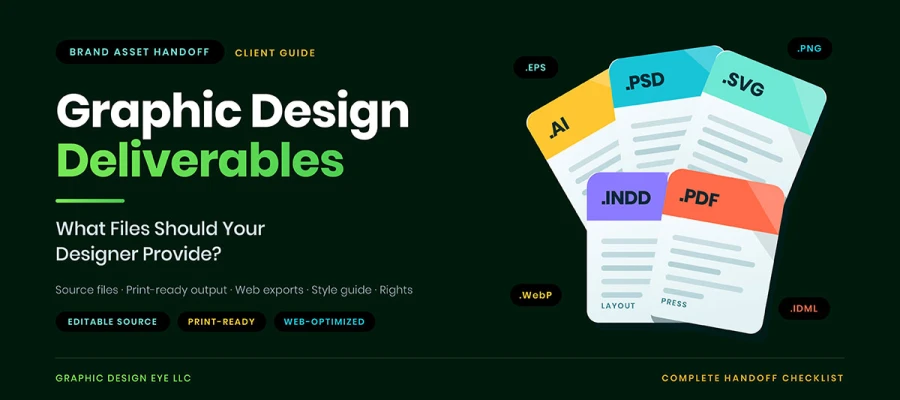
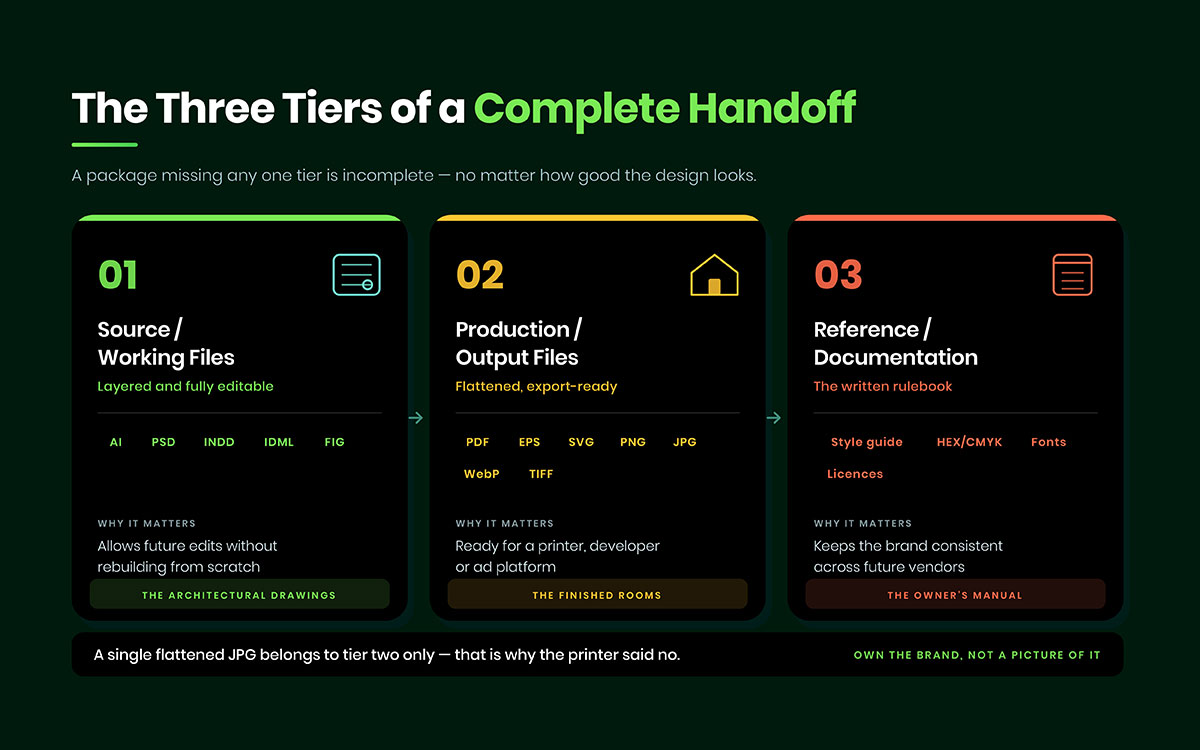
Graphic design deliverables are the full set of files, documents, and rights a designer hands over when a project ends. A proper handoff includes editable source files, print-ready PDFs, web exports, a brand style guide, color and font references, and written proof of ownership. One flattened image is never enough.
The design gets approved. You pay the invoice. You send a thank you email. Then the printer says something that ruins your week. "We can't use this file."
Somewhere in your inbox sits one JPG. It looks fine on screen but useless for printing. No layers. No vectors. No bleed. The designer already moved on to the next client.
This happens when no one lists the files to expect in advance. The design was great. The handoff failed. Months later, the business pays another designer to rebuild a logo it already owns.
In this article, we list every type of file a designer should provide you, in which format, at what resolution, and why each one matters, plus the exact questions to ask before you sign anything. Also, you'll learn what design deliverables are by project type.
Read it once, and you will never accept a mystery folder again!
Graphic design deliverables
The graphic design deliverables are source files, print-ready files, web files, logo variations, documentation, and legal rights. Each one serves a different use, from editing later to proving ownership. Miss one group, and part of your brand becomes unusable down the line.
Here's what each one should include:
Source files (editable/working files)
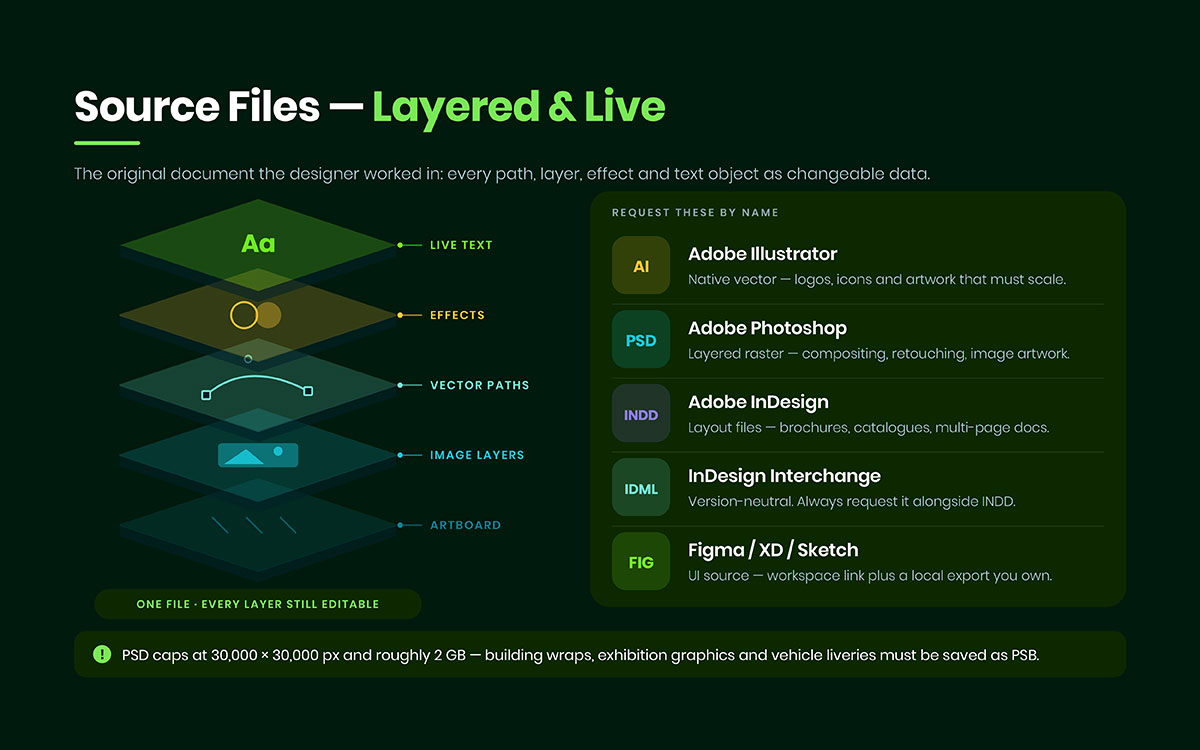
A source file is the original file a designer made. It has layers and can be fully edited. Every path, layer, effect, and text stays live. Final exports lose that.
AI: Illustrator's vector format. Used for logos, icons, and art that needs to scale.
PSD: Photoshop's layered format. Used for photo editing and image art.
INDD: InDesign's layout format. Used for brochures, magazines, catalogs, and multi-page documents.
IDML: A version-neutral InDesign format. Ask for this along with the INDD file, since older InDesign versions can't open new INDD files.
FIG / XD / Sketch: UI and web design source files. You get a shared link plus a local export you control.
One thing to know before a big project starts: Adobe's Photoshop documentation says PSD files max out at 30,000 × 30,000 pixels and about 2 GB. Big files like building wraps, exhibition graphics, and vehicle wraps need to be saved as PSB instead. If a designer says they'll deliver a PSD for a stadium banner, check what format they really mean.
Print-ready files
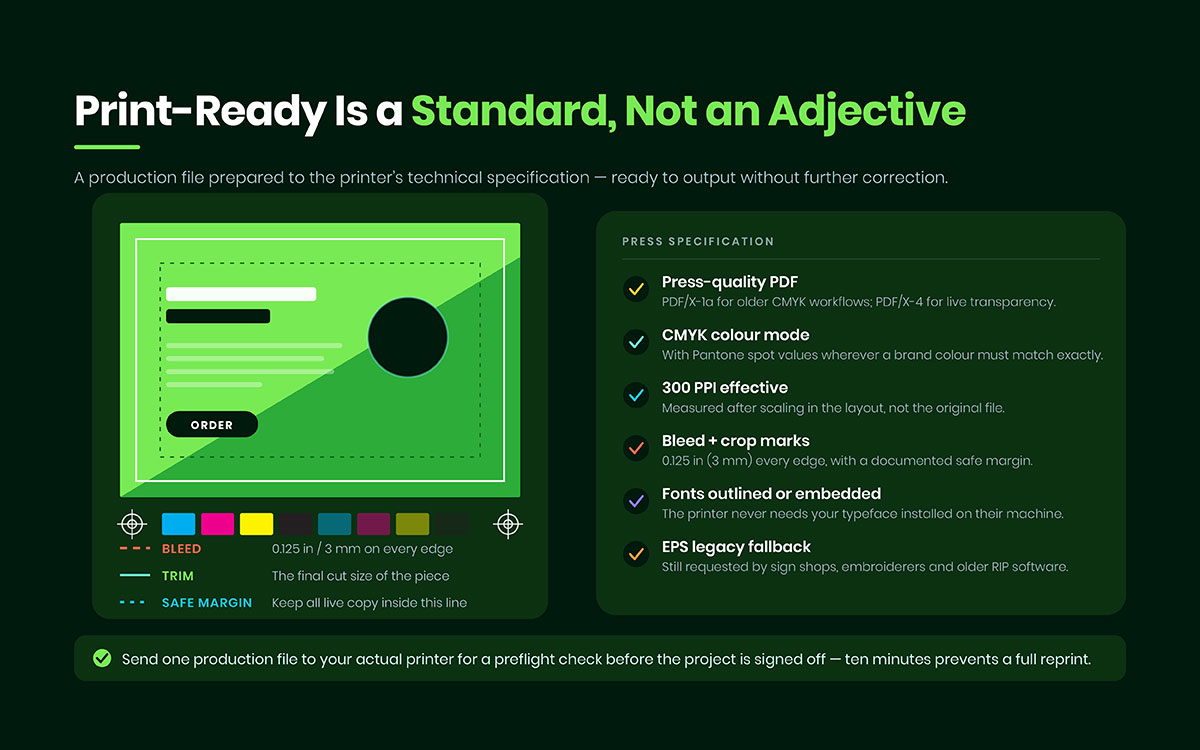
A print-ready file meets a printer's exact specs and needs no fixes. Print-ready means it hits a standard, not just a style.
Use a press-quality PDF, best made to the PDF/X standard. Use PDF/X-1a for older CMYK jobs. Use PDF/X-4 when you need live transparency or layers. PDF/X follows ISO 15930. PDF itself follows ISO 32000.
Use CMYK color: Add Pantone spot colors when a brand color must match exactly across materials.
Keep 300 PPI at final print size: This means the resolution after scaling in the layout, not the original file's resolution.
Add 0.125 in (3 mm) bleed on every edge: Include crop marks and a safe margin.
Outline or embed fonts: This way the printer doesn't need your font installed.
Keep EPS as a backup vector format: Sign shops, embroiderers, screen printers, and old RIP software still ask for it.
The biggest problem here isn't a missing file. It's a file that looks fine on a laptop but prints wrong on press. Have your designer send one file to your real printer for a preflight check before final approval. Ten minutes of checking saves you a full reprint.
Web & digital files
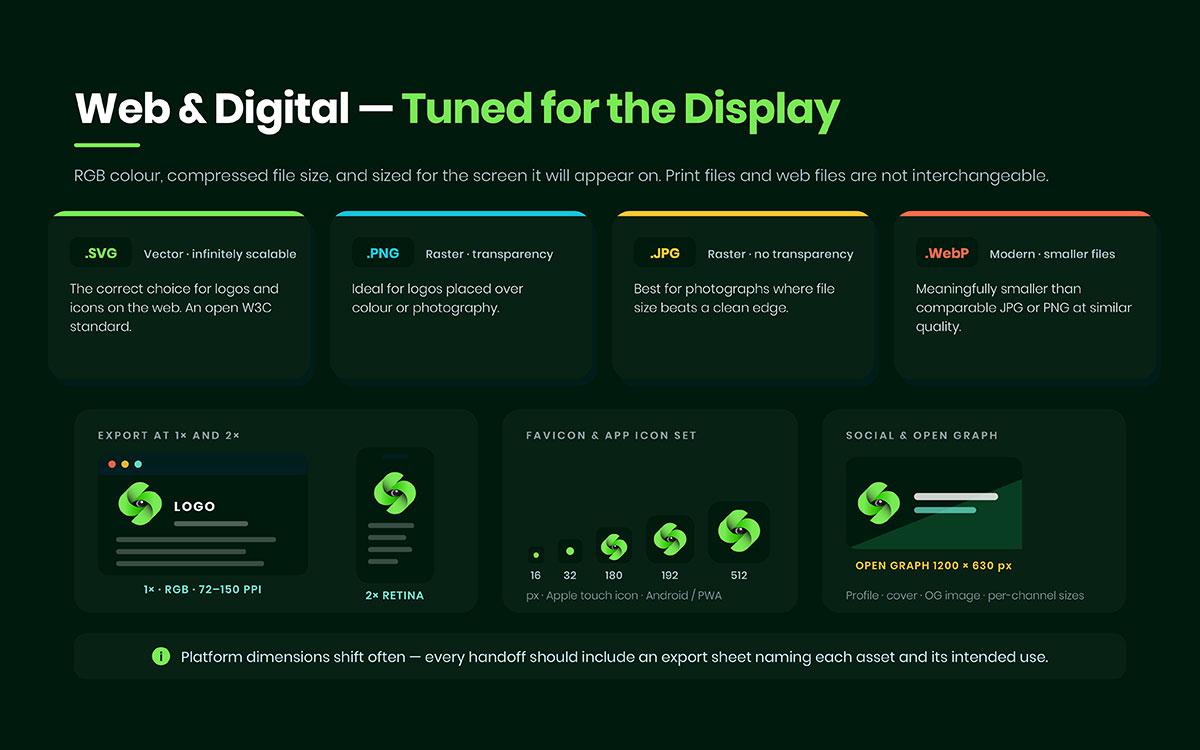
A web file is made for screens: RGB color, small file size, sized for the screen it shows on. Print files and web files are not the same. Using the wrong one looks bad to visitors.
SVG: A vector format: It scales to any size, stays small, and works best for logos and icons online. The W3C keeps this standard, so it works on every modern browser.
PNG: Supports transparency. Good for logos on coloured backgrounds or photos.
JPG: No transparency. Best for photos when file size matters more than clean edges.
Use RGB color at 72–150 PPI: Export at 1× and 2× for sharp screens.
Favicon and app icons: 16×16, 32×32, 180×180 (Apple), 192×192 and 512×512 (Android/PWA).
Social media sizes: Profile image, cover image, and an Open Graph image at 1200×630 px.
Screen sizes change often. So a handoff should have an export sheet, not random files with confusing names. Knowing the current image size requirements for each platform helps you brief a designer more quickly.
Logo variations (non-negotiable for brand work)
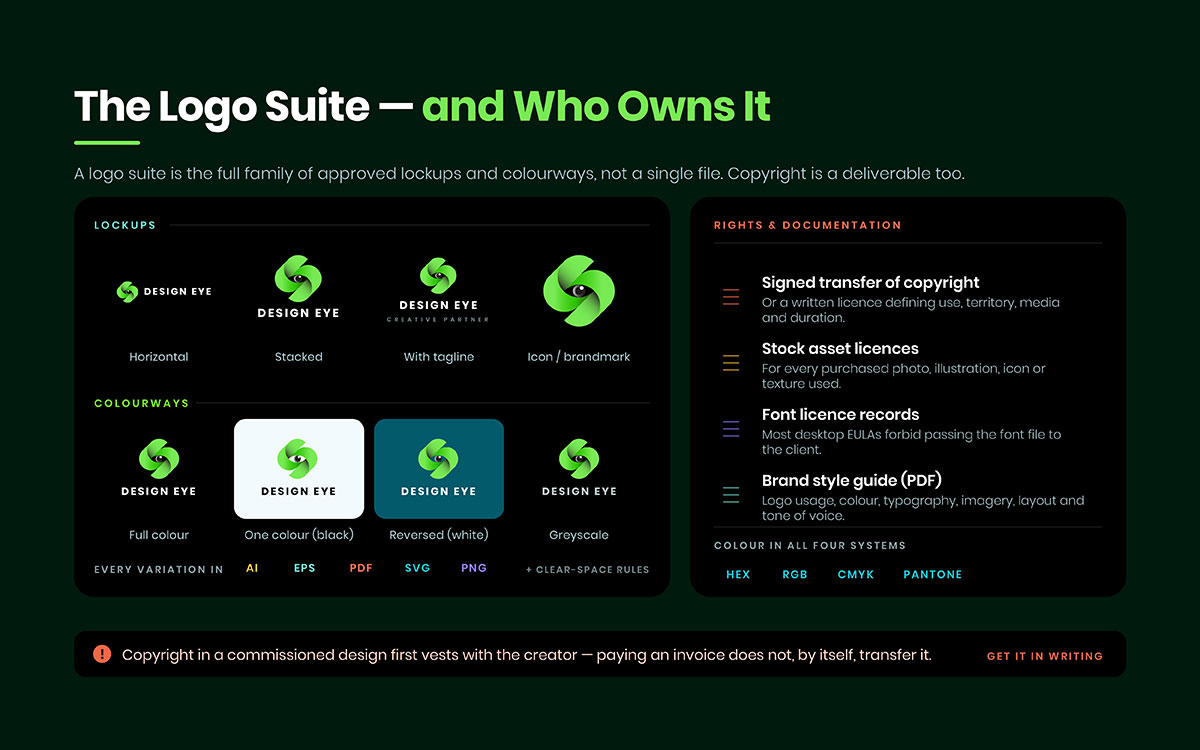
A logo suite is the full set of approved logo layouts and colors. It's not just one file. One logo can't work as a favicon, a billboard, a polo patch, and a newspaper ad.
A full suite has:
Lockups: primary, secondary, horizontal, stacked, and icon-only.
Colors: full color, black, white/reversed, and greyscale.
Formats: each version in AI, EPS, PDF, SVG, and PNG.
Rules: clear space and minimum size, written in the style guide.
This makes thirty to fifty files. Each one matters the first time someone asks for "just the white version." These files carry the visual weight of the business. So they're central to any real brand identity system.
Documentation & reference
A brand style guide is the rulebook for using the brand right. Clients often skip this part, then regret it later. It's the only piece that stays useful when you switch agencies.
Brand style guide or brand book (PDF): covers logo use, color, fonts, images, layout, and tone of voice.
Color codes in all four systems: HEX, RGB, CMYK, and Pantone. This way, a website, an ad, and a fabric print all match. Good color consistency shows real planning, not luck. The guide should explain why certain logo color combinations work well together, right next to the codes.
Font list: names every typeface, its weight, and where the license was bought.
Asset list or read me file: explains the folders and what each file is for.
Six months later, a new marketing manager opens that folder. A good read me means a smooth day. A bad one means calling a designer who's already gone.
Rights, licenses & legal documents
Copyright counts as a deliverable. Files are useless without the legal right to use, change, or copy them. That's why rights papers matter as much as artwork. Most clients get exposed here without knowing it.
Signed copyright transfer or a written license stating permitted use, territory, media, and duration.
Stock licenses for any bought photos, illustrations, icons, or textures used.
Font license records. Most font EULAs ban transferring the font file itself. So the client usually needs their own license. Typeface use carries serious legal and money risks.
The default legal rule surprises people. The U.S. Copyright Office says copyright on a commissioned design first belongs to the creator. It transfers only with a signed written agreement, or if the work counts as work made for hire under a narrow legal rule. Paying an invoice alone doesn't transfer copyright. Writing this down takes one paragraph. Skipping it costs a lawyer.
Our studio standard for design work: every project ends with a labeled folder tree, a read-me file, an export sheet listing each asset and its use, and a signed rights confirmation attached to the final invoice. Nothing gets delivered as a loose attachment. Source files always come, unless the client has declined them in writing.
Graphic design deliverables by project type
Requirements shift by project. A packaging job and a presentation share almost no files. So match your deliverables to where the work will live. Use this table as a starting point, and adjust for your own vendors.
Project Type
Core Deliverables
Formats to Request
Logo & brand identity
Logo suite, color palette, typography, style guide
AI, EPS, SVG, PDF, PNG
Print collateral (flyers, brochures)
Layout source, press PDF, low-res proof
INDD, IDML, PDF/X, JPG
Packaging
Dieline, mockups, press file, color build
AI, PDF/X, TIFF, 3D render
Website & UI
Design system, screen designs, exported assets
FIG/XD, SVG, PNG, WebP
Social media
Templates, resized variants, editable master
PSD/AI, PNG, JPG, MP4
Presentations
Editable deck plus a locked distribution copy
PPTX, KEY, PDF
Signage & large format
Scaled vector artwork, spec sheet
AI, EPS, PDF at scale
Two rows need extra attention. Print collateral fails most often because no one gets the layout source. A business can't update a phone number without a full redesign. Weigh this risk at the brochure design briefing stage.
Presentations fail for the opposite reason. Teams get an editable deck but no locked copy for sharing. Then someone opens the master file and wrecks it. A good presentation design always keeps these two separate.
Signage has its own trap. Large artwork often comes at a scaled ratio, like 1:10. The spec sheet with that ratio is also a deliverable. Without it, installers have to guess. A guess on a building front can be a costly mistake.
How to request deliverables before you sign the contract
Securing deliverables is a pre-contract task. Get formats, rights, and pricing written down before work starts, and the handoff needs no negotiation later. Here's the order to follow, one step at a time:
List every file format you need in the statement of work, not an email. Email isn't a contract, and memory isn't a spec.
State color modes and resolutions for each use. Print, web, and signage need different things. "High resolution" means nothing on its own.
Confirm in writing who owns the copyright after final payment. Include whether the designer keeps portfolio rights.
Ask whether source files are included in the fee or cost extra, and for the exact price. Both ways are fine. Surprises aren't.
Agree on how files get handed off. Use a named folder on cloud storage with a set retention time, not loose email attachments.
Set a review window to test the files. Open every source file. Send one print file to your printer before signing off.
Ask for an archive copy and confirm how long the designer keeps backup too.
None of these steps need design skill. They just need a paragraph written down. That's why they get skipped, and why explaining the graphic design process early leads to smoother projects. A studio that answers all seven points fast shows you how it really works.
Graphic design deliverable FAQs
Most fights over design deliverables trace back to unclear ownership, missing formats, or hidden costs. Below are the nine graphic design deliverable FAQs that, straight before a project starts, prevent nearly every dispute. And if something else is going through your mind regarding the design deliverable questions, feel free to contact us for answers.
Graphic design deliverables are everything a designer gives you at the end. This includes editable files, print and web-ready exports, brand guidelines, and proof you own the work. Think of them as a full toolkit to use, print, and update later. They are more than just the picture you saw on screen.
Not automatically. Payment covers the agreed work. Ownership of source files is a separate matter. Many designers only give final exports. Editable source files often cost extra. Confirm ownership in writing before the project starts. State that source files transfer once you pay in full.
A source file is the original, layered, editable file the designer worked in, like AI, PSD, or INDD. A final file is a flattened export from that source, such as a PDF, PNG, or JPG. Source files allow unlimited edits later. Final files can be used but not changed much. A full handoff includes both.
A logo should come as a vector first. AI is the source file. Exports should include SVG, EPS, and PDF, plus PNG for transparent backgrounds. Vector formats scale from a favicon to a billboard with no loss in quality. A logo saved only as a JPG can't be enlarged cleanly.
Most font licenses are user agreements. They block sharing the font file with anyone else, including clients. The designer isn't trying to be difficult. Sharing the file would break the license. Instead, they should give you a list of fonts, weights, and vendors so you can buy your own license from the foundry.
Yes, usually. A PDF can hold vector data, but it's an output format with limited editing. Layers, live text, and build details often get flattened during export. The AI file keeps the full working structure. Keep the PDF for sharing and printing. Keep the AI file for future edits.
Print files should be 300 PPI at final size for normal commercial printing, with 0.125 in (3 mm) bleed on each edge. Large format work seen from far away, like banners, billboards, and vehicle wraps, can use lower resolution, often 100 to 150 PPI at scale. Always check the specs with your printer before finishing the artwork.
Pricing varies a lot. Some studios include source files in the base price. Others charge separately, often 20% to 100% of the project fee, depending on the rights involved. Neither way is wrong. Compare total cost, not just the sticker price, when checking a graphic design price list.
Start with the written agreement. It shows what you're owed. If it transfers ownership and you paid in full, send a formal written request citing that clause. If there's no agreement, the designer may legally keep copyright. Negotiating a buyout is often faster and cheaper than a lawsuit. Rebuilding the artwork should be your last option.
Endnote
That's the end of this article!
We covered everything about graphic design deliverables. What source, print, and web files really mean. Why a logo needs thirty versions. How documentation and rights protect you after the project ends. What to ask for based on your project type. And the seven questions to settle before you sign anything.
A design is only as useful as your ability to reuse it later. The logo you approve today will move to a new website, a new supplier, a new manager, and a new printer. Each time someone opens a folder, they find either everything they need or one flat image and a problem.
And whether you are briefing an in-house team or looking to hire a graphic design agency for a full identity build, put the graphic design deliverables in writing before the first concept is ever presented. It takes one paragraph now and saves you a rebuild later.
Thanks for reading. Here's to a brand you'll never have to rebuild from scratch!
Graphic Design Eye LLC is a full-service creative agency built for brands that demand more than design — they demand vision. From strategic branding to complete visual identity, we partner with startups, agencies, and growing businesses as a dedicated creative force. With flexible subscription and project-based models. Let's start with us today!