How to apply for a Google Ad Grant with no marketing budget and no time to waste? Getting a Google Ad Grant takes six clear steps, in order. In return, you get $10,000 in free ads every month. Google keeps renewing it as long as your nonprofit follows the rules. You don't need a grant writer. You don't need a perfect story. No panel judges if your mission counts. You just need a website, a charity registration, and a form.
That simplicity is why so many nonprofits still mess up. The application looks easy, so people rush. Rushing causes most rejections: no padlock icon, a personal email, a homepage that hides its mission. Each mistake is avoidable once you know what to check.
This guide covers the full path, from your first eligibility check to your first live campaign. It includes the checklist experienced applicants use, a realistic timeline, and the five mistakes behind most rejections. By the end, you'll know what Google checks for and how to pass.
How to apply for a Google Ad Grant
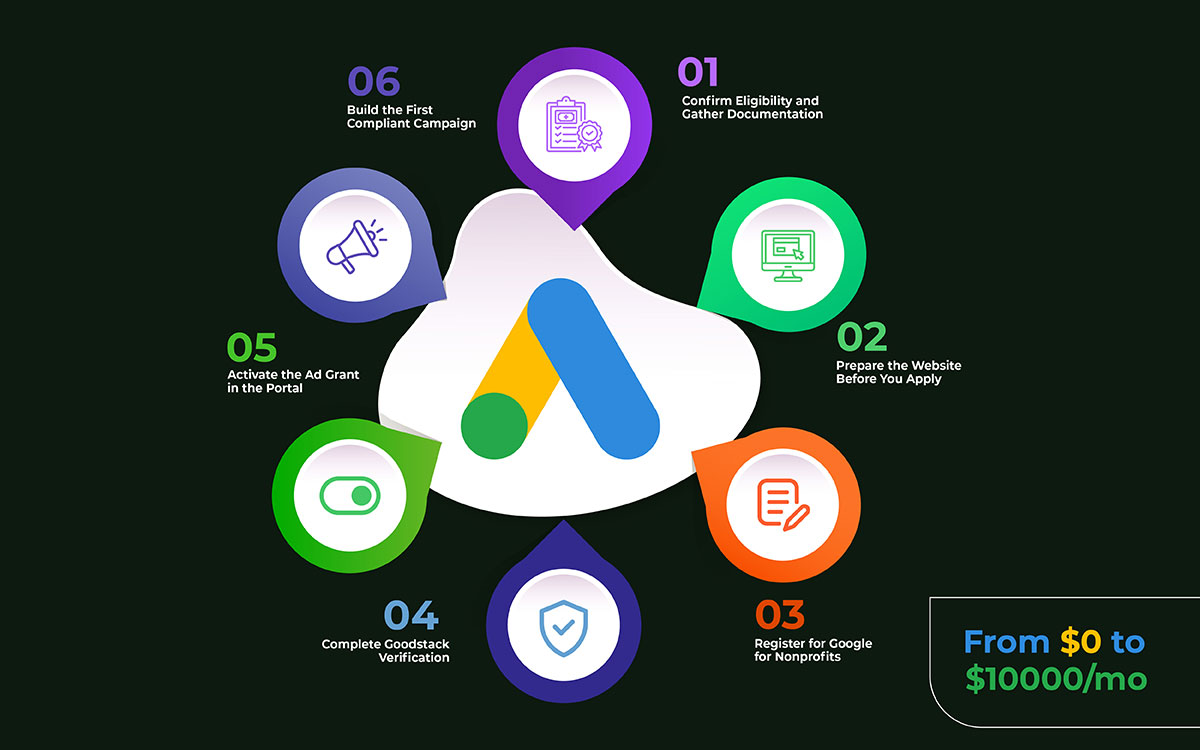
Knowing how to apply for a Google Ad Grant takes six steps, done in order. First, check if you qualify. Then get your website ready. Next, sign up for Google for Nonprofits. After that, pass Goodstack verification. Then turn on the grant in the portal. Last, launch your first campaign the right way. Finish each step before you apply for Google for Nonprofits.
Step 1: Confirm eligibility and gather documentation
Before you fill out the application, check that the organization meets both the org and website rules. Also gather the papers Goodstack will ask for during verification.
What's needed depends on the country, but you always need proof of charity registration. US groups need the IRS 501(c)(3) letter. Groups under a group exemption (common for churches and their branches) need a letter from the parent group, on official letterhead, naming the applying group as a subordinate. UK groups need Charity Commission registration. Other countries need their own charity registration certificate.
Have every document ready as a clean PDF before you start. Verification usually stalls when an applicant gets asked for papers and takes days to find them. A check that could take three business days turns into two weeks, just because the paperwork wasn't ready.
DO THIS NOW
Find and save as a PDF the charity registration approval letter. Get the EIN or charity number, and the exact legal name from the registration. Check the organization isn't in an excluded category.
The documentation you gather in one afternoon prevents a two-week verification delay.
Step 2: Prepare the website before you apply
The Google Ad Grant application is really a website check, in practice, a web design check. Fixing problems before you apply is much faster than fixing them after a rejection.
Four website issues cause most rejections. Your site needs HTTPS. If the browser shows "Not Secure," you get rejected right away. Your mission statement must show clearly on the homepage. It should also appear in the footer with your registration number. Google reviewers want your mission to be obvious. Core pages need at least 300 words of original content. Thin pages look low quality. Your site must have no broken links, no 404 errors, and no excess ads unrelated to your mission.
Sites that pass easily share more than the basics. They have a separate page for each program. They have an About page with staff or leadership info. They have a contact page with a real address. They have a privacy policy. These pages tell Google's AI reviewers that your group is real and transparent. This is also the time to check your design quality. Graphic design matters more for nonprofits than most boards think. Reviewers, human or automated, read credibility signals. A clear visual identity is one of them.
If your homepage buries the mission in a paragraph nobody reads, rewrite it. The groups that pass most easily already know how to show their story visually. A mission shown through a clear headline, one photo, and one line of text is clear to a crawler and memorable to a donor.
DO THIS NOW
Run the homepage through pagespeed.web.dev. Make sure mobile load time is under 3 seconds. Check that HTTPS is active. Add the mission statement to the footer, next to the registration number. Check every core page for the 300-word minimum. Fix broken links before publishing.
The Google Ad Grant approval is part of the Google for Nonprofits program. You must sign up for that program first. You cannot apply for the Ad Grant on its own.
Go to google.com/nonprofits and click Get Started. Your email address matters a lot here. Use an email from your organization's own domain, like [email protected]. Don't use a personal Gmail, Yahoo, or Outlook address. Google sees a domain email as proof your organization is real. Personal emails often get delayed or rejected.
The form asks for your organization's legal name, country, type, charity registration number, website, and a mission description. Every answer must match your official documents exactly. If your name doesn't match your determination letter, your approval could be delayed.
DO THIS NOW
Make an email using the organization's domain if you don't have one. Register at google.com/nonprofits with that address. Type the legal organization name exactly as it shows on the charity registration papers. Fill in every optional field. Complete profiles get reviewed faster.
Twenty minutes filling out the form carefully saves weeks of back-and-forth checks later.
Step 4: Complete Goodstack verification
After you register, Goodstack checks your charity. It used to be called Percent. They confirm your group is a real, registered charity in good standing. This step takes the longest. You have the least control over it.
Goodstack emails the address you used to register. It usually comes from [email protected]. Sometimes verification happens automatically; if your charity shows up in national registries, Goodstack can check. Other times, you must send the documents from Step 1. How fast you reply decides how long this takes overall.
Google says this step takes 2 to 14 business days. In practice, groups that reply within 24 hours often finish in 3 to 7 days. Groups that miss the email, often because it lands in spam, can wait weeks without knowing their application stalled.
DO THIS NOW
Add [email protected] to your safe senders list before Step 3. Check the registration inbox daily during verification, including spam. Reply to any document request within 24 hours. Check your status directly in the Google for Nonprofits portal. Don't just wait for email.
Google review time isn't the only clock ticking. Your response time counts too.
Step 5: Activate the ad grant in the portal
Getting approved for Google for Nonprofits does not turn on the Ad Grant. You have to apply for the grant separately, as a second step inside the portal. This two-step setup surprises a lot of applicants.
Once your Google for Nonprofits approval is confirmed, sign in to the portal and find the Google Ad Grants tile. Click Activate Products, then Get Started under Google Ad Grants. The form will ask for your website URL, details about your current marketing, and some questions checking that you understand the Ad Grants rules, like the mission relevance rule and the click-through rate standard.
This form usually takes about 15 minutes. Answer the policy questions carefully and honestly. They show Google that you understand the rules that come with the grant. After you submit, Google reviews your website and account setup, usually within 2 to 5 business days. If approved, you'll get an invite to your new Google Ads account.
DO THIS NOW
In the Google for Nonprofits portal, click Activate Products, then Get Started under Google Ad Grants. Fill out the form with your website URL and marketing info. Answer the policy questions honestly. Check for the Google Ads invite email within 5 business days.
You need to apply for two things. First, Google for Nonprofits. Then the Ad Grant activation.
Step 6: Build the first compliant campaign
Approval gets you an empty Google Ads account with $10,000 a month in credit. That money does nothing until you launch a campaign that follows the program's rules from day one.
Your first campaign has to meet several rules at once. You need conversion tracking set up and running before you launch anything. That's because Smart Bidding, required for every account made after April 2019, needs conversion data to work. Every keyword must have at least two words. Single-word keywords are banned, except for a short list Google allows. Each campaign needs at least two sitelink extensions. You also have to set your location targeting yourself, not leave it on global.
Build your first campaign around one specific audience, not everything your organization does. A focused campaign with five to ten closely related keywords, three responsive search ads, and a landing page built just for it will get a better Quality Score and click-through rate than a broad campaign covering all your programs. Treat that landing page like a printed appeal. Think about adding a shareable infographic too. People who land there from search decide in seconds if your cause is worth their time.
DO THIS NOW
Install Google Analytics 4 and Google Tag Manager. Set up at least one conversion action. Build one campaign for your main program or service. Add five to ten multi-word keywords. Write three responsive search ads. Add two sitelinks. Set your target location. Set bidding to Maximize Conversions.
Approval is just the start. The grant only matters once campaigns launch and follow the rules.
Realistic Google Ad Grant application timeline
Nonprofits that know how to apply for a Google Ad Grant typically finish the application in two to four weeks. There are six stages to follow: website prep, registration, Goodstack verification, activation, account review, and campaign build. Document requests or website fixes can stretch any stage. So experienced applicants plan for six weeks, not the minimum.
Goodstack confirms charitable status and may request documents
2 to 14 business days
3 weeks if documentation is requested
Ad Grant activation request
Complete the Ad Grants activation form in the portal
About 15 minutes
Same day
Google Ads account review
Google reviews the website and the initial account setup
2 to 5 business days
1 week
First campaign build
Build campaigns, add keywords, write ads, set Smart Bidding
2 to 4 hours
2 days
Total, start to live campaigns
End-to-end application through the first live ad
2 to 4 weeks
Plan for 6 weeks
5 Application killers that cause most Google Ad Grant rejections
Five common mistakes cause most Google Ad Grant eligibility rejections: entering billing details, using a personal email, launching a weak website, picking single-word keywords, and skipping conversion tracking. Fix these before you understand how to apply for a Google Ad Grant.
Killer 1: Entering billing information during account setup
What happens: The applicant sees the red banner asking for billing details in the new Google Ads account. They think it's required and enter a credit card.
Why it kills the application: Entering payment info can turn the Ad Grant account into a regular paid account. Grant credit doesn't work on paid accounts. This usually can't be undone, so the group must drop the account and reapply from scratch.
The fix: Ignore the billing banner. It stays up during setup, but it's not required. Never enter payment info in an Ad Grant account.
Killer 2: Applying from a personal email address
What happens: The application comes from a personal Gmail, Yahoo, or Outlook address. This happens when the group has no domain email, or a staff member just used their own.
Why it fails: Google and Goodstack check domain email to confirm a group is real. Personal addresses often get flagged, delayed, or denied, and the reason is rarely clear.
The fix: Set up an email on your organization's own domain first. Even one address like [email protected] works. Use that address for the whole application.
Killer 3: A website that fails the quality review
What happens: The site has no HTTPS, thin content on main pages, broken links, no clear mission statement, or loads slowly on mobile.
Why it fails the application: Google's review mostly checks the website. Crawlers, AI systems, and human reviewers all look at it. If the site fails any core signal, it gets rejected, no matter how good the organization is.
The fix: Finish the 12-point checklist in this guide first. Add HTTPS. Put the mission statement on the homepage and footer. Grow thin pages to at least 300 words. Fix broken links. Make sure mobile load time is under 3 seconds.
Killer 4: Building the first campaign with single-word keywords
What happens: The applicant builds a first campaign around broad single-word keywords like donate, charity, volunteer, or nonprofit. They seem to get the most searches.
Why it kills the application: Single-word keywords are banned under Ad Grants policy, except for a few Google-approved ones. An account built on banned keywords fails the first review. If it passes, it risks compliance issues and suspension.
The fix: Use only keyword phrases with two or more words. Long, specific phrases like "volunteer opportunities in Chicago" or "free food assistance for seniors" follow policy and reach people who are more likely to act.
Killer 5: Launching campaigns without conversion tracking installed
What happens: The applicant launches campaigns before setting up Google Analytics 4 and conversion tracking.
Why it kills the application: All Ad Grant accounts made since 2018 must track conversions. It's also required for Smart Bidding, which the program needs. Without it, the account can't bid smartly. The budget goes to the wrong traffic. The account breaks the rules.
The fix: Set up Google Analytics 4 and Google Tag Manager. Add at least one real conversion action. Check that tags work before launching any campaign. Measurement always comes first.
Google Ad Grant application FAQs
Nonprofit teams learning how to apply for a Google Ad Grant usually ask the following questions. These cover eligibility, timeline, cost, rejection reasons, reapplying, excluded groups, requirements after approval, and international eligibility. Each answer below is direct, so teams face fewer surprises during the application.
First, check if you're eligible. Then prepare your website and charity documents. Register for Google for Nonprofits using your organization's email. Complete Goodstack verification. Activate the grant in the portal. Launch a compliant first campaign with conversion tracking. This takes two to four weeks.
It usually takes two to four weeks from start to live campaigns. Goodstack verification alone takes 2 to 14 business days. Google's account review adds 2 to 5 more days. Website fixes can push the total to six weeks.
Yes. Applying costs nothing. There's no fee to apply or to maintain the grant. Approved nonprofits get up to $10,000 a month in Google Search ad credit. This renews forever if you follow the rules. Never enter billing details.
Common reasons include no HTTPS, thin website content, no mission statement, using a personal email instead of an organization one, failed charity verification, or single-word keywords in your first campaign. Every issue can be fixed. You can reapply as many times as you want.
Yes. You can reapply with no limit and no waiting period. Check your rejection notice for the reason. It's usually a website issue or missing paperwork. Fix it and resubmit through the same portal. Past rejections don't count against you.
No. The program excludes hospitals, healthcare organizations, schools, universities, and government bodies. Schools should apply to Google for Education instead. A charitable foundation linked to an excluded organization can still qualify on its own if it has independent charity registration.
You get invited to a Google Ads account with $10,000 in monthly credit. This credit sits unused until you launch compliant campaigns. To keep the grant, your account needs a click-through rate above 5 percent, multi-word keywords, conversion tracking, and a completed annual survey.
Yes. The grant is available in over 50 countries. Nonprofits outside the US apply through the same portal. Instead of an IRS letter, they submit national charity registration to Goodstack. Eligibility rules and the $10,000 monthly credit are the same everywhere.
Endnote
Knowing how to apply for a Google Ad Grant was never the hard part. The six steps fit into an afternoon, and none of them ask for a narrative, a budget justification, or a panel's approval, only honesty and a little preparation.
What separates approval from rejection is almost always sitting on your own website before you ever open a form. So the real work starts there, not in the Google for Nonprofits portal.
Before you register for anything, let Graphic Design Eye rebuild your homepage, fix your mission messaging, and bring your site up to the exact standard Google's reviewers are checking for, so your first application clears review instead of stalling on a padlock icon or a thin About page.
Start with the website, because everything else in this process depends on it passing. Somewhere right now, someone is searching for the exact help your organization provides. The only thing standing between that person and your nonprofit is whether your site is ready to be found. Fix that, apply with confidence, and let the credit start working the moment it lands.
Your mission has waited long enough to be the answer someone finally finds.
Graphic Design Eye LLC is a full-service creative agency built for brands that demand more than design — they demand vision. From strategic branding to complete visual identity, we partner with startups, agencies, and growing businesses as a dedicated creative force. With flexible subscription and project-based models. Let's start with us today!