Which are the best design elements for social media content that still work when your post shrinks to a phone screen? The twelve that matter most are visual hierarchy, contrast, typography, color, white space, focal point, alignment, consistency, imagery, balance, repetition, and scale. Each one has to hold up at roughly a quarter of its design size, for about two seconds, in a crowded feed.
Let’s say you spend an afternoon getting a post just right. The spacing is clean, and the typeface carries the tone. On your monitor, it looks like portfolio work. Then you spot it on your phone that evening, three posts down in someone else’s feed, and it falls flat. The headline you loved turns into a gray smudge. The soft contrast melts into the app’s interface, and even your own thumb scrolls past before you recognize the post as yours.
You built the design for a monitor, but people meet it in a feed. They see it at a fraction of the size, in a quick glance, often in poor light. Contrast that shines on a big screen becomes hard to read, and small type simply vanishes. A hierarchy that is merely present can’t guide the eye fast enough to matter.
This guide explains the twelve essentials that keep a post working in the feed and shows you how to apply each one with a practical rule.
Scroll down and keep reading!
12 Design elements for social media content
The strongest design elements for social media content are the basic principles of visual design, adapted to remain easy to read on a small screen during a fast scroll. Twelve of them carry most of the load. They also lean on each other, so a post can only be as good as its weakest element.
This section lists the 12 best design elements for social media content so you can see what each one does and how to apply it.
Element
Practical Rule
Common Failure
Hierarchy
Primary element at least 3x tertiary size
Everything at similar visual weight
Contrast
Minimum 4.5:1 text to background
Pale type on pale ground
Typography
Headline 60pt+, body 32pt+ on 1080 canvas
Sized for a design monitor
Colour
Three colors, 60/30/10 proportion
Accent color used on everything
White space
10 Percent minimum margin
Filled to the edges under pressure
Focal point
One, nameable in a single word
Two competing focal points
Alignment
One convention, applied consistently
Almost-but-not-quite aligned elements
Consistency
Locked palette, type, and treatment
A new look on every post
Imagery
One treatment across all sources
Mixed grades and color temperatures
Balance
Deliberate, symmetric or asymmetric
Composition that feels like it tips
Repetition
One fixed element across a series
Slides that look unrelated
Scale
Exaggerate primary-to-secondary size
Timid, uniform sizing
Element 1: Visual hierarchy
The path your eye follows through a design, shaped by size, weight, color, and position.
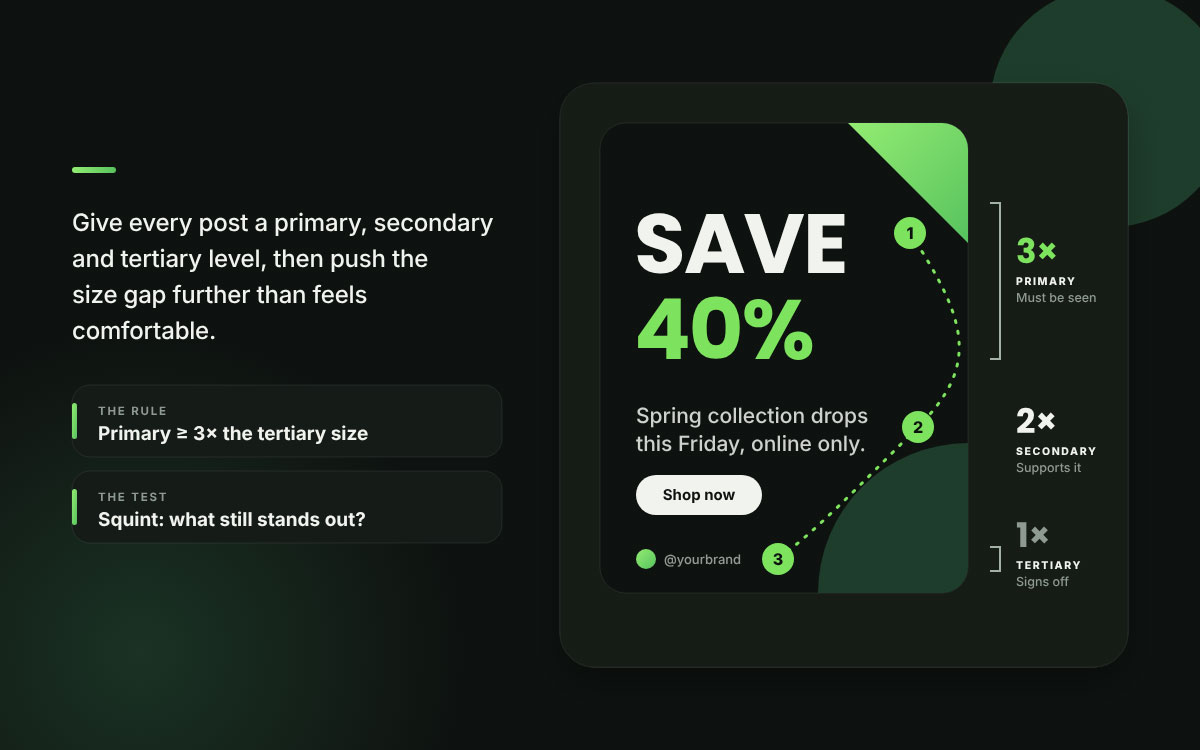
Why it matters on social: When every element shouts at the same volume, the viewer has no place to start and no trail to follow. That is the most common structural slip in social design, and it is the one that gets a post scrolled right past.
The rule: Set up three levels before you place anything. The primary level is the one thing that must be seen. The secondary level holds your supporting information. The tertiary level covers attribution, logo, and handle. Make the primary element at least three times the size of the tertiary one.
Squint at your design until it blurs. Whatever still stands out is your real hierarchy, and it often comes as a surprise.
Element 2: Contrast
The measurable gap between elements, like light against dark, large against small, or bold color against muted tones.
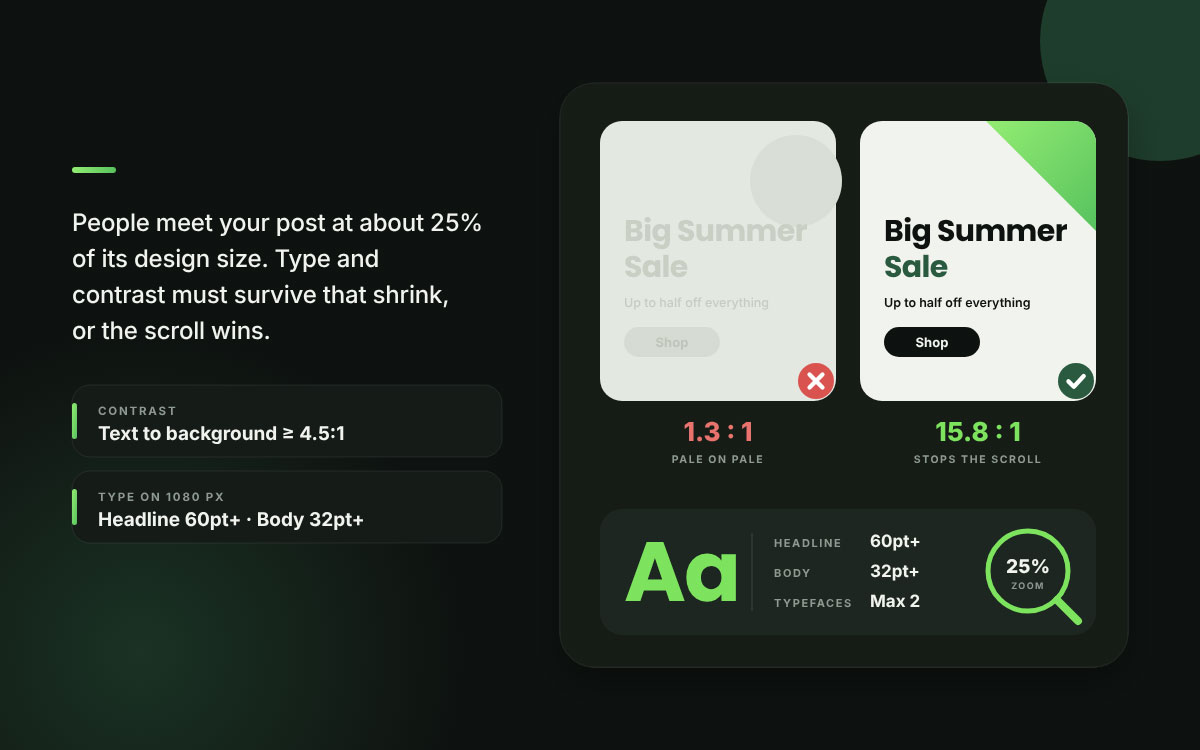
Why it matters on social: Contrast handles two jobs at once. It keeps your text easy to read, and it gives the eye a jolt that makes people stop mid-scroll. Low-contrast design drops the ball on both, which is why soft, pretty feeds so often fall short of their looks.
The rule: Aim for at least a 4.5:1 ratio between body text and its background. To stop the scroll, make sure your design stands out from the platform's interface. On most feeds, that means steering clear of pale neutrals.
Beautiful and low-contrast is the most common trap in social design. Legibility has no wiggle room, but aesthetics do.
Element 3: Typography
The typefaces, weights, and sizes you use, and how they relate to one another.
Why it matters on social: Type carries most of the message, and it tends to fail in the same way every time. Designers size it on a big monitor, but people read it in a feed. On a 1080-pixel canvas, headlines under 60 points and body text under 32 points get shaky at the size people actually see. Nailing this is one of the core social media design tips that separates readable posts from merely pretty ones.
The rule: Stick to two typefaces at most, one for display and one for body. Set headlines at 60 points or larger and body text at 32 points or larger on a 1080 canvas. Check everything at 25 percent zoom.
If you can’t read it at thumbnail size, it wasn’t built for social media.
Element 4: Color
The palette applied across the design, which covers how much of each color you use and which ones you pick.
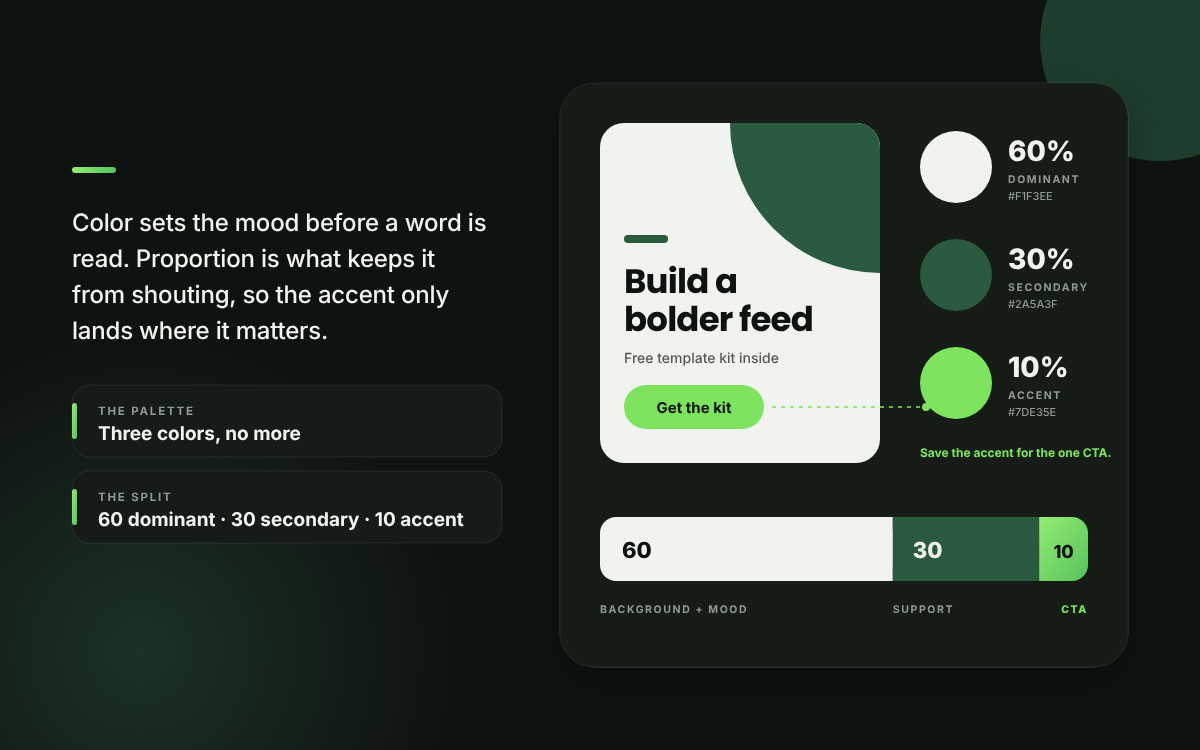
Why it matters on social: Color sets the emotional mood before anyone reads a single word, and it guides the eye when used with a light hand. Without rules about proportion, a post turns into a crowd where every element shouts, and nothing leads.
The rule: Stick to three colors. Follow the 60/30/10 rule, which gives 60 percent to the dominant color and 30 percent to the secondary one. The last 10 percent goes to an accent color, saved only for the element you most want people to notice.
An accent color does its job only when you truly keep it rare.
Element 5: White space
The deliberately empty area in a composition.
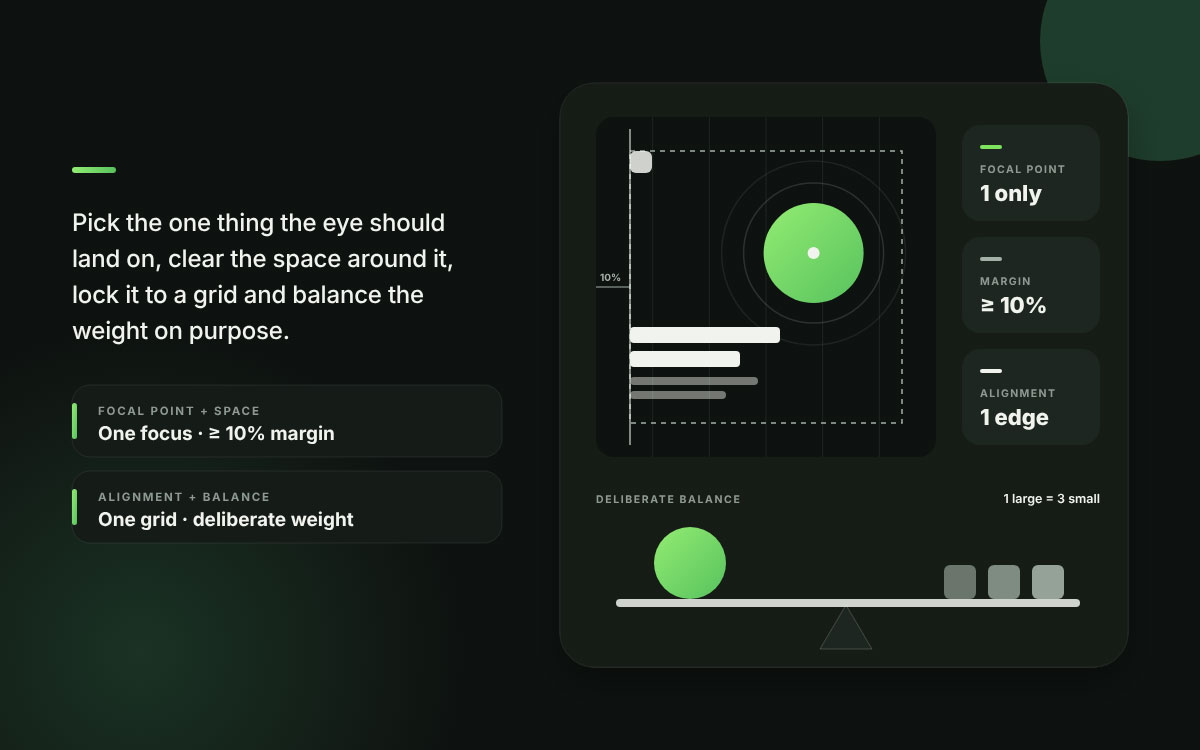
Why it matters on social: White space is usually the first thing to go when someone feels pressure to squeeze in more. Without it, a design starts to look cluttered and a little amateurish. A bit of breathing room also gives your focal point a chance to stand alone, so the eye knows exactly where to land.
The rule: Leave at least 10 percent of the canvas as margin, and resist the urge to fill the space around your main element. Density fatigue is real when people are scrolling through a busy feed. Empty space is never wasted. It gives the filled space room to be read.
Element 6: Focal point
The one element the whole composition is built to pull the eye toward.
Why it matters on social: A design with two focal points really has none, since the viewer's eye splits and wanders off. Hierarchy is often conflated with it, but they do different jobs. Hierarchy puts several elements in order, and the focal point is the single place that order leads to.
The rule: Pick your focal point before you open a design tool. Then let everything else take a back seat through size, contrast, and placement.
If you can't name the focal point in one word, your viewer won't find it in one second.
Element 7: Alignment
The invisible lines that guide where every element sits on the page.
Why it matters on social: Viewers may never be able to put their finger on why a post feels sloppy, but they feel it anyway. Crooked alignment whispers carelessness. Steady alignment is one of the strongest and cheapest ways to look professional, and it costs you almost nothing.
The rule: Set up a grid and line up every element along it. Pick one approach, whether that's left-aligned, centered, or a defined grid, and stick with it from post to post. Mixing them only invites confusion.
Nothing says amateur faster than elements that land almost, but not quite, in line.
Element 8: Consistency
Visual decisions repeated across many posts.
Why it matters on social: Consistency helps single posts add up to real recognition. People usually need around five to seven steady impressions before a brand sticks, and every inconsistent post sends that count back to zero. That quiet reset is what really drives brand awareness on social media.
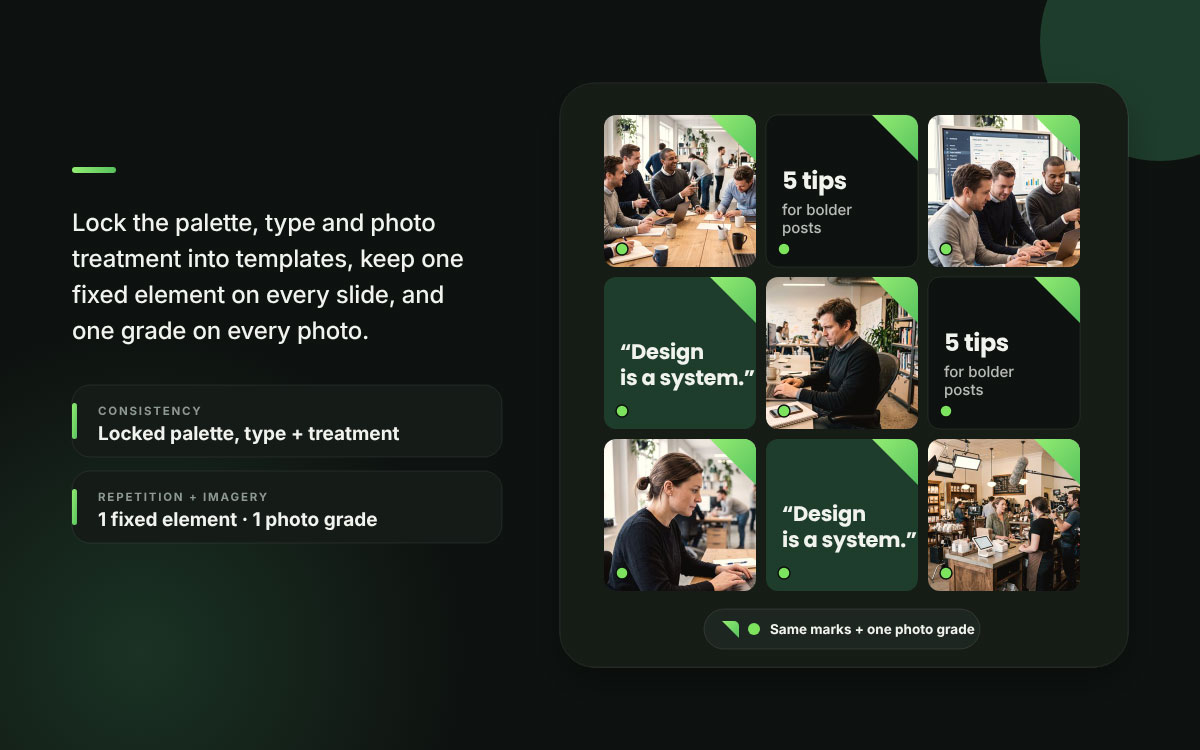
The rule: Write down your palette, typefaces, and treatment, then build locked templates so consistency lives in the structure and not in anyone's memory on deadline day. A dependable social media design system makes it the default setting instead of a hopeful goal.
Every inconsistent post wipes out the recognition value of the ones before it.
Element 9: Imagery
The photos, illustrations, and graphics you use, along with the treatment you apply to them.
Why it matters on social: People can form quick visual impressions. The widely cited study with a 50-millisecond window examined how appealing website homepages appeared to viewers. It covered nothing about social media image quality or how capable an organization is. That is a pretty harsh verdict to hand out so fast. Real photos of real people regularly beat stock images, and a consistent treatment pulls pictures from many sources into one cohesive feed.
The rule: Give every image the same photographic treatment, no matter where it came from. Choose authentic photography first, and add faces whenever the subject allows.
One consistent grade does more for feed cohesion than any other single choice.
Element 10: Balance
How visual weight is spread across the composition.
Why it matters on social: Viewers feel it right away when a layout is off-balance, even if they can't tell you why. A design can be symmetrical or asymmetrical and still work, as long as the choice was intentional.
The rule: Picture the canvas sitting on a scale, with every element adding its weight. Would it tip over? A big element offset by a handful of small ones often feels more alive than a perfectly centered layout.
Symmetry is the safe answer. Deliberate asymmetry usually wins.
Element 11: Repetition and rhythm
What it is: Repeating visual elements within a single design and across an entire series.
Why it matters on social: Repetition ties a single design together and gives a feed its rhythm. It helps a carousel read like a single document rather than eight unrelated slides that just happened to appear at the same time.
The rule: Pick a shape, a color block, a type treatment, or a border and bring it back across slides and posts. In carousels, keep one element fixed on every slide.
Repetition turns a set of designs into a system.
Element 12: Scale
The relative size of elements to one another and to the canvas.
Why it matters on social: Scale gives a design its emphasis and its confidence. When everything sits at a moderate size, the work ends up technically correct and completely forgettable. This happens far more often than most designers like to admit.
The rule: Make the size gap between primary and secondary elements bigger than feels comfortable. If the headline looks slightly too large on your monitor, it probably looks just right in a feed.
Most social designs fall short because they play it too safe, and a little boldness would have saved them.
FAQs about social media design elements
Plenty of weak social posts trip over the same handful of design problems, and those problems only show up at phone size. A quick preview on a real screen before you hit publish catches many of them. These social media design-element FAQs provide straight answers so you can spot what's wrong with a weak post and fix it. If you’re running from a different problem, share with us for a remedy. We’re happy to help our audience.
Contrast, typography scale, and consistency matter most. Contrast and type scale determine whether a post stays readable at the roughly 25 percent size it appears on phones. Consistency builds brand recognition over time, so audiences recognize your brand instantly rather than encountering it fresh with every scroll.
Visual hierarchy is the order in which the eye moves through a design, shaped by size, weight, color, and position. On social media, aim for three levels: a primary element at least three times the size of the smallest, secondary supporting information, and attribution last. Without it, elements compete.
Use at most three colors, following the 60/30/10 rule: 60 percent dominant, 30 percent secondary, and 10 percent accent. Reserve the accent for the one element you most want noticed. An accent color only creates emphasis when it is genuinely rare in the composition.
On a 1080-pixel canvas, use headlines of 60 points or larger and body text of at least 32 points. Smaller sizes become hard to read at the roughly 25 percent scale where social content appears on mobile. Check every design at 25 percent zoom before publishing.
Social media designs usually look unprofessional because of misalignment, weak contrast, timid scale where every element is medium-sized, or a canvas so crowded that white space disappears. Elements that almost align are the fastest giveaway of amateur work, and also the easiest thing to fix.
Endnote
Finally, our guide ends here, and the rest is up to your next post!
Across these twelve sections, you’ve seen that the best design elements for social media content are the familiar principles of visual design, held to a stricter standard. Hierarchy, contrast, typography, color, white space, focal point, alignment, consistency, imagery, balance, repetition, and scale all have to hold up on a small screen during a two-second glance.
Key Takeaway: Scale your latest post to 25 percent and squint at it. If you can’t read the headline or name one clear focal point, start there, since type size is the most common fix.
If you want these elements locked into a system your whole feed can follow, Graphic Design Eye LLC’s creative design service builds a consistent visual foundation that keeps every post on-brand, even when deadlines get tight.
Thank you for reading, and happy designing! May your next post be the one they stop for!
Graphic Design Eye LLC is a full-service creative agency built for brands that demand more than design — they demand vision. From strategic branding to complete visual identity, we partner with startups, agencies, and growing businesses as a dedicated creative force. With flexible subscription and project-based models. Let's start with us today!