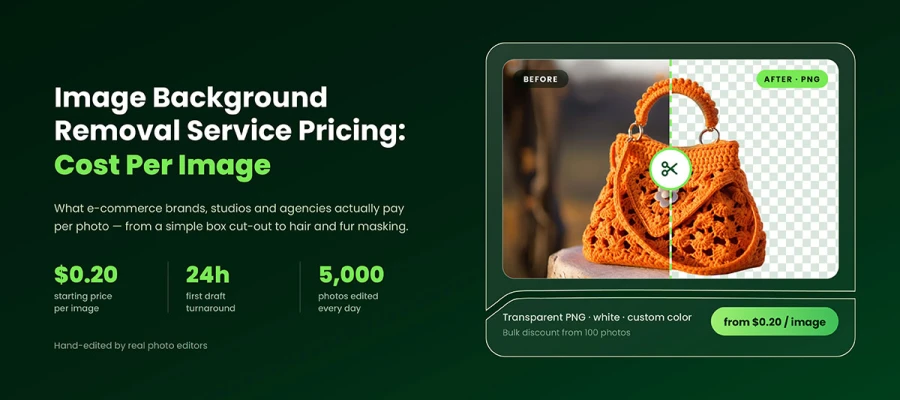
Background removal service pricing runs from $0.20 to $10 per image. Simple products usually cost $0.20 to $0.50. Medium complexity images range from $0.80 to $1.50. Hair, fur, mesh, and chain jewelry can cost $2.50 to $10. AI tools charge $0.02 to $1 per image, but fine edges may still need manual cleanup. So, compare vendors by the cost per usable image.
Suppose you’ve sent the same 40 product photos to three vendors. Same files. Same white background brief. Same deadline. Yet, the quotes came back at $12, $47, and $180.
Nothing about your images changed between those emails. So what changed?
If you have ever looked at those prices and wondered which one was fair, you are not alone. Most sellers choose the middle quote, and overpay for the next two years.
That price gap follows four things. They are edge difficulty, turnaround, volume, and the editor's work. Once you learn to read these signals, you can stop guessing.
Today, here we break down background removal pricing by complexity, the four pricing models vendors use, the real cost of AI and manual editing, hidden fees, and a calculation you can use on your catalog.
So, let’s dive and explore!
Background removal service pricing by complexity tier
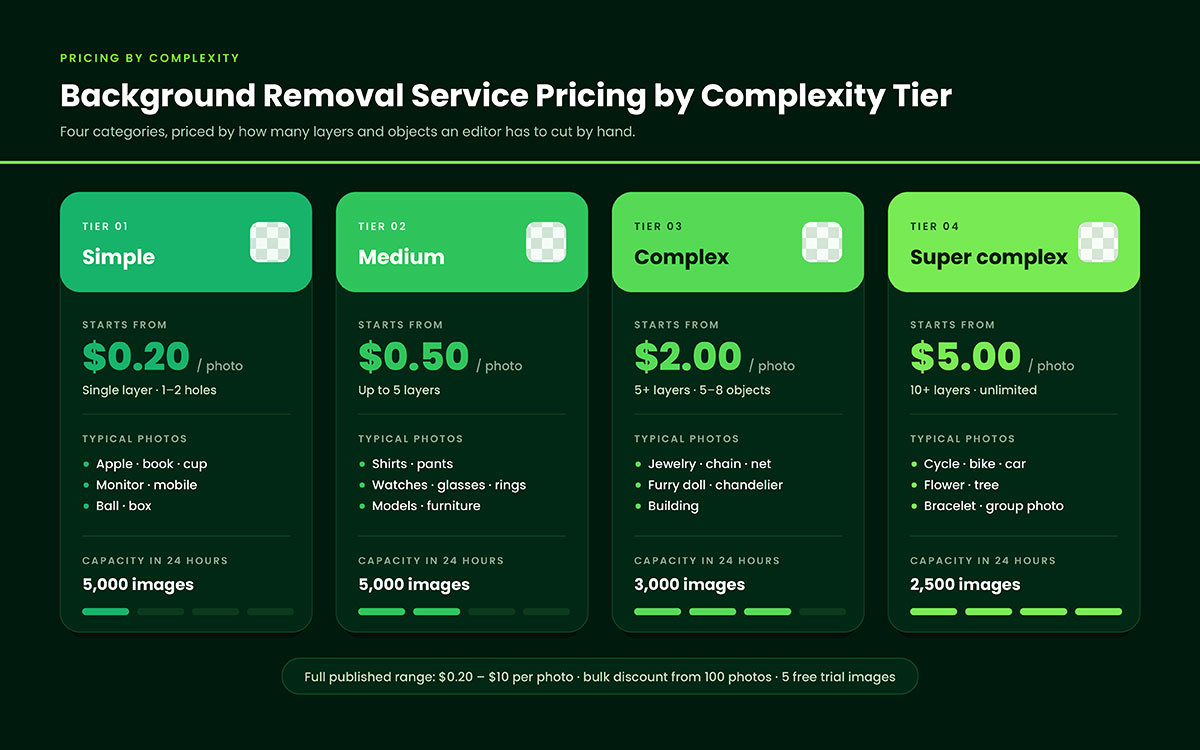
Background removal service pricing depends on how complex your image is. Studios group photos into tiers, from simple cutouts to detailed masking work. Each tier carries its own rate per image.
Check the table below to find where your product fits.
Compound paths plus channel masking or fine hair work
$5.00–$10.00+
Chain jewelry, mesh, nets, fur, veils, group shots
Masking add-on
Soft-edge retention where a path cannot work
+$1.50–$3.00
Hair, fur, tulle, feathers, smoke, glass
A clipping path is a hard vector outline hand-drawn around your product. Image masking keeps soft or see-through edges a path would ruin. A compound path contains multiple paths within a single image, including their holes. Vendors charge differently for each.
Simple background removal $0.20–$0.50 per image
A shampoo bottle takes an editor two to four minutes. One closed path, about fifteen points, clean curves, no gaps inside. At this level, background removal pricing depends only on the number of minutes it takes.
This is where AI actually competes well. A solid-color product on a plain white background is what segmentation models learned on. If your whole catalog looks like this, test a background removal service against an API before committing.
Medium background removal $0.80–$1.50 per image
Inside holes cause the jump. A handbag handle. A shoe buckle. The gap in a chair back.
Each hole means a second path. Every path needs more anchor points, zoom checks, and QA. Editing time roughly doubles from the simple tier. That's why background removal service pricing doubles too.
Complex background removal $2.50–$5.00 per image
Now you have five, ten, sometimes twenty paths on one file. A bicycle has spokes. A stroller has a mesh basket and folding frame. A tool set has 12 separate parts, each of which needs its own outline.
Editor time roughly triples. These files also usually need a second check before delivery, so the cost adds up. For the labor math behind this, our breakdown of the clipping path pricing guide aligns with the studio's tiers.
Super complex background removal $5.00–$10.00+ per image
This tier stacks techniques. A pendant on a fine chain needs a clipping path for the pendant, channel masking for the chain, and hand retouching where they meet. That's three skills on one image.
Read this warning twice. Vendors often reclassify images after you approve the quote. You send 200 photos at the medium rate, and 30 come back flagged as complex, priced at four times the medium rate. Ask any vendor to put the reclassification rule in writing before the first batch ships. If they won't, that's not a real quote.
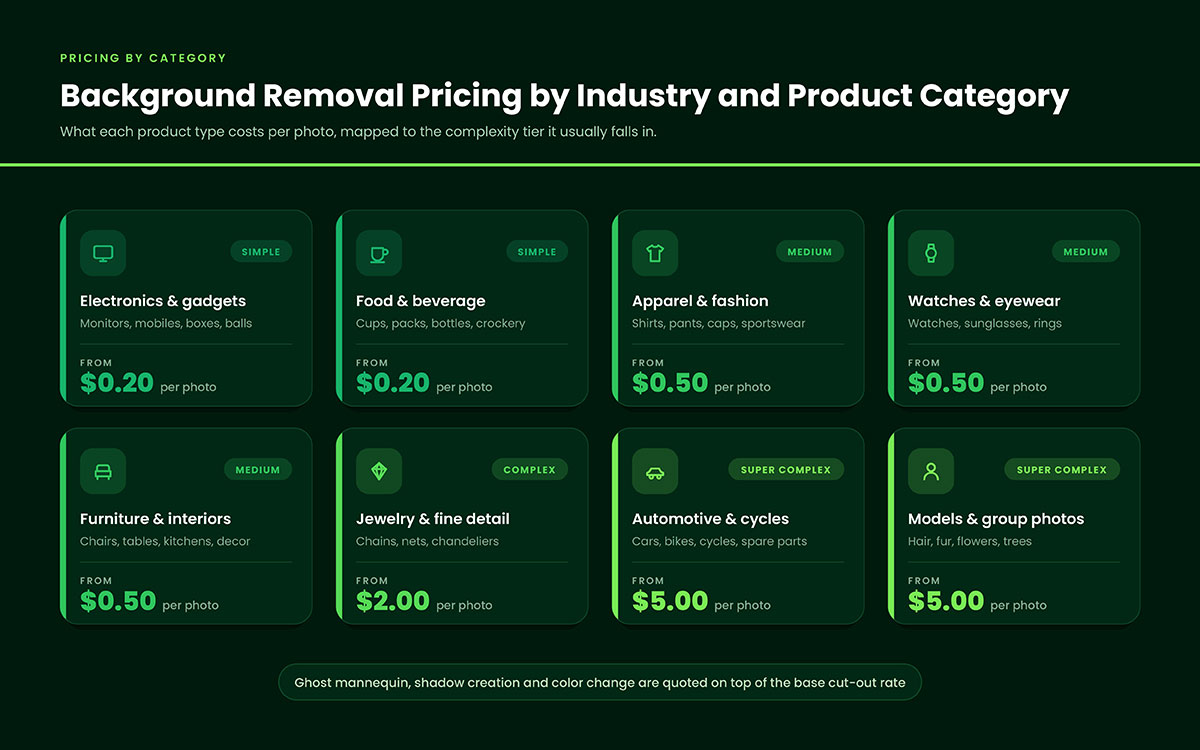
Background removal pricing by industry and product category
Product category affects background removal cost as much as image complexity does. Jewelry and furniture cost more due to fine detail and multiple cutouts. Apparel and electronics cost less with cleaner edges.
See the table below to find your category's typical rate.
Category
Typical cost per image
Why it prices where it does
Apparel — flat lay
$0.30–$0.80
Clean silhouettes, occasional interior holes
Apparel — ghost mannequin
$1.50–$4.00
Neck join and inner-label compositing across two shots
Footwear and bags
$0.80–$1.80
Laces, buckles, straps, chain handles
Jewelry
$3.00–$10.00
Chains, gemstones, transparency, reflection
Furniture
$1.50–$5.00
Mesh, legs, slats, multiple cut-outs
Electronics
$0.30–$1.00
Hard edges, but cables and screens add paths
Food and beverage
$0.50–$2.00
Garnish edges, glassware, liquid transparency
Real estate and automotive
$1.00–$4.00
Window transparency, alloy detail, large canvases
Two categories need a note. Ghost mannequin editing combines two or three shots into a single image. That's why it costs much more than a flat lay. Jewelry is different too. A single jewelry image can cost more than the product's profit. That's why jewelry retouching is priced per image rather than per batch.
4 Background removal service pricing models
Two vendors can quote the same rate, but give you different bills. The reason is structure. One charges per image with a minimum. One gives volume discounts, then resets the tier on the next order. One sells a monthly allowance you might not use. One prices the whole job upfront, revisions included.
Most buyers compare rates and ignore structure. That's how a cheap number becomes a bigger invoice. The table below breaks background removal service pricing into four models, showing the best fit and catch for each.
Model
How it works
Best fit
Watch out for
Per image
Flat rate per photo by tier
Under 100 images a month
Minimum order value of $10–$25
Bulk/volume
Tiered discount above a threshold
500+ images per batch
Discount tiers reset each order
Subscription
Fixed monthly fee for an image allowance
Steady weekly catalog work
Unused credits rarely roll over
Project/custom
Quoted for the whole job
Mixed-complexity catalogs
Scope creep on added SKUs
Look at what happens to the same 300 images under each pricing plan. At a flat $0.80 per image, you pay $240. With bulk pricing (25% off for orders of 250+ units), you pay $180. With a $199 monthly plan for 400 images, you pay $199 but lose 100 unused credits. With a project quote, you might pay $210, revisions included.
Practical Rule: use per-image pricing for orders with fewer than 100 images. Use bulk pricing above 500. Only use a subscription if your volume stays steady each month. If your orders spike in October and drop in February, a subscription will cost more than per image pricing every year.
AI background removal vs manual background removal
AI background removal costs $0.02 to $1.00 per image. Manual removal costs $0.20 to $5.00. AI is cheaper per image. But manual work does better with hair, wire, glass, and catalog consistency.
AI tools are genuinely good now. A good pricing guide has to admit this. Here is the honest side-by-side review.
Factor
AI background removal
Manual background removal
Price per image
$0.02–$1.00
$0.20–$5.00+
Speed
Seconds
1 minute – 2 hours
Simple hard-edged products
Excellent
Excellent
Hair, fur, feathers
Good, but inconsistent
Reliable with masking
Wire, spokes, mesh, chains
Frequently fails
Reliable
Glass and transparency
Poor
Reliable
Layered PSD with saved path
Rarely available
Standard
Consistency across 1,000 files
Varies file to file
Controlled by QC
Cleanup labor
Yours to absorb
Included
For current AI prices: remove.BG costs about $9 for 40 credits, $39 for 200, and $89 for 500. Pay-as-you-go starts at around $1 per image and drops to $0.21 only at high volume. AI API charges $0.02 per image on Basic and $0.10 per image on Plus, billed separately from the app subscription. Canva, Adobe Express, and Clipdrop include removal in bigger subscriptions.
AI being cheaper isn't the point. What you do with the 15% is.
If 850 of your 1,000 files come back clean and 150 need a human fix, you haven't saved money. You've just moved the cost from an invoice to your team's afternoon. For most US sellers, a hybrid works best. Use AI for the easy bulk. Use a clipping path service or background removal service for files where edges matter.
That matters more than it seems. Amazon needs main images on pure white, RGB 255, 255, 255, with the product filling at least 85% of the frame. A halo, gray fringe, or rough edge isn't just a style issue there. It's a risk of suppression.
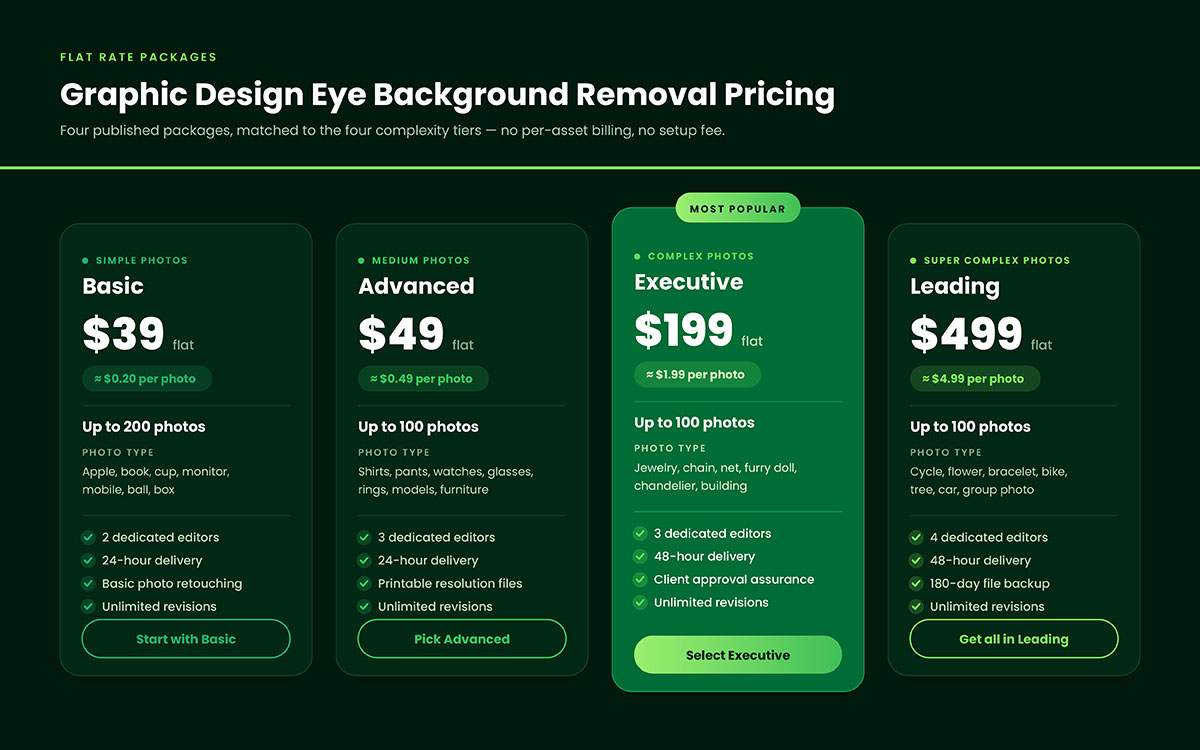
Graphic Design Eye background removal pricing
You've seen the market. Here's where we stand in it, listed openly so you can compare it yourself. Graphic Design Eye LLC's rates sit near the low end. The reasons are simple: fixed tiers, 12-hour turnaround, and no extra charge for marketplace specs.
The minimum order is $15. It drops for orders over 100 images. Bulk discounts start at 500 images per batch.
The table below shows our background removal service pricing by tier, with turnaround times and what's included.
Tier
Cost per image
Turnaround
Included
Simple
From $0.20
12 hours
PSD/TIFF + PNG + JPG, QA pass
Medium
From $0.89
12 – 24 hours
Multi-path cutout, unlimited revisions
Complex
From $2.50
24 hours
Compound paths, layered PSD/TIFF on request
Super complex
From $5.00
24 – 48 hours
Clipping path plus channel masking
Minimum order
$15
24 – 48 hours
Waived above 100 images
Bulk discount
15% – 40%
48 hours
Applies to above 500 images per batch
Background removal pricing FAQs
These ten questions come up in almost every quote conversation. Each answer below has a number. Background removal pricing without a number is just a guess. Find your question, then take it to your vendor. If your question isn’t answered below, feel free to knock us anytime to clear up your confusion.
Background removal costs $0.20 to $10 per image. Simple products with clean edges cost $0.20 to $0.50. Medium items with holes cost $0.80 to $1.50. Complex images with hair, mesh, or chain jewelry cost $2.50 to $10, depending on how many paths the editor must draw.
AI APIs are the cheapest option. AI Remove Background API costs $0.02 per image on a $20 monthly plan. Manual studios start near $0.20. The cheapest real result depends on your failure rate, since rejected AI outputs need a paid manual fix.
Four things drive prices. They are edge complexity, turnaround speed, order volume, and the editor's location. A US agency pays US wages for work that an offshore studio does much more cheaply. Turnaround under 12 hours usually adds 25% to 100% more.
It's cheaper for simple products and pricier for complex ones. Under $0.10 per image, AI wins on bottles, boxes, and electronics. For hair, fur, glass, and chain jewelry, rework can push the cost above a manual studio's $0.50 rate.
For 1,000 mixed images, manual rates run $290 to $850 before bulk discounts. An all-simple catalog costs near $290. An all-complex catalog can pass $2,500. AI processing alone costs $20 to $100, plus the cost of fixing failed outputs.
Yes. Prices drop by 15% to 40% for orders of more than 500 images at most studios. The threshold and discount vary. Most vendors reset the tier each order instead of tracking your total yearly volume.
Most set a minimum of $10-$25 per order. Some set a minimum image count instead, usually 10-25 files. Either way, small batches cost more per image than the rate card shows.
Yes. Standard turnaround is 12 to 24 hours with no extra charge. Delivery under 12 hours raises prices 25% to 50%. Same-day or weekend delivery can double the rate, since it pulls editors into unscheduled shifts.
No. Clipping path is one method for removing a background, using a hand-drawn outline. Background removal is the result and may require a path, channel masking, or both. Vendors often bill them separately, so check the quote closely.
Yes, but complexity limits the savings. A 1,000 image batch of simple products might drop from $0.39 to $0.24 per image. A batch of chain jewelry rarely drops below $4.00 because editor time per file remains the same.
Endnote
Remember those three quotes? $12, $47, and $180 for the same 40 photos? Now you know why.
The $12 vendor called every image simple. He'll reclassify half later. The $180 vendor is a US agency. He charges campaign rates for catalog work. And the $47 vendor sorted your files into tiers. He quoted you honestly.
This gap was never a mystery. It came from complexity, turnaround, and volume. Photo background removal service pricing runs from $0.20 to $10 per image. Where you land depends on your product mix. So judge every quote by one number. Cost per usable image.
A $0.20 rate that fails 40% of the time isn't cheap. An $0.89 rate that ships perfect files on the first try isn't expensive. Sort fifty of your own photos into tiers this week. Then send them out.
Graphic Design Eye LLC is a full-service creative agency built for brands that demand more than design — they demand vision. From strategic branding to complete visual identity, we partner with startups, agencies, and growing businesses as a dedicated creative force. With flexible subscription and project-based models. Let's start with us today!