White space in design is the empty room around and between elements and it's working harder than you think. Tired of clients asking you to "fill that empty space"? Don't. That gap tells the eye what to read first, what belongs together and what matters most. It doesn't have to be white. It isn't wasted. It's a decision.
You've finished a layout. It looks good. Then someone says the words every designer dreads: "There's a lot of empty space here. Can we fill it?"
Hmm. Sound familiar?
Here's the thing. Your readers don't read. They hunt. Back in 1997, Jakob Nielsen found that 79% of test users scanned any new web page, while only 16% read word by word. A later Nielsen Norman Group analysis showed that people read about 20% of the words on an average page, or 28% at the very most.
And they judge you fast. A 2012 study by Tuch and colleagues, run with Google, found visitors form an impression of a website's beauty in as little as 17–50 milliseconds, and visually complex pages lost that first impression.
So what helps a scanning, hurried eye? Emptiness. Used on purpose.
In this guide, you'll learn what white space really is, why it works on the human brain, and how to use it with real numbers, plus the arguments you need when a client asks you to "fill the gap".
Keep reading and make some room!
What is white space in design?
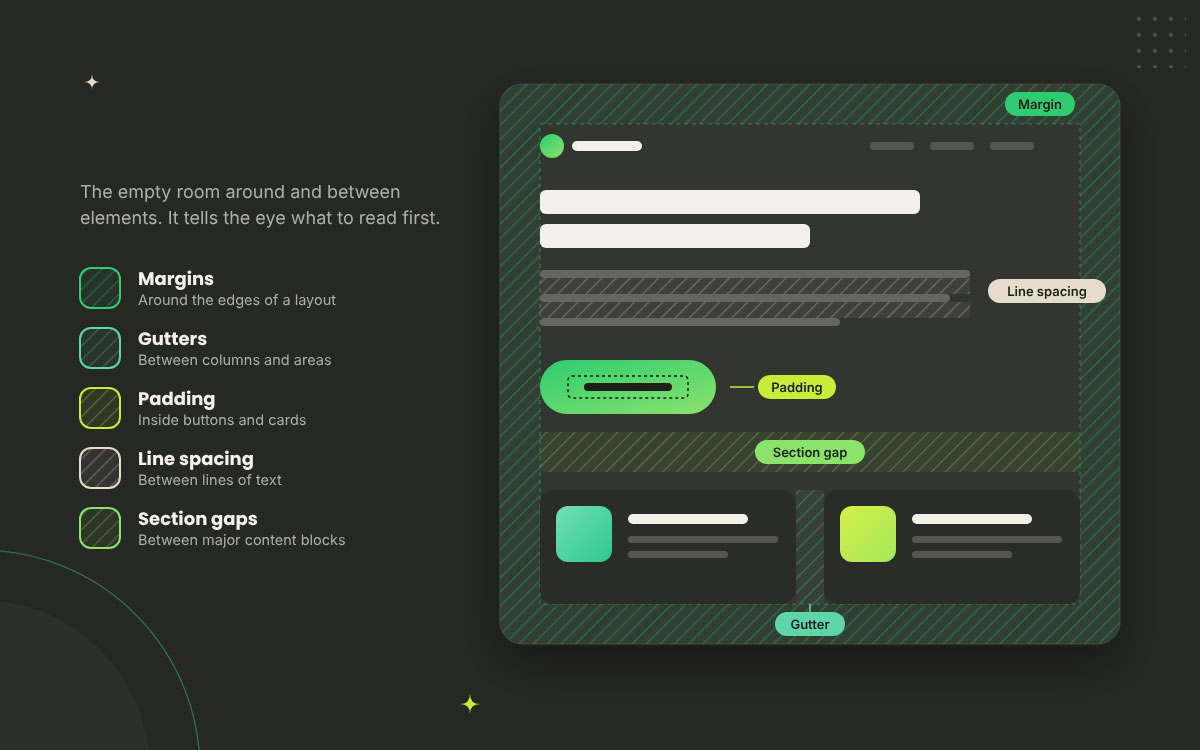
White space in design is the empty area between and around elements. It includes margins, gutters, padding, and the space between lines, letters, and sections. There may be no content in those areas, but they still control how the content is seen and understood.
Think of it as the silence between notes in a song. Without the pauses, everything becomes noise. The same happens on a page. When there is no room between a headline, image, and button, they compete for attention. Give them space, and each element gets its turn to speak.
And white space does not have to be white. It can be any colour, texture, gradient, or image. What makes it white space is that the area is not carrying the main content.
The main types include:
Margins: Space around the edges of a layout
Gutters: Space between columns or other layout areas
Padding: Space inside buttons, cards, and other elements
Line spacing: Space between lines of text
Section gaps: Space between major blocks of content
The core idea is simple: white space is not leftover room. It is a design decision that helps control what the viewer notices, reads, and does next.
White space vs negative space: Are they the same?
Yes. White space and negative space mean the same thing in most design work. When you compare white space vs negative space, you are usually comparing two names for the same idea, the empty area around and between elements. The difference is mostly about context and how designers talk about that space.
Used interchangeably: In UI, web, and graphic design, designers commonly use both terms for the same empty area.
Negative space in art and logos: Artists and logo designers often use “negative space” when the empty area creates a shape, symbol, or second image of its own.
The FedEx example: Remember the hidden arrow between the “E” and “x” in the FedEx logo? Yup, that is negative space doing a second job. We look at more clever uses of space in our list of famous fashion logos.
So, in everyday design work, you can usually treat white space and negative space as the same thing. The name changes, but the idea stays the same.
What white space is not
White space is not minimalism, wasted space, or something that automatically makes a design look clean. Knowing the difference matters because these myths can cause unnecessary arguments between designers and clients. Hmm, sounds familiar? Let’s clear up each one so you know what those empty areas are actually doing.
It isn’t minimalism: A dense newspaper page can use white space effectively. Minimalism is a visual style, while white space is a tool for organising content and guiding attention.
It isn’t wasted space: An empty area does not mean the designer ran out of content. It gives important elements room to stand out and helps related content stay together.
It isn’t automatically clean: White space can make a layout easier to read, but random gaps can break the flow. Too much or badly placed space can confuse the eye just like clutter can.
The 4 types of white space
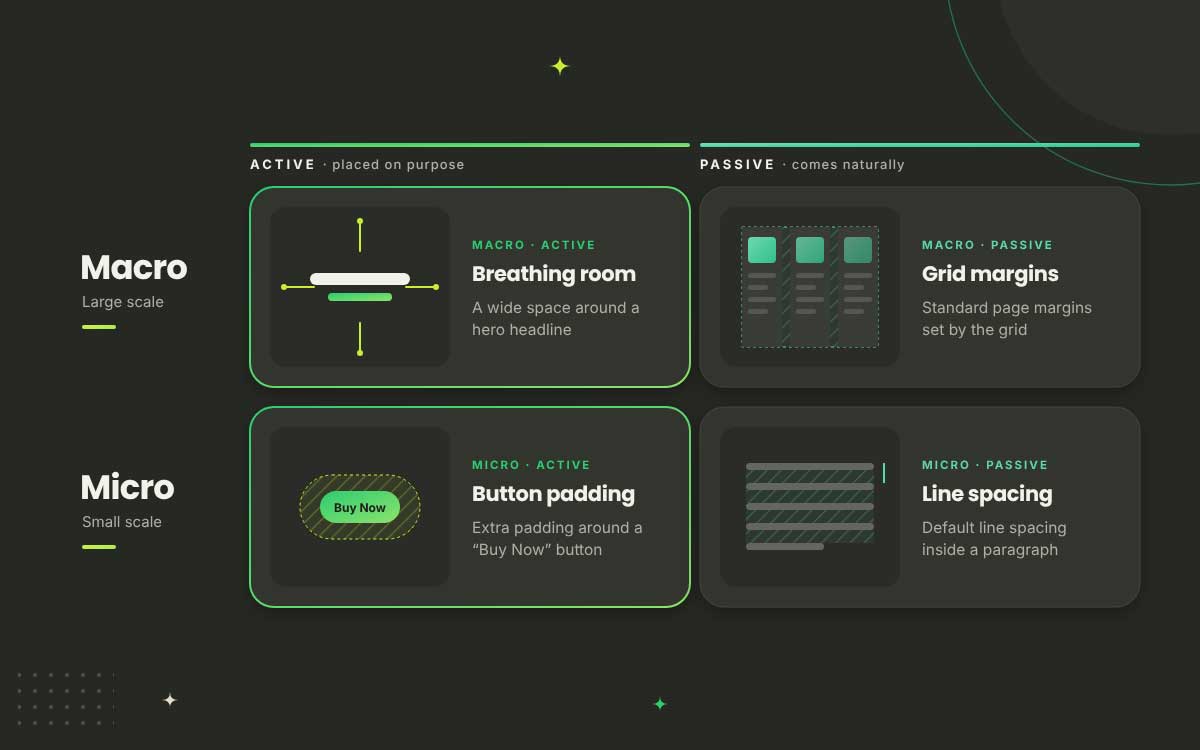
White space can be understood in two ways, by scale and by intent. Macro and micro tell you how large the space is, while active and passive tell you why it exists.
Put them together and you get a simple 2 × 2 map that works across a poster, brochure, website, or app screen. Once you see the difference, you start noticing it everywhere. It can also make explaining spacing choices to a client much easier.
Let’s walk through the four types.
Type
Active
Passive
Macro
A wide space around a hero headline
Standard page margins set by the grid
Micro
Extra padding around a “Buy Now” button
Default line spacing inside a paragraph
Macro white space
Macro white space is the large empty area in a layout, such as page margins, gaps between major sections, and the space around a hero headline or key image. You notice it before you read a word. Does the page feel open and calm, or busy and rushed? Macro white space helps set that first impression.
Where you’ll find it: Page margins, gaps between major sections, and open areas around hero headlines or key images.
What it controls: The overall sense of openness, pace, and visual breathing room across the page.
Its partner is the grid: The grid gives content a place to sit, while macro white space gives the eye room to rest. Get that balance wrong, and even strong images can feel crammed.
Micro white space
Micro white space is the small space inside and between elements, such as the leading between lines, tracking between letters, and padding inside a button. It may look tiny, but it can change how easy text is to read and how polished a design feels. Tighten a paragraph by a little, and suddenly it feels cramped. Yeah, it’s that powerful!
Where you’ll find it: Leading between lines, tracking between letters, padding inside buttons, and gaps between list items.
What it controls: Readability, legibility, and the small details that make a layout feel comfortable to use.
Go deeper: Our guide to the law of fonts and typefaces in design and marketing explains how type and spacing work together.
Active white space
Active white space is empty area added on purpose to highlight something, separate ideas, or guide the eye. Picture a single “Buy Now” button sitting with plenty of room around it. That space is doing a job. It tells the viewer, “Look here.” Active white space is intentional, and the eye can feel the difference.
Why it’s added: To highlight an element, separate ideas, or guide the eye through the layout.
A classic example: Isolating a “Buy Now” button or leaving extra space before an important price or headline.
It can be asymmetric: A headline may sit to one side while another area stays open. The layout does not need to be balanced evenly, as long as the empty space has a clear purpose.
Passive white space
Passive white space is the natural space created by type, line spacing, and the grid. It is not added to draw attention to one spot. Instead, it keeps content comfortable and easy to follow. Think of it as the quiet worker of a layout. When it is doing its job, nobody notices it. When it disappears, everyone does.
Where it comes from: Letter spacing, line height, paragraph spacing, and grid gutters all create passive white space.
What it does: Keeps content balanced, readable, and comfortable without pulling attention toward one element.
How to spot it missing: Text starts to feel cramped, crowded, and tiring when there is not enough space between the parts.
Why emptiness is a powerful design decision
Emptiness works because our brains use space to group related things, separate different things, and make sense of what we see. Good spacing reduces competition between elements, so the eye can move through a layout more easily.
This is the part to bookmark. Why? Because the next time someone asks you to “fill that gap,” you can explain why the space is there instead of arguing about taste. Gestalt psychologists began studying how people organise what they see more than a century ago, and those principles still help explain why white space works in design today.
Let’s break it down.
Proximity: Space creates meaning
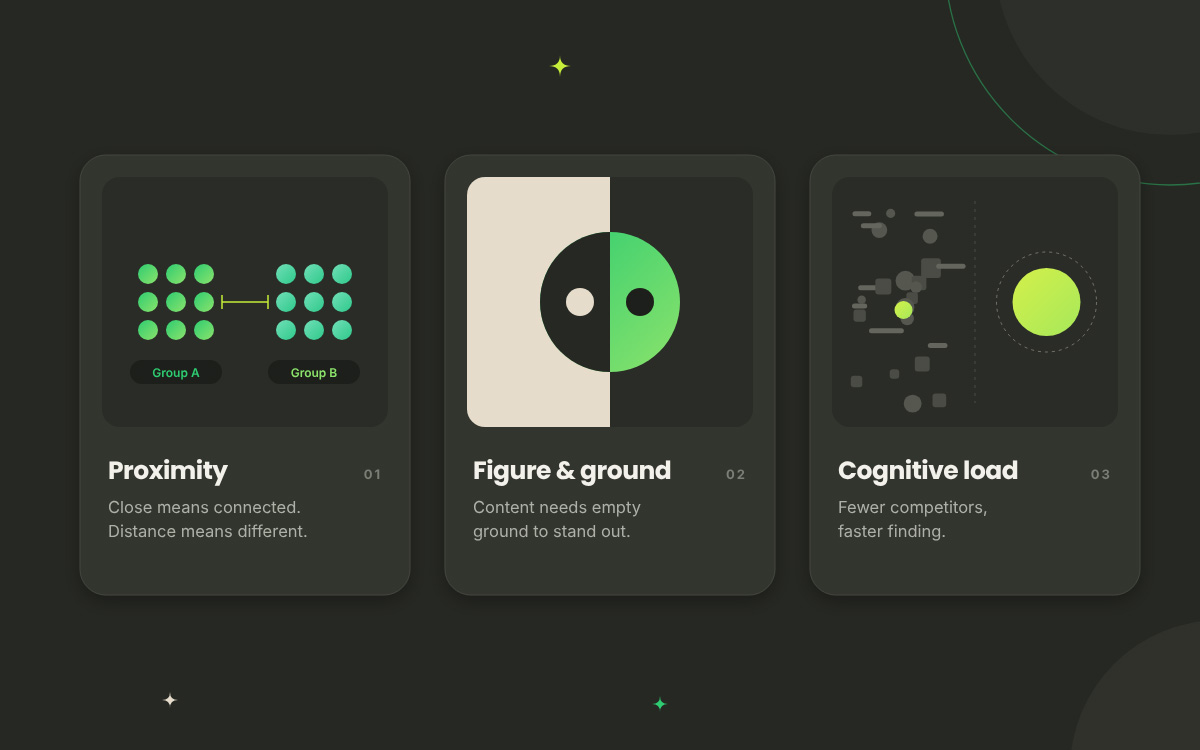
Elements placed close together are seen as related, while elements set apart are seen as separate. That's proximity. Space creates meaning long before anyone reads a word. The Gestalt psychologists formalised this idea in the early twentieth century, and Max Wertheimer described it in 1923. No doubt, that's why one small gap can make or break a whole layout.
Closeness means connection: A caption near a photo feels connected to that photo. A price near a product feels connected to that product. The eye groups them automatically, without being told.
Wrong spacing, wrong meaning: If a form label sits closer to the field below it than to its own field, users can read it as belonging to the wrong field. Your intent doesn't matter. Their brain decides.
The golden rule: The space inside a group should be visibly smaller than the space around it. If the two gaps look equal, the groups become harder to see.
Quick fix you can use today: In a form, keep the label close to its field, then give the next field group noticeably more space. Suddenly, every label feels like it has found its home.
Figure and ground: Space makes content visible
The eye separates a subject, the figure, from its background, the ground. Without enough ground, the figure can stop standing out. That's figure and ground in simple terms. Space helps content become visible. Edgar Rubin showed the idea with his famous 1915 vase illusion. Is it a vase, or two faces? It depends on which area your brain treats as the figure.
Ground is not optional: Content needs some empty space around it to stand apart and read as a distinct object.
In UI: A card without enough padding can lose its visual boundary and start melting into the page.
In logos and print: Clear-space rules around a logo work for the same reason. They give the mark enough room to stand apart from everything around it.
Attention and cognitive load
Every extra element on a page asks for some attention, so spacing out competing elements can make the important one easier to find. That's where attention and cognitive load connect to white space. Cognitive load is the mental effort needed to process what is in front of you.
Less clutter means less work for the viewer. Simple, right?
Fewer competitors, faster finding: When fewer things fight for the eye, the important element becomes easier to spot. White space helps reduce that competition without adding another visual effect.
Isolation is a cheap form of emphasis: You don't always need a brighter colour, bigger size, or bolder weight. Move the surrounding elements away and give the important one some room. Honestly, it costs nothing.
A note of honesty: You may have seen the claim that “white space improves comprehension by 20%.” It's shared everywhere, but without a clear source, that number is hard to verify. So we'll stick to principles you can actually test and observe.
Perceived value and brand tone
White space can change how a brand feels before anyone reads a word. Generous spacing can make a layout feel premium, calm, or exclusive, while a tighter layout can create a sense of value, urgency, or activity. Picture an Apple product page beside a flash-sale site. One gives a product plenty of room, while the other fills the screen with deals, badges, and timers. Both use space differently for a reason.
Lots of space can feel premium: Luxury fashion, hotel, and tech brands often give products plenty of room to create a calm, refined feel.
Dense layouts can signal value and urgency: Discount retailers often place more offers and information together to make deals easy to spot and create a faster shopping feel.
Neither is automatically better: The right amount of space depends on what your brand needs to communicate. Let the spacing support the message instead of copying what another brand does.
Pace and rhythm
Space controls the pace of a layout. Tight spacing keeps the eye moving, while open spacing gives it a reason to slow down. That's pace and rhythm in design. Think about reading a good magazine. Some parts pull you along quickly, then suddenly there is a little more room and you pause. A pause here, a rush there, and the layout starts to feel like a story instead of one long, breathless sentence.
Tight spacing means speed: A compact list tells the reader, “Keep moving.” It keeps related information together and lets the eye scan without stopping at every line.
Open spacing means pause: A bigger gap before a new section gives the reader a moment to breathe. It can also make the next heading or message feel like it matters.
Mix both: Keep routine information tighter, then open things up when you want the reader to stop. That change of pace gives the layout a natural beat instead of making every section feel the same.
White space and readability
Readability depends heavily on micro white space, including line spacing, line length, paragraph spacing, and letter spacing.
Have you ever opened an article, seen one giant grey block of text, and closed the tab? You're not alone. A wall of text gives the eye nowhere to rest and no obvious place to begin. The fix is not always fewer words. Often, the words simply need more room to breathe. Luckily, typographers have been working on this problem for a very long time. Here are the spacing choices that can make text easier to read.
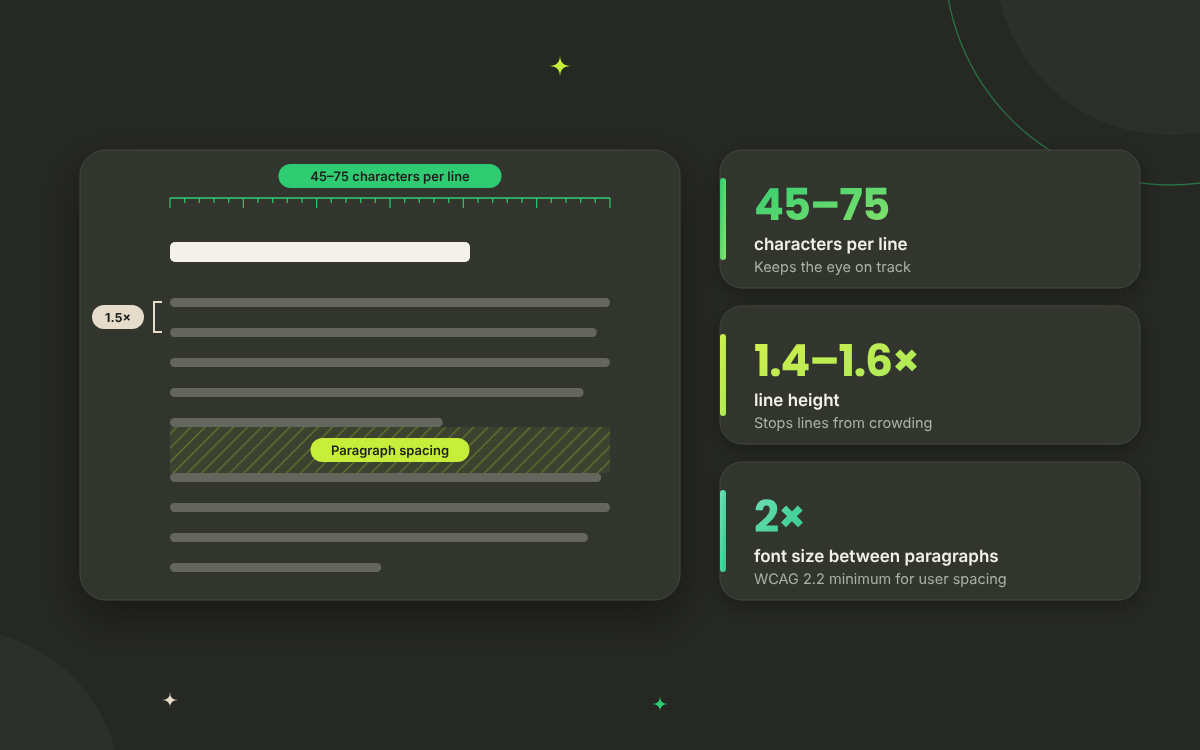
Line length: Robert Bringhurst's The Elements of Typographic Style recommends roughly 45–75 characters per line for comfortable reading, with around 66 often used as a useful target. Lines that run too long make it harder to find the next line, while very short lines can make reading feel choppy.
Line height: Body text generally works well at around 1.4–1.6 times the font size. More generous spacing can help with longer passages, especially when readers are spending several minutes on the page.
Paragraph spacing: On screens, use space between paragraphs instead of relying on indentation. Those small gaps break up long passages and give readers clear places to pause and start again.
Accessibility: White space also has to survive changes made by the reader. WCAG 2.2 Success Criterion 1.4.12 requires content to remain readable and usable when users increase line height, paragraph spacing, letter spacing, and word spacing to specified minimum values.
Property
Useful starting point
Why it matters
WCAG 2.2 SC 1.4.12
Line length
45–75 Characters
Keeps the eye on track between lines
Not specified
Line height
1.4–1.6 × Font size
Stops lines from blending together
At least 1.5 × font size
Paragraph spacing
Clear space between paragraphs
Gives the eye places to pause
At least 2 × font size
Letter spacing
Typeface default for body text
Keeps word shapes familiar
At least 0.12 × font size
Word spacing
Typeface default for body text
Keeps words clearly separated
At least 0.16 × font size
Here's the practical catch. Fixed-height text containers can cause problems when readers increase spacing. If the box cannot grow, text can get cut off or overlap. Let the layout expand with the content. Your readers will thank you, and your developer probably will too.
White space in UI and web design
White space in UI and web design helps define groups, separate tap targets, structure forms, and make calls to action easier to find.
On a poster, bad spacing can make a layout look messy. On a website or app, it can make people tap the wrong button, abandon a form, or miss an offer completely. Ouch! White space in web design is not decoration. It helps the interface tell users what belongs together, what can be clicked, and what to do next. Here’s where those gaps earn their keep.
Forms: Keep the space between a label and its field smaller than the space between separate fields. That simple difference helps users understand which label belongs to which field.
Cards and lists: Padding gives content room inside a card, while space between cards keeps each one separate. Lose either, and the whole page can start looking like one long block.
Navigation: Spacing helps users see which menu items belong together. A little extra space before “Log in,” for example, can separate it from the main navigation choices.
Calls to action: An isolated button gets more attention because the surrounding space gives it room to stand out. Give your “Start Free Trial” button some breathing room and it does not need to shout.
Touch targets are also a spacing issue. A button can be large enough on paper but still feel difficult to use when other targets sit too close to it. These are useful standards to keep in mind:
Standard
Minimum target size
Level / note
WCAG 2.2 SC 2.5.8 Target Size (Minimum)
24 × 24 CSS pixels
Level AA; sufficient spacing can be used in some cases
Apple Human Interface Guidelines
44 × 44 points
Recommended minimum tap target
Material Design
48 × 48 dp
Recommended minimum touch target
Mobile nuance: Screens are smaller, but spacing becomes even more important when a mis-tap can send someone to the wrong screen. When space gets tight, reduce unnecessary content before squeezing every element together.
Dense-by-design exceptions: Hold on a second! Not every screen needs to feel airy. Data tables, dashboards, trading terminals, and admin tools often need higher information density because users are comparing lots of numbers at once. In those cases, rely on consistent row spacing, clear column gaps, and strong alignment instead of simply adding more empty space.
How to use white space in design
Use a consistent spacing scale, space elements by their relationship rather than by eye, and give the most important element enough room to stand out.
Theory is great. But you've got a deadline, right? So here are eight rules you can apply to your very next project, whether it's a website, a brochure, a slide deck, or a t-shirt concept. Each one is short enough to pin above your desk. Follow them, and you'll stop nudging things around “until they look right.” Instead, you'll know how to use white space in design and why each gap is there.
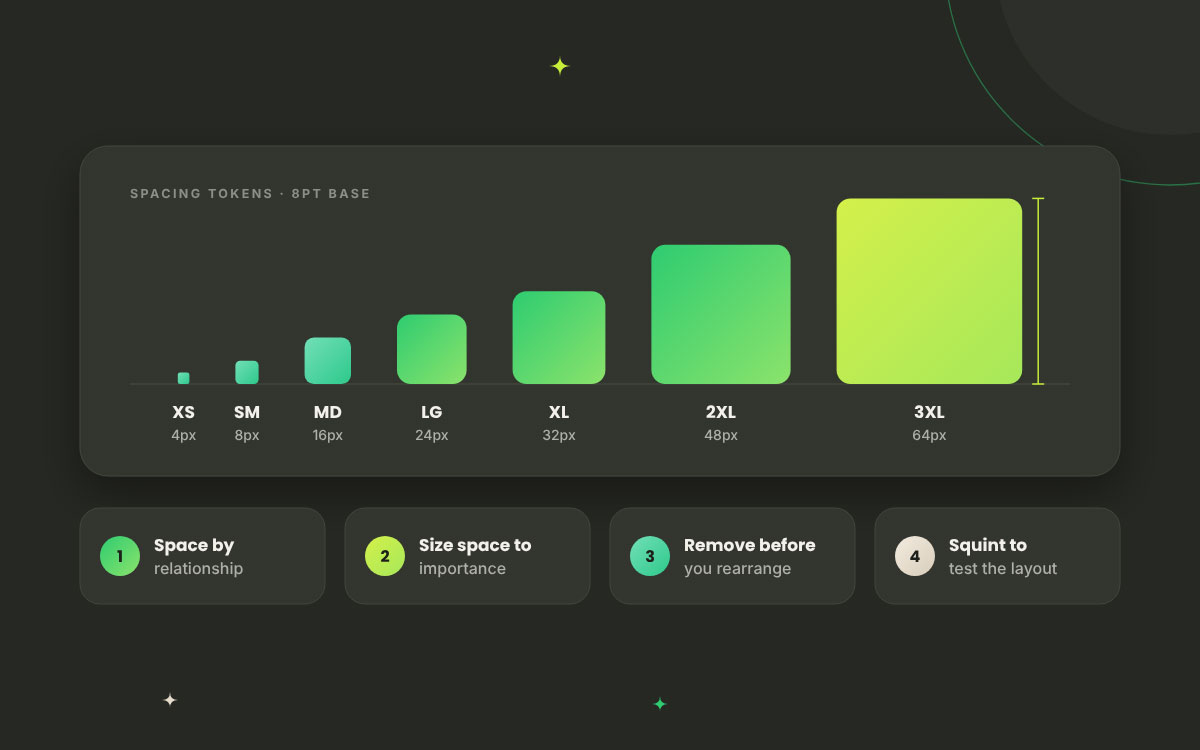
Adopt a spacing scale: Pick a small set of spacing values and use them consistently throughout the layout. You do not need to measure every gap from scratch. A repeatable scale makes spacing decisions easier and keeps the design from feeling random.
Space by relationship: Keep related elements close and give unrelated elements more room. A heading should sit closer to the paragraph it introduces than to the next section. Let the relationship between elements decide the gap, not your eye alone.
Make space proportional to importance: Let the most important element breathe. A headline, product image, or call to action needs enough room around it to stand apart. If everything gets the same amount of space, everything starts competing for attention.
Keep vertical rhythm consistent: Give sections a steady pattern of space as the viewer moves down the page. You can change the spacing when the content calls for it, but avoid inventing a new gap for every section. A steady rhythm makes the layout easier to follow.
Respect the margins: Keep enough space between your content and the edge of the page or screen. When text or images sit too close to the frame, the whole layout can feel cramped. Good margins give the content room to breathe.
Remove before you rearrange: When a layout feels crowded, resist the urge to squeeze everything into place. Look for content that can be removed, shortened, or combined first. Once the clutter is gone, the white space you need often appears without moving a single box.
Test at real sizes on real devices: A layout that looks spacious on a large monitor can feel cramped on a phone or printed page. Check your design at the size people will actually see it. If the gaps disappear or the content starts crowding, adjust the spacing there.
Squint or blur the design: Step back, squint, or blur the design until the details disappear. You should still be able to see the main groups and overall hierarchy. If everything melts into one block, your white space is not doing enough work.
Here's a simple 8-point scale to start with. You can adjust it for your typeface, layout, and screen rather than treating these values as rules carved in stone.
Token
Value
Typical use
Space-xs
4 px
Icon to label, tight inline gaps
Space-sm
8 px
Label to field, list items
Space-md
16 px
Padding inside buttons and cards
Space-lg
24 px
Between related blocks
Space-xl
32 px
Between cards or form groups
Space-2xl
48 px
Between page sections
Space-3xl
64 px
Around hero content and major breaks
Want to see where spacing fits into the bigger workflow? Our walkthrough of the graphic design process shows how layout decisions like these fit into a project from brief to final file.
White space in design FAQs
White space in design FAQs answer the practical questions that come up when a layout feels too empty, too crowded, or simply not easy to understand. Designers, students, and clients often see the same space differently, especially when a client wants every gap filled.
The answers below explain what white space does, when you need more or less of it, and how to judge whether a layout has enough. If you have another question about using white space, reach out and we can help.
White space in design is the empty area between and around elements. It includes margins, padding, gutters and line spacing. Designers use it to group related content, create a clear visual hierarchy and improve readability, so the viewer knows what to look at first and what to read next.
No. White space refers to the absence of content, not the colour. It can be any solid colour, a texture, a gradient or even a photograph background. A black luxury website can be full of white space. What matters is that the area is empty and doing a job.
In most design contexts, there's no real difference. Both describe the same empty area. "Negative space" is more common in art and logo design, where the empty shape may itself form a recognisable image, like the arrow hidden in the FedEx logo. "White space" is more common in web and UI design.
The four types are macro, micro, active and passive. Macro and micro describe scale: how large the gap is. Active and passive describe intent: whether the space was placed deliberately to direct attention, or appears naturally from the typeface, line spacing and grid.
White space separates groups, improves readability and reduces the number of elements competing for attention. It makes calls to action easier to find and tap targets easier to hit. It also sends a quality signal: well-spaced interfaces tend to feel more trustworthy and professional.
There's no universal number. Use a consistent spacing scale, such as the 8-point system (4, 8, 16, 24, 32, 48, 64), and set gaps by relationship. The space inside a group should always be visibly smaller than the space around it.
Yes, it can. Too much space breaks grouping, pushes important content below the fold and forces extra scrolling. Uniform spacing everywhere is also a problem, because it removes hierarchy entirely. White space works when it varies with purpose, not when it's spread evenly.
Yes, it can. Too much space breaks grouping, pushes important content below the fold and forces extra scrolling. Uniform spacing everywhere is also a problem, because it removes hierarchy entirely. White space works when it varies with purpose, not when it's spread evenly.
No. Minimalism is a style choice about how much content to include. White space is a structural tool that every layout uses, including dense newspaper pages and data dashboards. You can design a busy page with excellent white space, and a minimal page with poor white space.
Endnote
Finally, we're at the end!
But it's your time to start, because white space in design is a decision, not a leftover. Every gap you place tells the viewer what matters, what belongs together, and where to look next.
From understanding macro, micro, active, and passive white space to using proximity, figure-ground, isolation, readable line lengths, proper text spacing, and a consistent spacing scale, the goal is the same: give every element enough room to communicate clearly without making the layout feel disconnected.
So, open your latest project and squint at it. Does it breathe? If not, don't add more. Take away. Look at the relationships between elements, the space around your text, and the areas that need more visual rest, because sometimes the strongest improvement is the element you decide not to add.
And if you'd rather hand the spacing puzzle to experts, the Graphic Design Eye team can help you build layouts, brochures, and brand designs with purposeful spacing so every element has room to work and the final design feels calm, clear, and premium. We believe good design starts with knowing what to leave out.
Now, look at your next design and ask yourself: does it need more elements, or does it need more room around them?
Hope your next design finally gets the room it deserves!🙂
Graphic Design Eye LLC is a full-service creative agency built for brands that demand more than design — they demand vision. From strategic branding to complete visual identity, we partner with startups, agencies, and growing businesses as a dedicated creative force. With flexible subscription and project-based models. Let's start with us today!