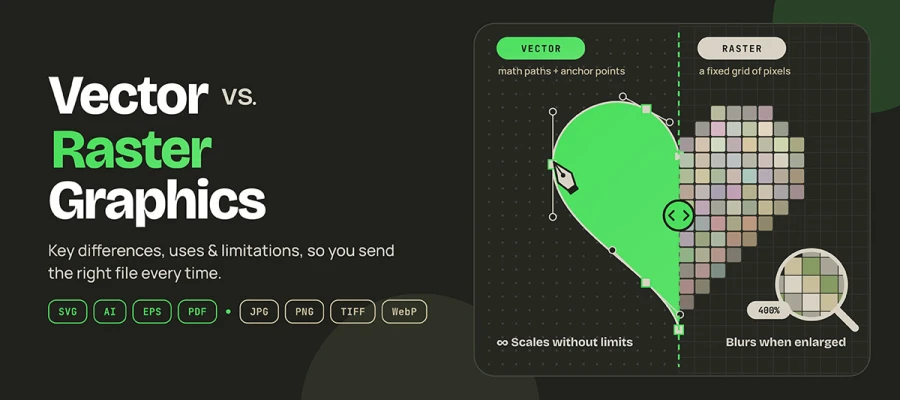
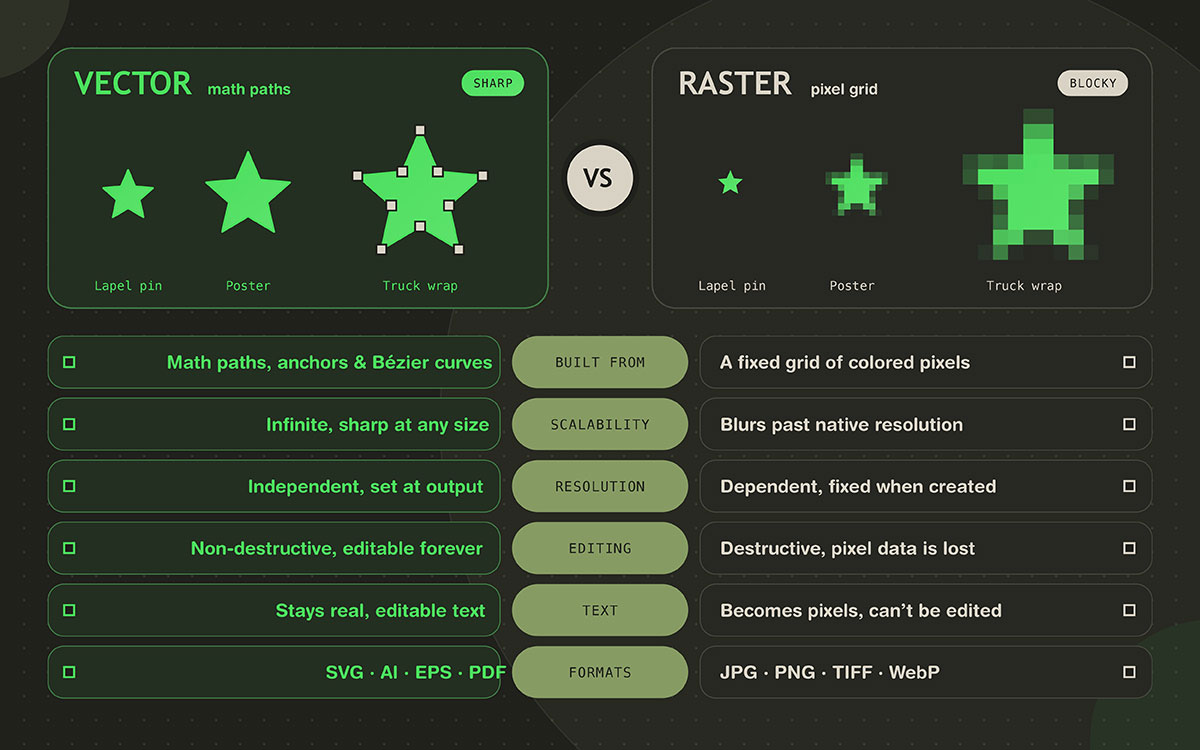
Vector vs raster graphics is all about math versus pixel-based illustrations. Because they are built from mathematical paths, vector graphics scale to any size without losing quality. That makes them ideal for logos, icons, and print work. Raster graphics are made of a fixed grid of pixels. This grid captures photographic detail beautifully, but it breaks down once you enlarge it past its native resolution.
Let’s say your printer just emailed back. "Can you send the vector file?"
You freeze. The only logo file you have is a PNG your cousin exported three years ago, and you have no idea if that counts.
If that stings a little, you're in good company. Every week, small business owners across the U.S. find out that the logo they paid for doesn't exist in the one format that matters. It usually happens two days before a trade show.
Here's the good news. The vector vs. raster question is simple, and it's no designer secret. Once you see it, you won't send the wrong file again.
So, this guide explains how vector and raster graphics work, where each one wins, and where each one quietly fails, so you can pick the right file every time.
Scroll on and let's get your files sorted before the next deadline finds you.
Vector vs raster graphics: Key differences
Vector graphics stay sharp and easy to change no matter how far you push them, while raster graphics lose quality the moment you stretch or rework them. That gap shows up in the cost of every reprint and every edit. Seeing the key differences between vector and raster graphics tells you which format protects your time and budget.
The difference between vector and raster graphics lies in how each stores an image. That single choice affects how a file resizes, edits, prints, and loads. A side-by-side view makes the gaps easy to compare.
Move on to vector vs raster graphics at a glance to see them all.
Attribute
Vector Graphics
Raster Graphics
Built from
Mathematical paths, anchor points, Bézier curves
A fixed grid of colored pixels
Scalability
Infinite, with no quality loss at any size
Limited by native resolution, and blurs when enlarged
Resolution
Independent of resolution, set at output
Dependent on resolution, fixed when created
File size driver
Number of paths and anchor points
Pixel dimensions and color depth
Editing
Changes don't destroy anything, and shapes stay editable forever
Destructive, since pixel data is altered or lost
Color handling
Flat color, gradients, spot and Pantone colors
Color set for each pixel, ideal for photographic tones
It cannot be enlarged beyond its native resolution
Best for
Logos, icons, type, signage, cut and print production
Photos, retouching, digital painting, web imagery
Twelve rows. Three of them matter far more than the rest.
Scalability is the headline
A vector file stores a recipe rather than an image. The recipe says start here, curve there, and fill with this color. Your screen or your printer's RIP (raster image processor) reads that recipe and draws it fresh at whatever size you ask for. That's why the same logo file can go on a lapel pin and a truck trailer wrap without wasting an hour.
A raster file, on the other hand, has a finite number of pixels. When you enlarge it, the software has to invent the missing pixels through interpolation, which is a polite word for guessing. Guessing shows up as pixelation and soft, mushy edges.
File size behaves in a way that surprises almost everyone
Raster file size grows roughly with the square of the dimensions. If you double the width and height, you quadruple the number of pixels. The 2,000 × 2,000 px logo you thought was "big enough" becomes a monster the moment someone needs it at poster scale. Vector file size has nothing to do with output size. A vector logo on a stadium banner is the same file as the one in your email signature.
But here's the myth worth killing
Vector files aren't always smaller. A detailed vector illustration with tens of thousands of anchor points, live effects, and blend modes can be far heavier than a well-compressed JPG of the same artwork. It can also render much more slowly in a browser. In vector, complexity is what drives file size, and dimensions play no part.
Editability is the quiet money saver
In vector, changing your brand blue takes one click on a swatch. Raster means masking, selecting, feathering, and hoping the edges hold up. Multiply that across every asset you own, and you'll see why agencies insist on vector masters.
Vector vs raster file formats compared
Vector formats such as .AI keep the editable master of a design, while raster formats such as JPG and PNG carry the finished image to a screen or a printer. Seeing vector vs raster file formats compared shows which extension to keep as your master and which to send out. That way every file ends up where it belongs.
Format
Type
Best Used For
Key Limitation
SVG
Vector
Web icons, UI, logos, animated graphics
Poor fit for photographs, with patchy legacy support
.AI
Vector
Master working files in Adobe Illustrator
Proprietary, and needs Illustrator to edit fully
EPS
Vector
Legacy print workflows and older RIPs
Aging format with inconsistent modern support
PDF
Both
Print handoff, sharing, proofing
Can hold raster content and still look vector
CDR
Vector
CorelDRAW projects, sign and print shops
Proprietary to CorelDRAW
DXF/DWG
Vector
CAD, laser cutting, CNC, fabrication
Not designed for general graphic design
JPG
Raster
Photographs where file size matters
Lossy, has no transparency, and artifacts build up
PNG
Raster
Flat graphics, screenshots, transparency
Large files for photographic content
TIFF
Raster
Print quality masters and archiving
Very large file sizes
WebP
Raster
Fast loading modern web images
Not accepted by every platform or tool
AVIF
Raster
High efficiency modern web delivery
Support still uneven in older software
GIF
Raster
Simple animation, limited color graphics
256 color ceiling, and poor for photos
PSD
Raster
Layered Photoshop working files
Huge files, and not a delivery format
RAW
Raster
Unprocessed camera capture
Requires processing, and is specific to each camera
Common raster formats
Each raster format exists because it is the best at one job. Use each one for that job.
JPG: Photographs where file size matters. Lossy compression throws away data you mostly can't see, and each new save removes a little more.
PNG: Flat graphics, screenshots, and anything that needs crisp edges with alpha transparency. It's lossless, which is why files get chunky when they contain photographic content.
WebP and AVIF: Modern web delivery. Both compress far better than JPG at similar quality, which helps your Core Web Vitals.
TIFF: Print quality masters and archiving. Lossless, enormous, and completely reliable.
PSD: Your layered Photoshop working file. It's a workspace, so never send a client a PSD as their final asset.
RAW: The digital negative straight off the sensor. Maximum flexibility, zero convenience.
Common vector formats
SVG: The open standard for web and app interfaces, maintained by the W3C. It's actually XML text, so you can style it with CSS, animate it, and recolor it in code.
.AI: Adobe Illustrator's native master file. Your designer should keep this file and hand it over to you.
EPS: The oldest format here, still requested by older RIPs and legacy print workflows, and still prone to breaking in modern apps.
PDF: The universal handoff format for print. Portable, ISO standardized, and understood by every printer in America.
DXF and DWG: CAD formats for laser cutting, CNC routing, and fabrication. They are made for machines to follow.
Is PNG a vector file?
No. PNG is always raster. It stores a fixed grid of pixels, so it has a fixed resolution ceiling, even when the artwork inside is a clean, flat logo with a transparent background. PNG supports alpha transparency, which is why people mistake it for a vector file. Transparency and scalability are two different things.
A word on hybrid files
Here's the trap that catches even experienced marketers.
A PDF, EPS, or SVG can embed raster images inside vector artwork, so you can receive a file with a vector extension that contains only a photograph. Opening it proves nothing. Dropping a JPG into an SVG doesn't make it scalable, because it only puts a pixel grid inside a vector wrapper.
Always check what's inside the file, because the extension can mislead you. We'll show you how in a moment.
When to use vector and raster graphics
Neither format is "better."
They're different tools built for different jobs, and the fastest way to waste a week is to make one of them do the other's work. We've watched clients try to vectorize a product photo, and we've watched others try to screen print from a JPG. Both attempts ended the same way.
Instead of asking which one wins, ask what the job needs. Is the artwork drawn or captured? Will it print at a size nobody has decided yet? Does a machine need to follow a path?
Answer those three questions and the choice makes itself. Here's the full picture of when to use vector and raster graphics:
When to use vector graphics
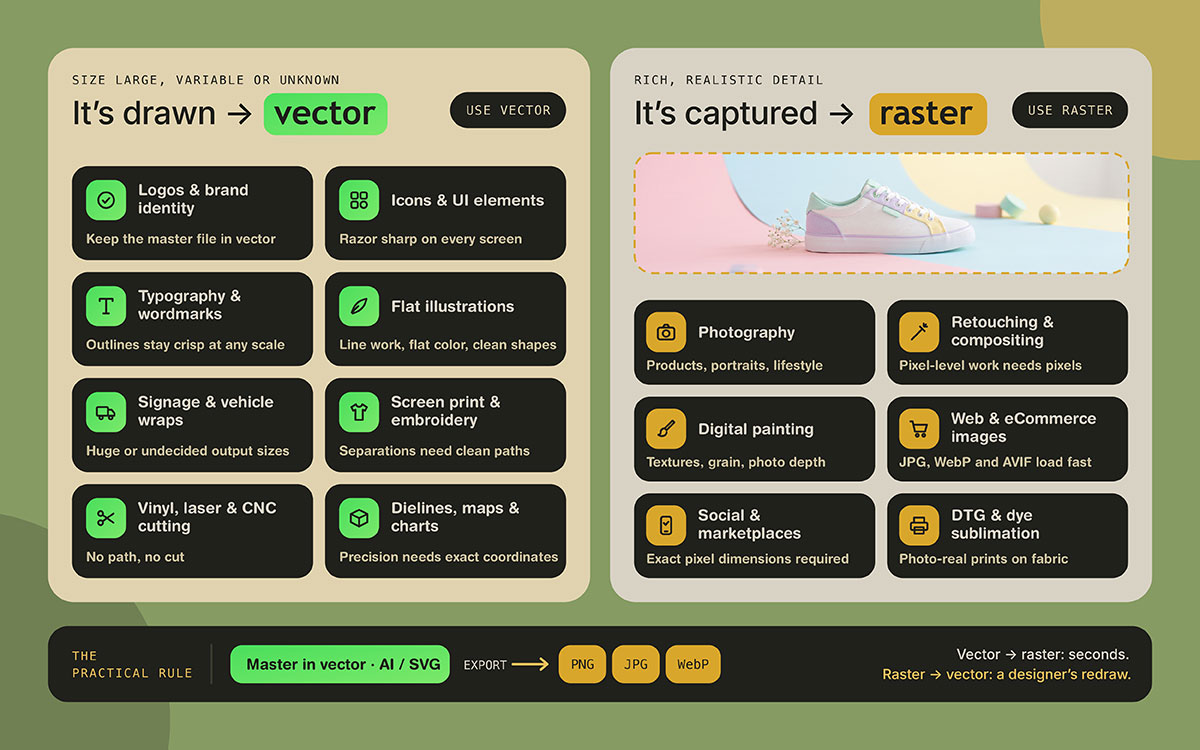
Use vector whenever the artwork is drawn rather than captured, and whenever the final output size is large, variable, or unknown.
Logos and brand identity systems: Your master logo design should always exist as a vector, and every raster version should be exported from it.
Icons and UI elements: SVG stays razor sharp at every pixel density, from a budget Android phone to a 6K display, and you can recolor it with a single line of CSS.
Typography, lettering, and custom wordmarks: Outlines stay crisp at any scale.
Illustrations with flat color, line work, and defined shapes.
Signage, banners, billboards, and vehicle wraps: Output size here is often enormous or not yet decided.
Screen printing: Color separations and spot or Pantone assignment depend entirely on clean vector paths. Our article on t-shirt printing methods covers which processes need vector artwork.
Embroidery: Digitizing software converts clean vector artwork into stitch files far more reliably than a JPG ever will.
Vinyl cutting, laser cutting, laser engraving, and CNC routing: The machine follows a cut path, and a path exists only in vector form. No path, no cut.
Packaging dielines, technical drawings, floor plans, maps, and charts: This precision work depends on exact coordinates. The same goes for packaging design, where the dieline is the deliverable.
Anything resized, recolored, or reproduced across many media: For a growing brand, that's nearly everything. Vector also makes brand color changes painless, so trying out logo color combinations takes minutes instead of days.
The practical rule. Build the master in vector, then export raster versions for each channel. Going from vector to raster takes thirty seconds. The other direction takes a professional and a budget.
When to use raster graphics
Use raster graphics when an image needs rich, realistic detail. That makes them the right choice for projects built around real-world imagery. See when to use raster graphics for specific examples and use cases.
Photography of every kind: Product shots, lifestyle imagery, portraits, editorial.
Photo retouching, compositing, and manipulation: Work at the pixel level needs pixels. Our photo retouching service lives entirely in raster.
Digital painting, concept art, and textured or hand-drawn illustration.
Web and eCommerce imagery: A compressed JPG, WebP, or AVIF loads faster than complex vector artwork with thousands of paths.
Social media graphics and marketplace listings: Amazon, Etsy, Shopify, and Instagram all require specific pixel dimensions. Our image size guide has the current specs.
Realistic textures, film grain, and gradients with photographic depth.
DTG printing and dye sublimation: Both reproduce photographic artwork beautifully.
Screenshots, scans, and anything captured rather than drawn.
Let's say the balancing point out loud. A vector can't photograph a product, and every camera on Earth produces raster data. The only question that matters is which format matches the job in front of you.
There's one more nuance worth knowing. A photograph reproduced at the correct pixel dimensions for its final size will always beat a vector version of that photograph. If you're shooting your own products, our Etsy photography tips will get you further than any conversion.
Vector vs raster graphics limitations
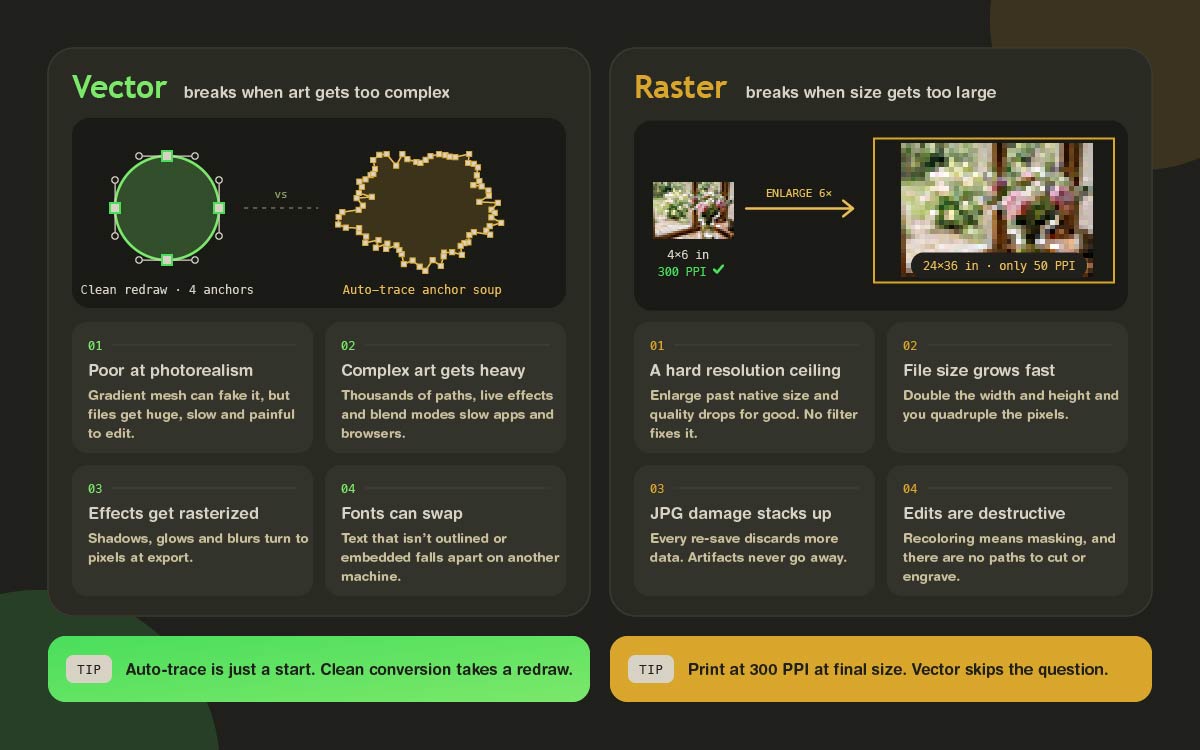
Vector graphics fail when the artwork gets too complex, and raster graphics fail when the size gets too large. Neither failure shows up until a file reaches a printer or a browser. Knowing the vector vs raster graphics limitations before you start tells you which problems to plan around, so no file surprises you late.
Limitations of vector graphics
Photorealism is impractical: Gradient mesh can approximate it, but the files become enormous, slow, and painful to edit. Nobody vectorizes a portrait for fun.
Complex vector artwork gets heavy: Thousands of paths, live effects, and blend modes will bring both design software and browsers to a crawl.
Effects get rasterized anyway: Drop shadows, glows, blurs, and some transparency modes are converted to pixels at export, which quietly brings back the resolution dependence you thought you'd escaped.
Rendering isn't perfectly consistent: Different RIPs, browsers, and PDF viewers interpret transparency, overprint, and effects differently, so what looks perfect on your monitor can shift on press.
Fonts are a liability: If your text isn't converted to outlines or properly embedded, another machine will swap in a different typeface, and your layout falls apart. Every designer has been burned by this.
Software and licensing friction: .AI and CDR are proprietary, older EPS files break in modern applications, and SVG support is still patchy across email clients and legacy platforms.
It takes real skill and time: Clean vector work is drawn carefully, point by point. That's why quality conversion costs more than running an automatic tracing filter, and why the results are worth it.
Not every platform accepts it: Most marketplaces and social platforms require raster uploads at exact pixel dimensions, no matter how pristine your master file is.
A note on automatic tracing. Tools like Adobe's Image Trace can convert a raster image to paths in seconds, and on a clean logo with strong contrast and just two colors, it does a decent job. On anything with soft edges, gradients, or compression artifacts, it produces a mess of ragged, unusable anchor points that takes longer to clean up than redrawing from scratch. Automatic tracing gives you a starting point, and a full conversion still takes more work.
Limitations of raster graphics
Resolution dependence: Every raster file has a ceiling. If you enlarge past it, quality drops permanently. No filter brings it back.
File size grows fast: Raster files at print resolution and large dimensions become hard to store, open, and transfer.
Lossy compression is cumulative: Every time you save a JPG again, it discards more data. Artifacts stack up and never go away.
Editing is destructive by nature: Reshaping an object means rebuilding pixels, since there are no points to drag.
Recoloring is difficult: Changing a brand color across a raster logo takes masking and selection work. In vector, it takes one click.
Poor fit for production that needs paths: Cutting, engraving, routing, and color separation all need real paths.
Text degrades: Type baked into a raster file becomes pixels. It can't be edited, searched, or reset cleanly.
Transparency is format dependent: JPGs have none, which is exactly why flat logos appear with an ugly white box around them.
One more piece of vocabulary. PPI (pixels per inch) describes your digital file. DPI (dots per inch) describes what the printing device physically lays down. People use the terms interchangeably and mostly get away with it, but the standard from every U.S. print shop is 300 PPI at final output size. A 300 PPI file at 4 × 6 inches stops being a 300 PPI file at 24 × 36 inches, because the same pixels get stretched thin. If resizing is a regular headache, our image resize service handles it properly.
How to tell if a file is vector or raster
A vector file gives you shapes you can pick apart and reshape, while a raster file gives you only a finished picture. Any file that resists that kind of editing will struggle once it reaches a printer. Knowing how to tell if a file is vector or raster saves you a rush before the deadline.
Check the extension, but treat it only as a clue: .AI, EPS, SVG, and DXF suggest vector. JPG, PNG, GIF, and TIFF are always raster, no exceptions.
Zoom in hard, to 1000 percent or more: Vector edges stay razor sharp forever. Raster edges break into visible colored squares.
Open it in vector software and click a shape: If you can select individual paths and see anchor points with Bézier handles, it's vector. When the whole thing selects as one flat rectangle, it's a raster image.
For a PDF, try selecting the text: If the text highlights as text, there's real vector content inside. When nothing selects, you're looking at a flat raster image in a PDF wrapper.
Check the file size against the artwork: A simple, two-color logo that weighs 40 MB is almost certainly a high-resolution raster file pretending to be a master.
If steps 3 and 4 come back empty, all you have is a picture of a logo. That's the moment to look into raster to vector conversion before the deadline, rather than during it.
Vector vs raster graphics FAQs
Still have a question rattling around? Good, that usually means you're about to make a real decision with real money attached. Below are the vector vs raster graphics questions our team hears most from business owners, print on demand sellers, and marketing managers. Every answer is short, direct, and useful on its own. Skim for the one that's bothering you. If you can’t find the answer to your question, contact us directly for a little talk.
PNG is always raster. It stores a fixed grid of pixels with a set resolution ceiling. PNG's support for alpha transparency causes the confusion, but transparency and scalability are unrelated. If you enlarge a PNG beyond its native size, it pixelates.
A PDF can be either or both, since it's only a container. One exported from Illustrator holds true vector paths, while a scanned document is a raster image inside a PDF wrapper. Try selecting the text. If it highlights, there's real vector content inside.
Vector, without question. A logo has to work on a business card, a billboard, embroidery, and a favicon. Only vector delivers all of that from a single file with no quality loss, and only vector lets you recolor and separate cleanly for print.
Yes, but it takes a redraw, since a simple file conversion can't do it. Automatic tracing works on simple artwork with strong contrast. Anything with gradients, soft edges, or compression artifacts needs a designer to rebuild it path by path. The result is a genuine vector master you'll own forever.
Because it's a raster file pushed past its native resolution. Software invents the missing pixels through interpolation, and that guesswork shows up as blur and pixelation. The permanent fix is a vector master. Exporting a bigger version of the same file won't solve it.
A bitmap is just another word for a raster, a map of individual pixels. Vector stores mathematical paths instead. A bitmap has a fixed resolution and captures photographic detail well. A vector is resolution-independent and remains editable and scalable forever.
For logos, icons, and flat UI graphics, yes. SVG files are usually smaller, stay sharp across all screen densities, and can be styled or animated with CSS. For photographs, PNG wins easily, and WebP and AVIF do even better. SVG handles photographic content poorly.
The U.S. print standard is 300 PPI at the final output size. Large format work viewed from a distance, such as banners, billboards, and trade show displays, often runs at 100 to 150 PPI and still looks perfect. Vector artwork avoids the question entirely, since it has no fixed resolution.
Yes. Screen printing requires clean color separations, and separations come from vector paths and spot color assignments. A JPG can't be separated reliably. DTG and dye sublimation are the exceptions, and both handle high-resolution raster artwork well.
Ask for the layered vector master (.AI or SVG), a print-ready PDF with fonts outlined, and exported PNGs at the sizes you actually use. Confirm you own the files too. That one conversation prevents the most expensive problem in this whole article.
Endnote
Finally, at the end of the discussion.
Here's the one line worth keeping. Vector describes shapes, raster records light. Neither is superior. Using the wrong one at the wrong moment costs money, and it usually happens at the worst possible time, two days before a print deadline.
So do one small thing today. Open the folder where your logo lives, look for an .AI, EPS, or SVG file, and try step three from the checklist above to see if the shapes select as paths.
If they do, wonderful, you're protected. Save a backup somewhere safe and get on with your day. If they don't, at least you know now, before it becomes an emergency. That feels very different from finding out in the printer's reply email.
Need a hand? Graphic Design Eye is always ready to provide professional raster-to-vector conversion and vector graphic for your business illustrations. No pressure, no jargon, just clean files you'll own forever. Curious how we work? Look at our order completion process walks you through it.
Now you know exactly where you stand on vector vs raster graphics. We'll be back soon with another topic to help grow your brand. Till then, stay creative and keep your masters safe!
Graphic Design Eye LLC is a full-service creative agency built for brands that demand more than design — they demand vision. From strategic branding to complete visual identity, we partner with startups, agencies, and growing businesses as a dedicated creative force. With flexible subscription and project-based models. Let's start with us today!