Learning how to optimize a photography website for SEO starts with making your webpage easier for search engines to understand. Use the right keywords, write clear titles and alt text, improve page speed, and structure your content properly. Add local SEO details and create helpful blogs around client questions. Do this consistently, and your photography website can attract the right visitors.
You have spent years learning light.
You know the exact minute the sun softens behind the trees. You know how to calm a nervous bride, make a toddler laugh on cue, make a product look worth wanting. Your work is good. You know it is.
And yet your website just sits there in silence.
That silence is one of the loneliest feelings in creative business. It is not a failure of talent, it is a failure of translation. Knowing how to optimize your photography website for SEO is the difference between a portfolio sitting quietly in a corner of the internet and one that brings a stranger to your inbox on a Tuesday, saying they found you on Google.
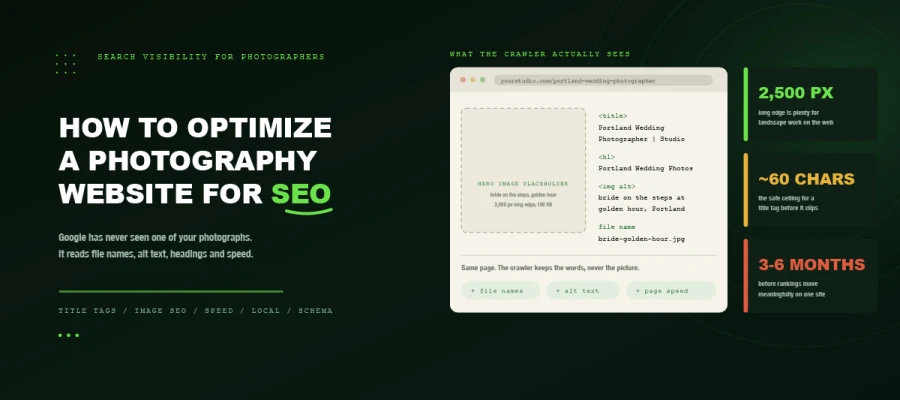
Here is the hard, freeing truth. Google has never seen one of your photographs. Neither has Bing, ChatGPT, or the AI Overview sitting atop the results page. They see file names, alt text, headings, captions, page speed, and the words you never got around to writing. Your gallery, to a crawler, is a locked room with no label on the door.
And this guide unlocks that door. Twelve steps, for WordPress, Squarespace, Wix, Showit, or Pixieset. No jargon left unexplained.
So, ready? Let’s get that door open.
How to optimize a photography website
How to optimize a photography website for SEO is rarely about one clever trick. Most photographers do not need twelve separate tips. They need the right sequence, because SEO built on a weak foundation will not hold.
Start with keywords and structure. Then fix images and speed. Build authority after that, measure what changes, and keep going.
Here is why the order matters and where you actually begin.
Step 1: Do keyword research around location + service
Photographers rank locally by pairing what they offer with where they work. The formula is simple: location + service. For example:
New York product photographer.
Austin family photographer.
Manchester wedding photographer.
Clients rarely search for “beautiful timeless imagery.” They search for what they need, where they need it.
The three keyword types to map
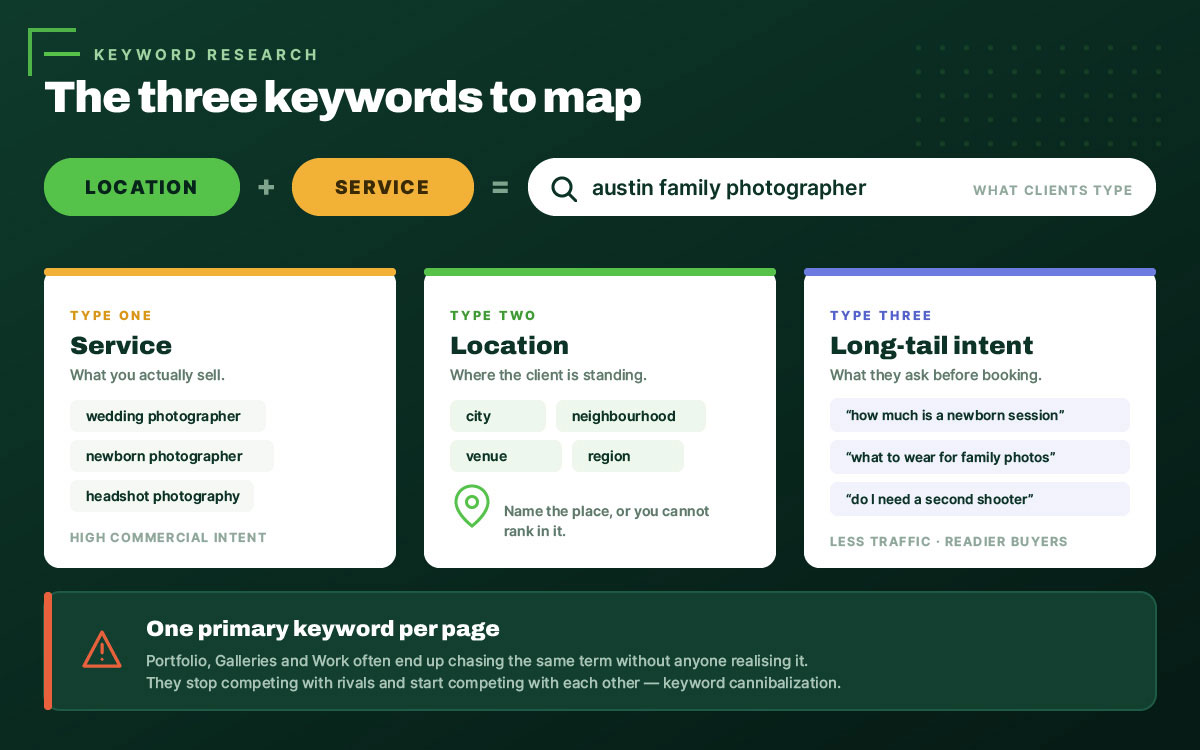
Every keyword has a different job. These three types work together to bring the right visitors to your website.
Service keywords describe the photography services you offer: wedding photographer, newborn photographer, headshot photography, product photography.
Location keywords connect your services to specific areas: a city, neighbourhood, venue, or region where clients are searching.
Long-tail and intent keywords are the questions people type before they are ready to book: “how much does a newborn photo session cost,” “what to wear for family photos,” “do I need a second shooter.”
Long-tail phrases usually bring less traffic. But they attract people with clearer needs and stronger booking intent.
Free ways to find them
You do not need an expensive SEO tool to get started.
Start by typing your photography service into Google and reviewing the autocomplete suggestions.
Scroll to People Also Ask and note the questions that match your clients’ needs.
Open Google Search Console and review the query report to see the searches already bringing visitors to your site.
Then study the page titles of photographers ranking above you.
That is four useful sources. No paid tools. A solid starting point in one afternoon.
One primary keyword per page
Give each page a single primary keyword.
When two pages target the same search term, they compete against each other. Instead of strengthening your website, they divide its ranking signals and make it harder for Google to decide which page deserves visibility. This is called keyword cannibalization.
Common mistake: Portfolio, Galleries, and Work pages often end up targeting the same keyword without the owner realizing it.
Map it before you write it:
Page
Primary Keyword
Secondary
Intent
Homepage
New York wedding photographer
Wedding photography New York
Commercial
Service page
New York product photographer
eCommerce product photos New York
Commercial
Location page
Brooklyn wedding venue photographer
Brooklyn wedding photos
Local
Blog post
What to wear for family photos
Family photo outfit ideas
Informational
Pricing page
Wedding photography packages New York
Wedding photography cost
Transactional
Step 2: Fix your site architecture and URLs
Every important page should be reachable within three clicks of your homepage. A complicated menu hides your best work from both visitors and Google.
Build a simple, logical website structure:
Home → Services → Individual Service Pages → Portfolio → Blog → Contact
Each photography service deserves its own page. Wedding photography, family photography, newborn photography, and commercial photography should not compete on a single Services page.
Then clean up your URLs
✔ Good: /new-york-product-photography/
✘ Avoid: /gallery-2/
✘ Avoid: /page-id=4471/
Keep URLs short, descriptive, and easy to understand. Remove dates, session IDs, and random numbers that mean nothing to visitors or search engines.
Finally, connect your pages with internal links. Every blog post should link to the most relevant service page using descriptive anchor text. If your website structure needs work first, start with the essential elements of a modern web page.
Step 3: Write title tags, meta descriptions, and headings that rank
These three elements are among the first signals both searchers and Google use to understand your page. Most photographers leave the default versions untouched. That is a gift to your competitors.
Title tag formula
Use the format Primary Keyword | Business Name and keep the title tag around 60 characters to reduce the chance of it being cut off in search results. One page, one specific idea.
Good: New York Wedding Photographer | Rivera Studio
Avoid: Home | Rivera Studio | Wedding Portrait Family Event Photography New York
Meta descriptions
Keep meta descriptions around 140–155 characters to give search engines enough context without making the message too long. Lead with the benefit, include the keyword naturally, and write for the person deciding whether to click. The meta description is not a ranking factor. It is an invitation. Treat it like one.
Heading hierarchy
Use one H1 per page that clearly tells visitors and search engines what the page is about. H2s for major sections. H3s for subpoints. Where it fits, turn headings into real questions that match the way people search for answers.
Step 4: Master image SEO (the part photographers get wrong)
Image SEO means optimizing every image on your website with descriptive file names, useful alt text, the right format, proper dimensions, and sensible compression. Do this for every image, not just your homepage hero shot.
If you remember one lesson about how to optimize a photography website for SEO, remember this: your images are your content. Without proper optimization, they are content search engines struggle to understand.
File naming
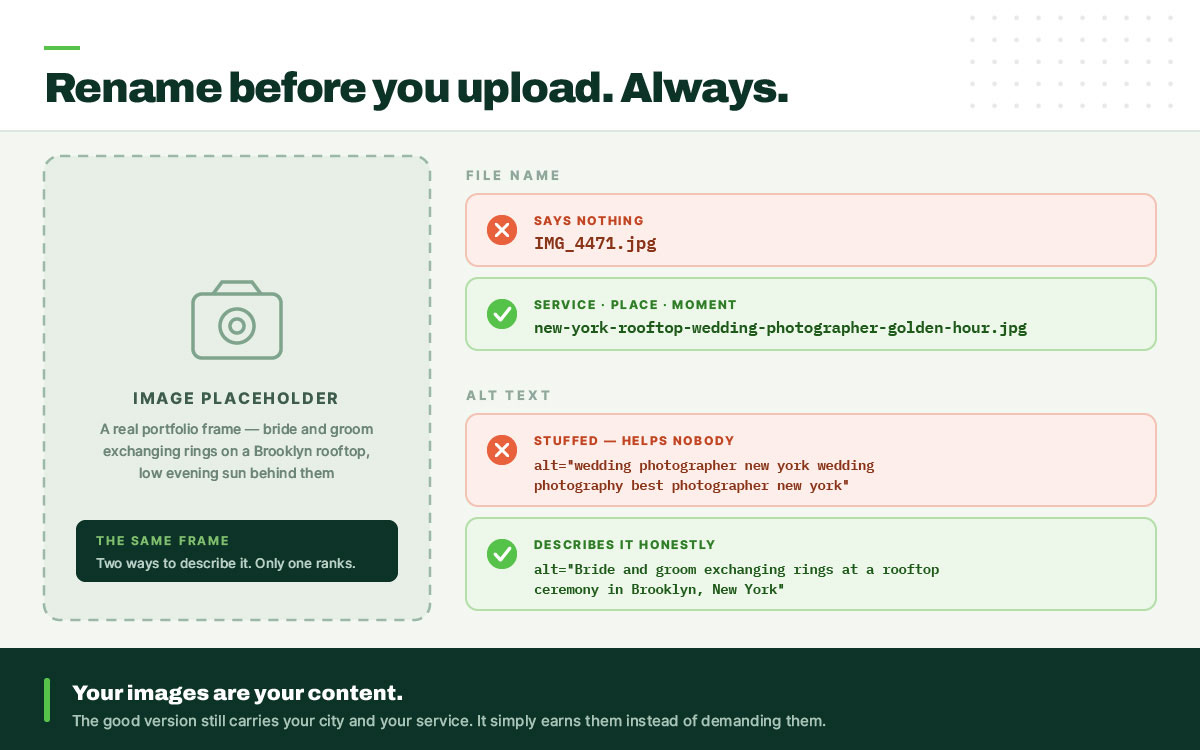
Rename before you upload. Always.
IMG_4471.jpg says nothing. new-york-rooftop-wedding-photographer-golden-hour.jpg tells Google Images, screen readers, and visitors exactly what the image represents.
Alt text
Describe the image accurately for a person who cannot see it. That is the first duty. Keywords come second, and only where they fit honestly.
Poor: alt="wedding photographer new york wedding photography best photographer new york"
Good: alt="Bride and groom exchanging rings at a rooftop ceremony in Brooklyn, New York"
The good version still contains your location and your service. It just earns them.
Formats
Use WebP or AVIF for most image delivery, with JPG as a fallback when browser support requires it. PNG only for logos and images needing transparency, because a PNG photograph is needlessly heavy, and the PNG file format explained makes clear where it genuinely belongs. SVG for icons. Avoid heavy animated GIFs entirely.
Dimensions and compression
As a practical starting point, keep landscape images around 2,500 px on the long edge and portrait images around 1,500 px. Anything larger is weight your visitor pays for and never sees.
Compress until just before quality visibly suffers, then stop. Use responsive images with srcset so a phone gets a smaller file instead of downloading the full-size version.
If you are exporting full-resolution images straight from Lightroom, resize them before uploading. If you have thousands of older files to process, bulk image resizing can save considerable manual work.
Captions, EXIF, and structured data
Captions sit below the image, giving visitors useful context and search engines another clue about what it shows. EXIF data can preserve camera and location metadata, but it is not a meaningful ranking signal by itself.
ImageObject structured data gives search engines more information about your photographs and can help pages qualify for supported search features. It also gives AI-powered systems clearer, structured information about the image.
Lazy loading
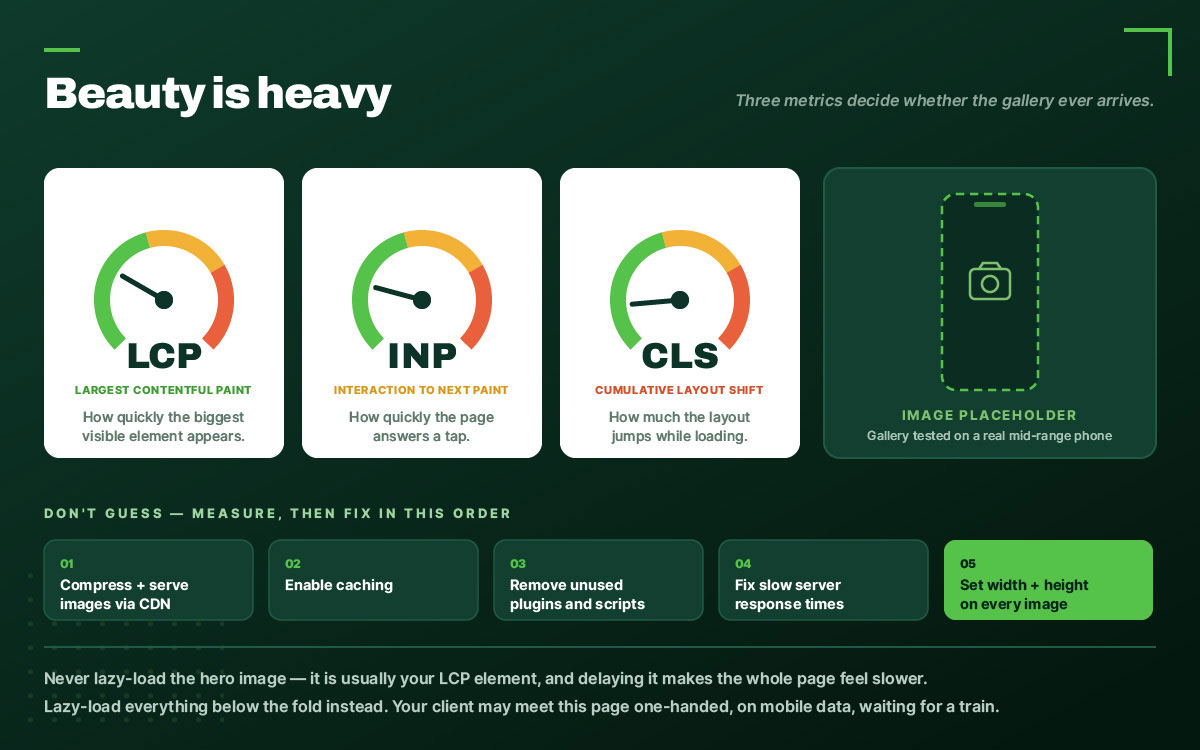
Lazy-load below-the-fold gallery images. Never lazy-load your hero image. It is often your Largest Contentful Paint element, so delaying it can make the page appear slower.
Before
After
File name
IMG_4471.jpg
new-york-rooftop-wedding-golden-hour.webp
Format
JPG
WebP
Dimensions
6000 × 4000 px
2500 × 1667 px
File size
8.4 MB
310 KB
Alt text
(empty)
Descriptive, location-specific
Loading
Eager, all images
Lazy below the fold only
Step 5: Make an image-heavy site fast
Speed is where photography websites lose, and they lose badly. Beauty is heavy.
Core Web Vitals are three Google metrics that measure how a page loads, responds, and stays stable.
LCP (Largest Contentful Paint): How quickly the largest visible content element appears.
INP (Interaction to Next Paint): How quickly the page responds to interaction.
CLS (Cumulative Layout Shift): How much the layout shifts while loading.
Don't guess where the site is slow. Check PageSpeed Insights and the Core Web Vitals report in Search Console first. Start with the images. They are usually the heaviest thing on a photography site. Serve them through a CDN and compress them properly. After that, look at the rest. Enable caching. Remove plugins and scripts you no longer use. Fix slow server response times. And give every image explicit width and height attributes, so the layout has somewhere to put it before it loads.
And test on a phone. A real phone, on mobile data, not your desktop at fibre speed. Your client may not meet your website at a desk. They may meet it one-handed, on a phone, while waiting for a train. Responsive web design makes sure the experience still works.
If your gallery stutters on a mid-range Android, a potential client may never reach the photograph you spent three hours perfecting.
Step 6: Win local SEO
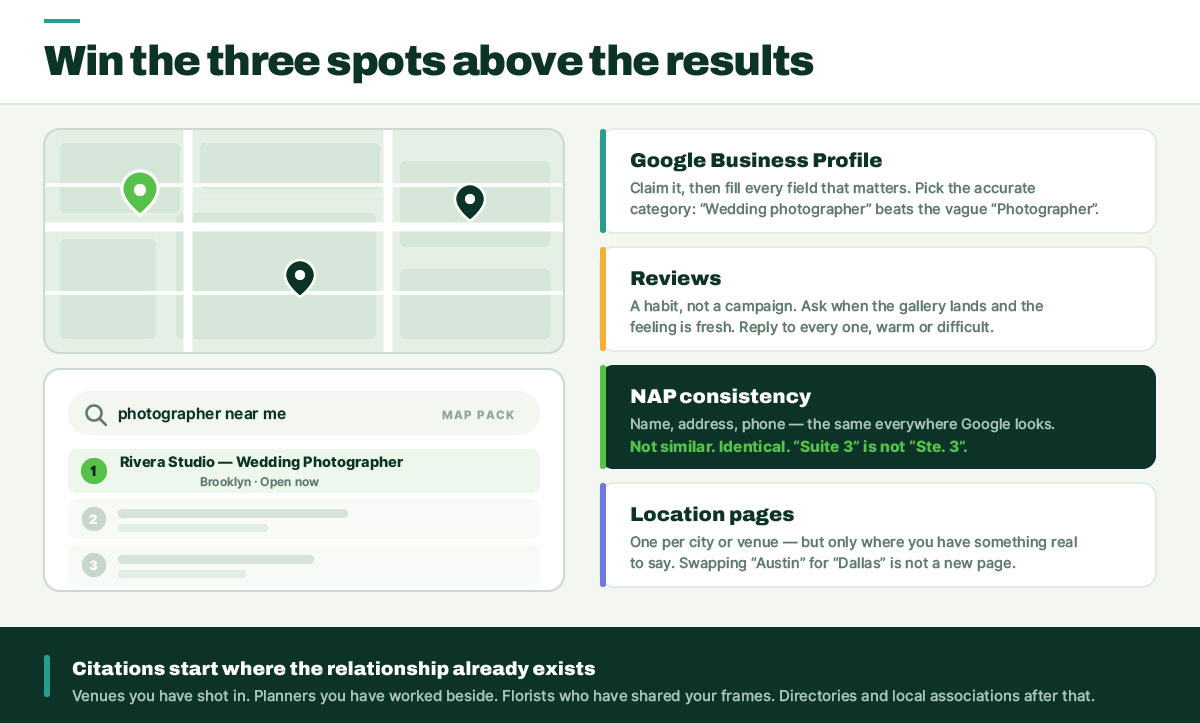
Search “photographer near me,” and you may see three businesses with stars, reviews, and a map above the regular results. That is the local map pack.
Anyone learning how to optimize a photography website for SEO eventually gets here. Many wish they had started sooner. If your clients live nearby, local search puts your work in front of them at exactly the moment they start looking.
Google Business Profile
Claim it. Then fill out every field that matters. Don't leave useful information blank. Choose the most accurate primary category: “Wedding photographer” is far more useful than the vague “Photographer.”
Define your service areas. Keep the profile fresh with real portfolio images. The gallery should not freeze on the day the profile goes live. Give the profile something new to say. Use Posts for recent work, updates, and announcements. Don't ignore the Q&A section. Answer genuine questions and keep the information accurate.
Reviews
Reviews work better as a habit than a campaign. Ask consistently, not twenty clients at once. Build the request into your delivery workflow. The gallery lands. They see the photographs. They remember how good the whole experience felt. Ask then. Respond to all of them. Thank the happy clients. Handle the difficult ones calmly and professionally.
NAP consistency
Google sees your business in more places than your website. Make sure the name, address, and phone number tell the same story everywhere.
Not similar. Identical.
“Suite 3” and “Ste. 3” mean the same thing to a human. For local search, don't give systems a reason to wonder.
Location pages
Give each city or venue its own page, but only when you have something real to say about it. Write about the place itself: the light in that ballroom, the permit rules in that park, the walk from the car park.
Swap “Austin” for “Dallas” and call it a new page? Don't. A useful location page needs details that belong to that place.
Local citations and vendor links
Wedding venues, planners, florists, directories, local business associations.
The venue already knows you. The planner has worked with you. The florist may have featured your work before. Start there.
Step 7: Add schema markup
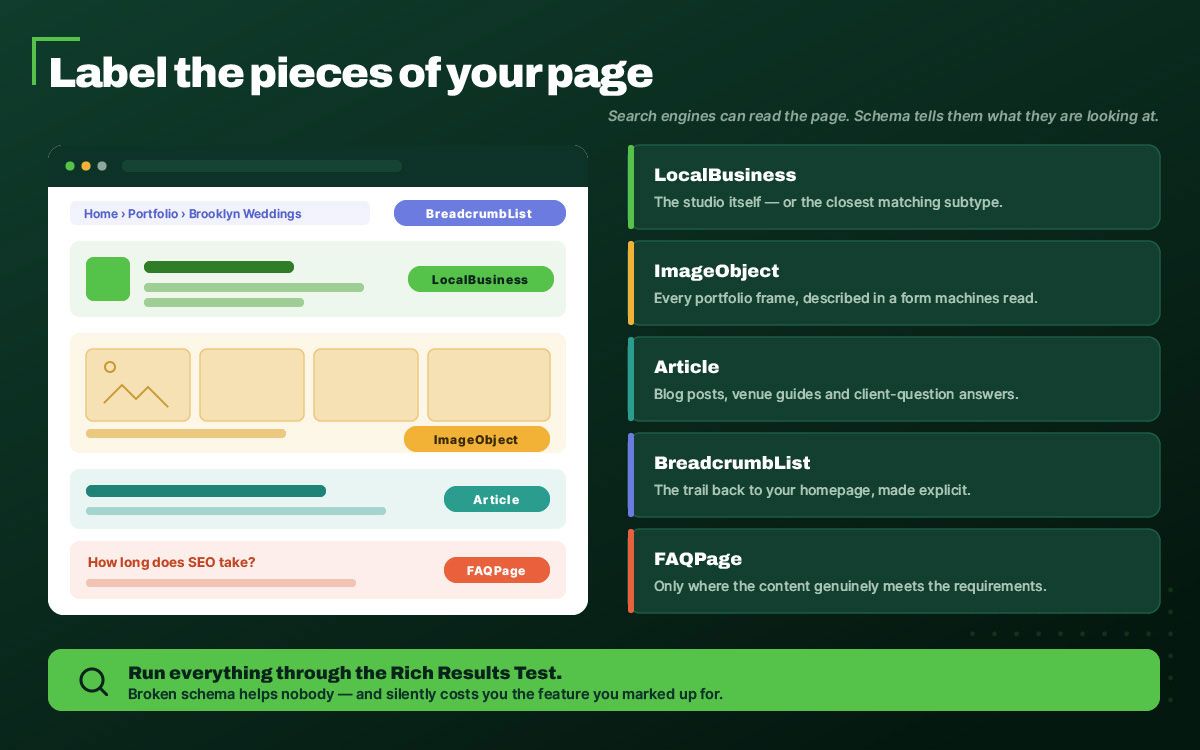
Search engines can read the page. Schema helps them understand what they are looking at.
Think of it as labeling the important pieces. This is the business. This is an image. This is an article. This is the navigation.
For the business itself, use LocalBusiness or the most appropriate subtype. Use ImageObject for portfolio images, Article for blog posts, and BreadcrumbList for navigation. Use FAQPage only where the content and eligibility requirements actually support it.
Then run everything through Google's Rich Results Test.
Broken schema helps nobody.
Step 8: Blog with purpose (not just “recent sessions”)
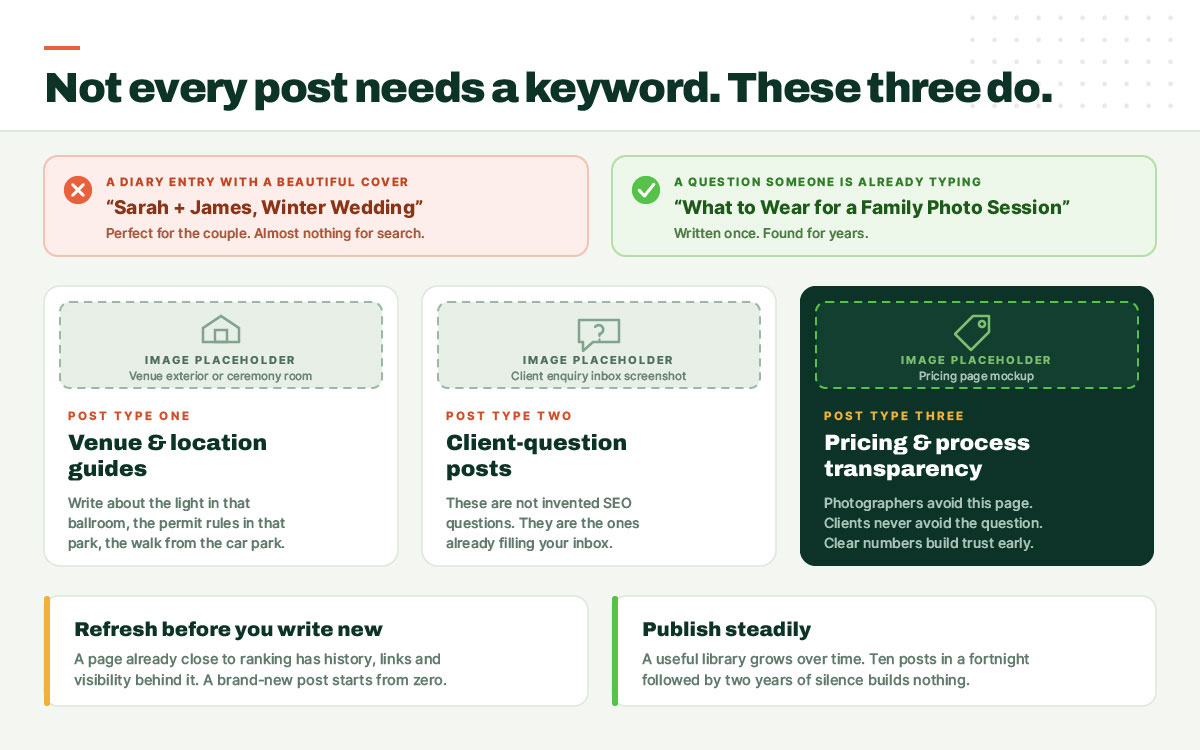
“Sarah + James, Winter Wedding” is a lovely title for the couple. For search, it says very little. It is a diary entry with a beautiful cover.
Not every post needs to chase a keyword. These three have a real reason to be found.
Venue and location guides
“A Photographer’s Guide to Getting Married at [Venue]” can reach couples while they are still planning, long before they choose a photographer.
Client-question posts
“What to Wear for a Family Photo Session.” “How Long Does a Wedding Timeline Need to Be?” These are not invented SEO questions. They are the questions already filling your inbox. Answer them once, publicly, properly.
Pricing and process transparency
Photographers often avoid this page. Clients rarely avoid the question. Publishing clear pricing can filter out poor-fit enquiries and build trust before the first call.
The gallery is not just a gallery anymore. It is a piece of local content. Name the venue, name the city, credit the vendors, and link to them. If the relationship is genuine, some may return the favor with a mention or link.
And refresh before you write new. Don't abandon a page that is already close. Strengthen it first. A well-updated article already has history, links, and search visibility behind it. A new post starts from zero.
Publish steadily. A useful library grows over time. A burst of ten posts followed by silence does not.
Step 9: Build backlinks as a photographer
Photographers have an unusual advantage with backlinks: the work already travels. Venues display it. Vendors share it. Publications publish it.
Exchange links with venues and vendors you have genuinely worked with. Submit styled shoots to wedding blogs and publications. Pitch a local news outlet a story with your images attached. Write a guest tutorial for a photography education site. License images with attribution required.
Every one of these is a real relationship producing a real link.
Paid link schemes, private blog networks, and “500 backlinks for $20” services are the opposite. They violate Google’s spam policies, they are getting harder to hide, and recovering from a manual action costs far more than the links ever did.
Step 10: Set up measurement
You cannot improve what you refuse to look at.
Google Search Console shows which pages are indexed, which queries generate impressions, and how often searchers click through. A page with high impressions and low clicks already has visibility. It needs a better title tag.
Google Analytics 4 should track conversions that matter: contact form submissions and enquiry clicks, not raw pageviews.
Rankings are worth tracking for the ten to twenty keywords that actually drive bookings. Not two hundred. Twenty.
Now the part nobody says kindly enough: this takes time. For competitive local terms, give it several months before judging whether the work is moving. Newer domains often take longer. This is not a reflection of your worth. It is the pace of the system.
Sites that stall are often sites where someone quit in month two.
Step 11: Optimize for AI overviews and AI search (AEO/GEO)
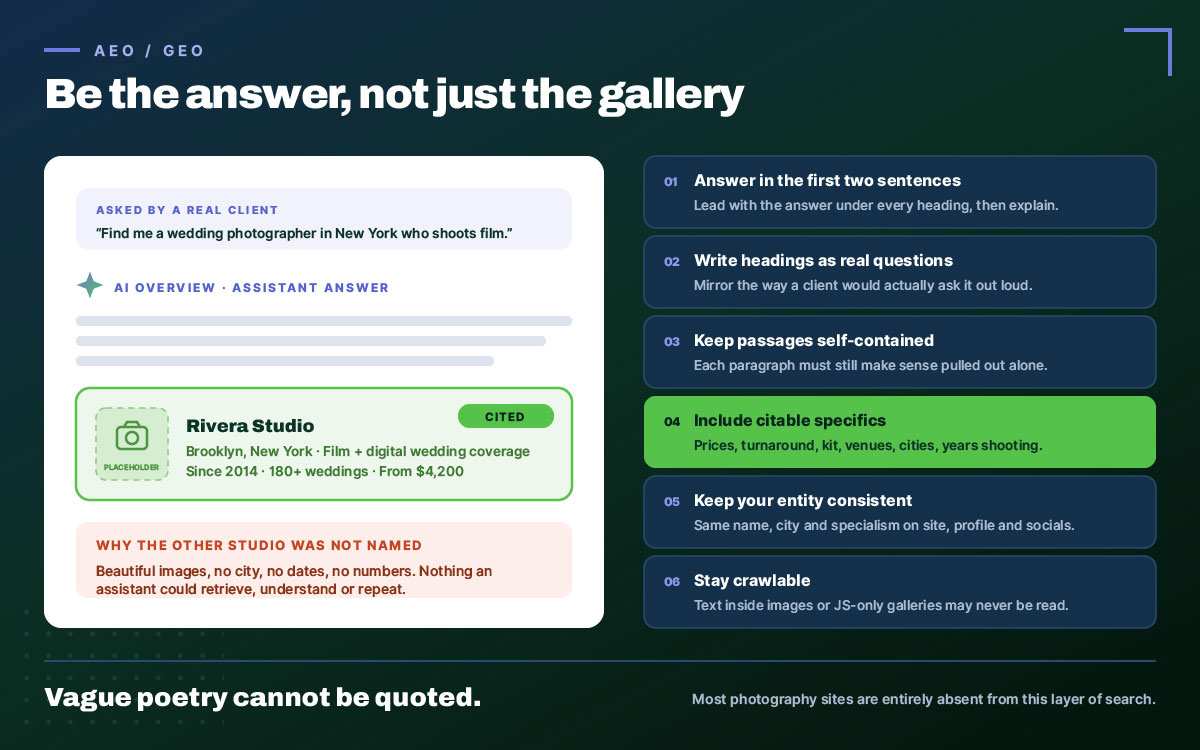
The search journey is changing. People are asking AI assistants questions they once typed into Google. “Find me a wedding photographer in New York who shoots film.” The answer needs information an AI system can find, understand, and cite. A gallery of images cannot provide all of that on its own.
This is the newest chapter in how to optimize a photography website for SEO, and it is where most photography sites are entirely absent:
Answer directly in the first two or three sentences under every heading. Lead with the answer, then explain.
Use question-formatted headings that mirror how people actually speak to assistants. Write the question the way a client would ask it.
Keep passages self-contained, so each paragraph still makes sense when retrieved out of context.
Include specific, citable facts: prices, timelines, turnaround, equipment, venues, cities. Vague poetry cannot be quoted.
Maintain entity consistency across your site, Business Profile, and social platforms. Keep the same business name, city, specialization, and visual identity everywhere.
Stay crawlable. Text buried inside images or locked behind JavaScript-only galleries may never reach a retrieval system.
Step 12: Publish proof, not just pictures
The final step is the one that ties E-E-A-T to a photography business. Search engines and AI systems both reward demonstrable, first-hand experience.
Write it down. Years shooting. Number of weddings covered. Venues you know well. Awards, features, memberships. Real client names, where you have permission. Your face and your story on an About page written in your own voice.
Original screenshots of your own Search Console, PageSpeed, and Business Profile dashboards prove you did the work. Stock imagery proves nothing.
6 Common photography website SEO mistakes
These photography website SEO mistakes are rarely complicated. Most photography sites are not broken by exotic technical failures. They are broken by ordinary habits, repeated everywhere, usually by people who simply had no reason to know.
Let's see which ones are hiding on your site.
Full-resolution uploads straight from a Lightroom export. An 8 MB hero image can turn a simple page into a long wait on mobile data.
A homepage that is one giant slideshow with no crawlable text. Stunning to a human. Blank to a crawler.
“Home,” “Portfolio,” “Gallery 2” as title tags. Three chances to say who you are and where you work. All discarded.
No city named anywhere on the site. You cannot rank locally in a place you never mention.
Blocking the site with robots.txt, or leaving a staging site indexed. A stray Disallow: / can hide the whole site, while an indexed staging site can expose unfinished pages.
Never claiming the Google Business Profile. Free. Fast. And often one of the highest-return tasks in local search.
Optimize your photography website FAQs
Some questions arrive again and again, usually from photographers who have just realised how much they did not know they did not know. Nobody teaches this in a photography course. You learned aperture, posing, and how to hold a room together.
Then the internet quietly handed you a second profession. So here are direct answers to the questions photographers ask most. If anything is missing, simply reach out to us. We’ll be happy to help.
Most photography websites see meaningful movement in three to six months. Competitive metropolitan markets can take nine to twelve. Technical fixes may register within weeks, while local authority and backlinks build slowly. Anyone promising page-one rankings in thirty days is selling something else.
A blog is not strictly required, but it is the most reliable way to rank beyond your business name. Service pages target commercial keywords; blog posts target the hundreds of questions clients ask before they are ready to book.
No platform ranks better by default. Implementation decides the outcome. WordPress offers deeper technical control, while Squarespace and Wix can rank perfectly well when images and metadata are handled properly. Pixieset suits delivery more than discovery.
Watermarks have no direct effect on rankings, but heavy ones can hurt engagement and discourage sharing. A small, discreet mark in the corner is a reasonable compromise. Image protection is better handled through licensing terms than covering the frame.
Fifteen to thirty optimized images is a sound range for most gallery pages. Beyond that, page weight rises and visitors may stop scrolling. If a project needs more, split it across themed pages, each targeting its own keyword.
Most photographers can handle the majority themselves. File naming, alt text, title tags, Business Profile work, and blog content need patience more than technical expertise. Hire help for schema, Core Web Vitals, competitive markets, or when shooting leaves no time for SEO.
EXIF data has no confirmed direct effect on rankings. Google can read some metadata, but evidence for a meaningful ranking benefit remains thin. File names, alt text, captions, and surrounding page text matter far more, so invest your effort there first.
WebP is a strong default for photography websites in 2026. It produces smaller files than JPEG at comparable quality and has broad browser support. Use JPEG as a fallback, and reserve PNG for images requiring transparency.
Local SEO is critical for photographers serving a defined area. People searching for a photographer in their city already know what they need. Winning a map pack position can therefore generate enquiries much closer to booking than broad, non-local searches.
Endnote
Let us return to where we began.
You did not become a photographer to study meta descriptions. You became one because light does something to you that words cannot explain, and because you wanted to hand people back moments they would otherwise lose.
That is why any of this matters.
Talent that nobody finds is talent held hostage.
Everything in how to optimize a photography website for SEO comes down to one act of respect: respect for the machine that cannot see, and for the stranger searching for exactly what you do. Rename a file. Write honest alt text. Claim your Business Profile. Name your city. None of it is glamorous. All of it compounds.
Start with image optimization this week. Claim your Business Profile tomorrow. Write one client questionn post this month. Then keep going when nothing seems to happen.
If your website, branding, or image presentation needs professional help, Graphic Design Eye can help with website design, branding, logo design, photo editing, and image optimization, so the work behind your name looks as strong as the work in your camera.
Six months from now, someone may search for exactly what you do.
They will not see the SEO! They will see the work! And that is exactly how it should be!
Graphic Design Eye LLC is a full-service creative agency built for brands that demand more than design — they demand vision. From strategic branding to complete visual identity, we partner with startups, agencies, and growing businesses as a dedicated creative force. With flexible subscription and project-based models. Let's start with us today!