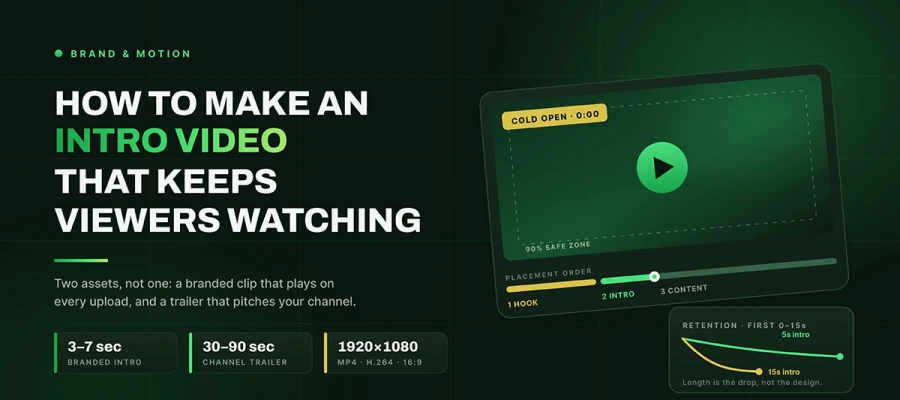
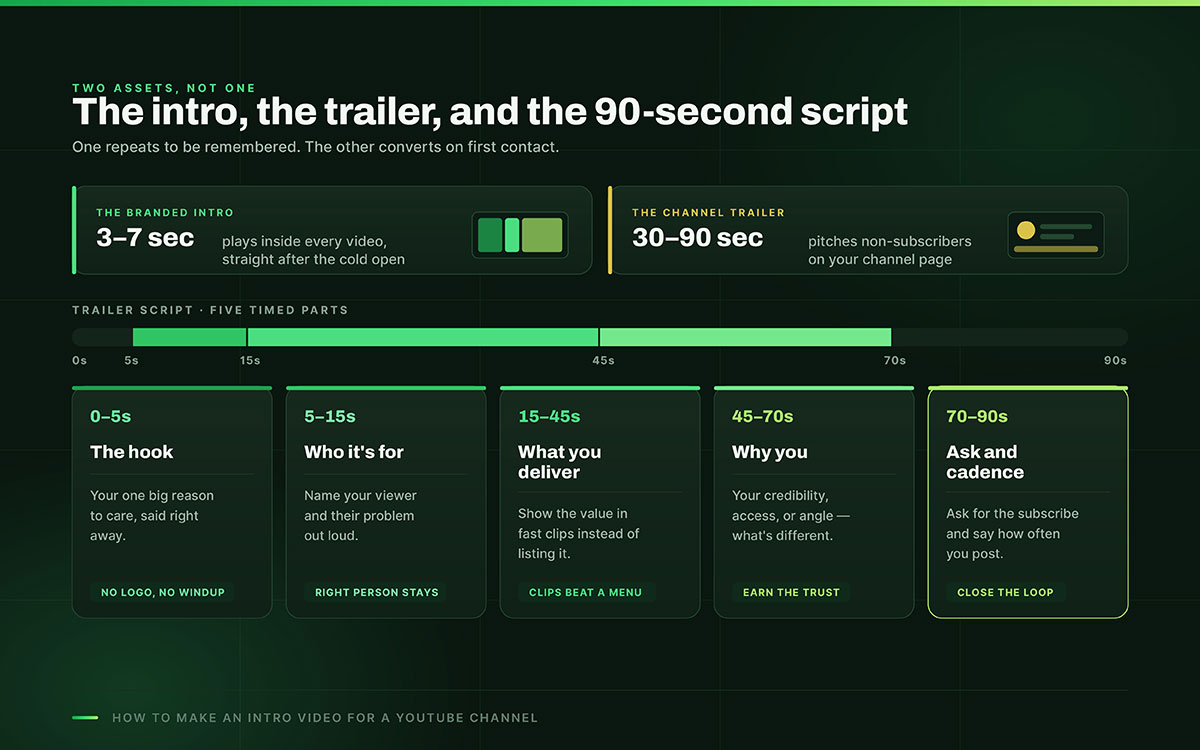
How to make an intro video for a YouTube channel starts with treating it as two separate assets: a 3 to 7 second branded clip that plays after the hook on every upload, and a 30 to 90 second channel trailer that pitches non-subscribers on your channel page. Both follow exact specs, not guesswork.
Picture someone who clicks your video. They wait through a fifteen-second logo animation with music. Then they leave before you say a word. They won't comment. They won't explain why. Your analytics will just show a sharp drop early on. Most creators studying that drop never blame the intro they're so proud of.
The intro is the one thing every viewer sees, on every video. It's your most repeated asset. Yet it's usually the least thought out, made once in a rush, then never touched again while everything else gets optimized.
That's the problem this guide solves. Something viewed thousands of times deserves more care than a single thumbnail, not less. There are two assets worth building here, and they're different things. So learning to make a YouTube intro starts with telling them apart. Keep reading to learn more!
How to make an intro video
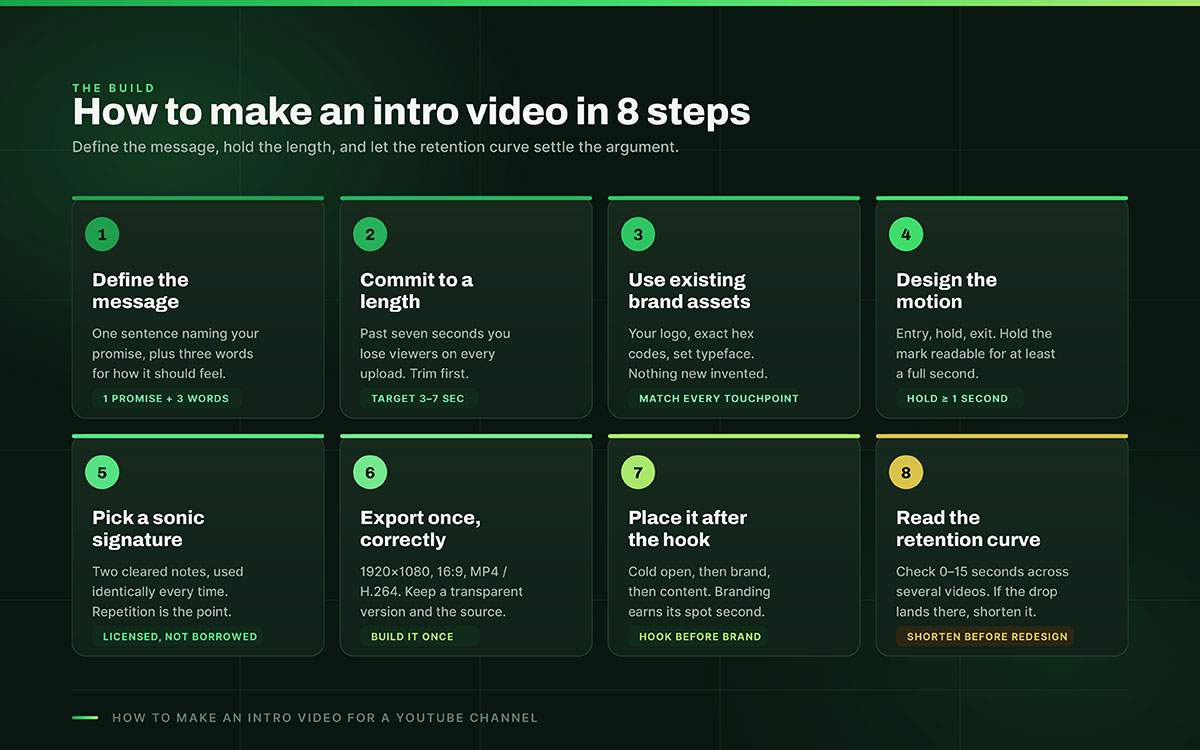
To know how to make an intro video for a YouTube channel, define your channel's core message first, then keep it under 7 seconds. Build it from existing brand assets (logo, colors). Add deliberate motion and a signature sound, and export at 1920x1080. Place it after a cold open, then refine using retention data. Now, let’s get started.
Step 1. Define what the intro must communicate
Before designing any frame, decide what the intro should say. Not visually, but conceptually. One promise and three brand words are enough to start.
Why it matters: An intro squeezes your identity into a few seconds. It's more than decoration. If you can't name the feeling it should leave, you can't judge a draft. You'll just settle for whatever the template offers.
What to do: Write one sentence naming your channel's promise to viewers. Then pick three words for how it should feel, like precise, warm, and confident. Judge every choice about color, motion, and sound against those four words.
An intro without a defined message is just an animation looking for a reason.
Step 2. Choose a length and commit to it
YouTube intro length advice is confusing, so let's be exact. Sources disagree, but the data on retention doesn't.
Why it matters: Some guides say ten seconds or more. Watch time data says otherwise. Attention drops fast in the first seconds. Past about seven seconds, you start losing viewers on every video. A long intro hurts everyone watching, not just one person.
What to do: Target 3 to 7 seconds for your branded clip. If yours runs longer, trimming it is often the best edit you can make. It beats any redesign.
The intro is the most repeated stretch of seconds on your channel. Spend them like they cost something.
Step 3. Build the intro from your existing brand assets
An intro should sharpen your existing look, not create a new one.
Why it matters: The intro should match your channel art, thumbnails, and website. Otherwise it breaks recognition instead of building it. Viewers should feel the same brand in the banner, the thumbnail, and the first three seconds. If those clash, viewers remember nothing clearly.
What to do: Use your logo, exact hex codes, and your set typeface. Nothing new. If your colors are not fixed yet, decide them first. Choosing brand colors carefully helps every asset, not just the intro.
Recognition compounds only when every touchpoint agrees. The intro is one more place to agree.
Step 4. Design the motion, not just the graphics
A logo just sitting on screen is a slide. Motion is what makes an intro feel like an intro.
Why it matters: Movement carries energy and meaning a still image cannot. But it must support clarity, not fight it. The logo needs three parts. Entry, hold, and exit. This lets the eye register the mark. A logo that spins in and out in half a second only feels busy.
What to do: Give the animation a clear entry. Hold the logo still and readable for at least one second. End with a clean exit. Careful motion design keeps complex movement feeling intentional, not frantic.
Motion should reveal the brand, then get out of its way.
Step 5. Choose audio that can become a signature
Sound is the half of branding most intros skip. Often it's the half people remember most.
Why it matters: A short, unique sound, called a sonic logo, sticks in memory faster than visuals. Two well-chosen notes can become as recognizable as a logo. The catch is rights. Music you do not own can trigger claims, demonetization, or strikes on every video with that intro.
What to do: Get or license a short royalty-free sound, or make a simple two-note signature, and clear it for commercial use. Keep it the same every time, since repetition is the point. Never use copyrighted music on something that plays on every upload.
A brand people can hear is a brand they recognize with their eyes closed.
Step 6. Produce it once, at the correct specification
Your intro is permanent. So, build it right the first time, not badly for years.
Why it matters: A wrong resolution or bad export causes problems. You get soft edges, wrong aspect ratio, or poor quality. Fixing it later means starting over.
What to do: Export at 1920x1080, 16:9, as MP4 using H.264. Also make a transparent background version for overlays. Keep the editable source file too. This way, future changes are easy.
Build it once at full quality, and it stops being a decision you revisit.
Step 7. Place it correctly within the video
Where you place the intro matters just as much as the intro itself.
Why it matters: Starting a video with the intro is the biggest mistake. The first seconds decide if a viewer stays. A logo animation won't give them a reason to. The hook must come first. It should promise what the video delivers before any branding shows up. Branding only earns its spot once you have attention.
What to do: Start every video with a cold open. Show a few seconds of the payoff or a clear promise. Then show the branded intro. Then the content. The hook always comes before the brand.
Earn the attention first. Spend it on branding second.
Step 8. Check the retention curve and adjust
An intro is just a guess until the data proves it. YouTube Studio shows the truth.
Why it matters: Look at audience retention for the first 0 to 15 seconds. That's your clearest feedback. If viewers drop off right during the intro, they're leaving. That drop is almost always about length, not looks. Even a beautiful intro loses people if it's too long.
What to do: Open audience retention in YouTube Studio. Check the opening seconds across several videos. If the intro lines up with a drop, shorten it first. Worry about redesign later.
The retention curve does not care how much you like the intro. Listen to it anyway.
How to script a YouTube channel trailer
To script a YouTube channel trailer, structure it in five timed parts: hook your one big reason to care (0–5s), name who it's for (5–15s), show what you deliver through fast clips (15–45s), explain why you're different (45–70s), then ask viewers to subscribe and state your posting cadence (70–90s).
The hook (0 to 5 seconds): Say your one big reason to care, right away. No slow start, no logo. Just the promise.
Who this is for (5 to 15 seconds): Name your viewer and their problem. The right person will feel seen.
What you deliver (15 to 45 seconds): Show your value, don't list it. Fast clips beat a spoken menu.
Why you (45 to 70 seconds): Share what makes your take different. Your credibility, access, or view.
The ask and cadence (70 to 90 seconds): Ask them to subscribe. Say how often you post.
The trailer is not about your channel. It is about the viewer's next ten minutes.
7 Mistakes that make an intro video hurt a channel
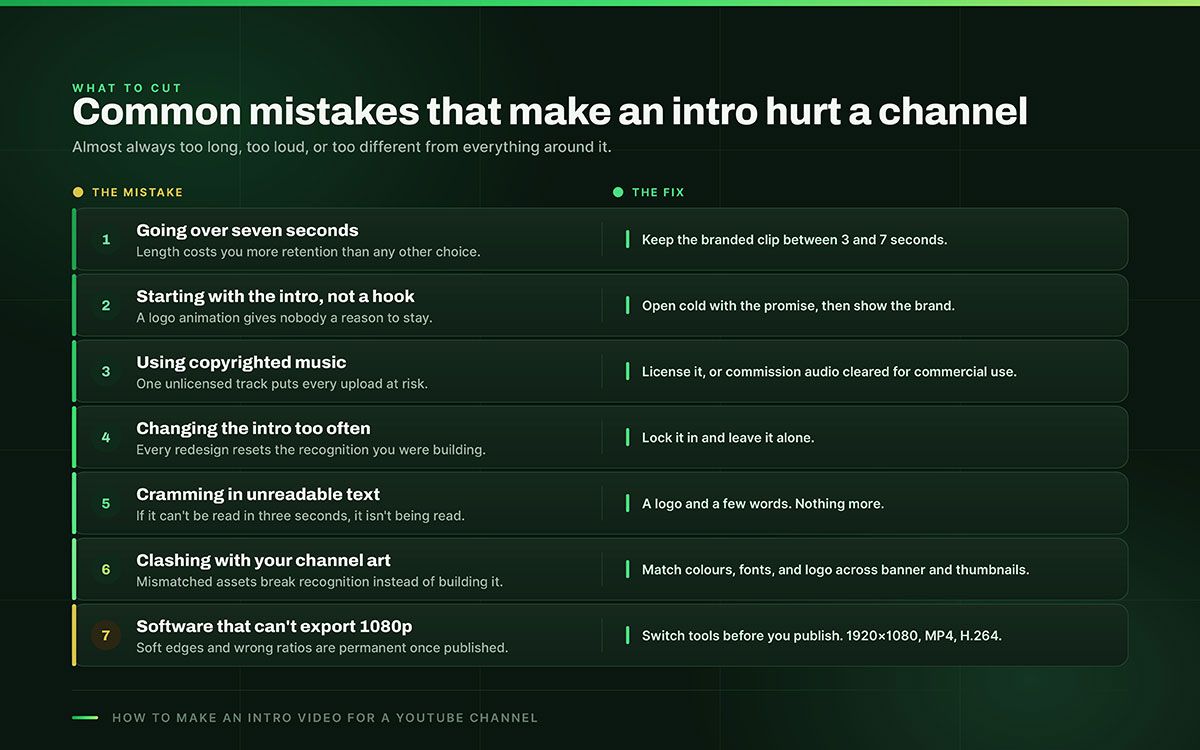
A weak intro doesn't just do less. It hurts the videos after it. These seven mistakes turn a helpful intro into a harmful one. Each comes with a fix on how to make an intro video for a YouTube channel.
Going over seven seconds. Keep it 3 to 7 seconds. Length kills retention the most.
Starting with the intro, not a hook. Open cold, then show the brand.
Using copyrighted music. Get licensed or custom audio to avoid strikes and demonetization.
Changing the intro too often. Lock it in. Every change resets recognition.
Cramming in text you can't read in three seconds. Stick to a logo and a few words.
Making the intro clash with your channel art and thumbnails. Match colors, fonts, and logo everywhere. Treat the intro like your best YouTube thumbnails, so the channel feels like one brand.
Using software that can't export 1080p. Switch tools before you publish.
An intro that hurts a channel is almost always too long, too loud, or too different from everything around it.
YouTube intro video FAQs
This FAQ answers common questions about how to make an intro video for a YouTube channel. Topics include the best length (3 to 7 seconds), correct export size (1920x1080), how intros differ from channel trailers, using copyright-safe audio, effects on retention, and whether branded intros are still worth making in 2026.
Concerned with other things? Reach out to us anytime for a free consultation.
A YouTube intro should run 3 to 7 seconds. Longer clips measurably reduce retention, since viewer attention is most fragile in a video's opening seconds. A channel trailer is a separate asset and can run 30 to 90 seconds.
Make a free YouTube intro using a browser-based editor like Canva or Clipchamp. Both offer free templates you can brand with your logo, colors, and cleared audio, then export at 1920x1080 as an MP4. The main limit is originality, since templates are shared across many channels.
A YouTube intro should be 1920x1080 pixels, 16:9 aspect ratio, exported as an MP4 using the H.264 codec. Keep your logo and text within the central 90 percent safe zone so nothing crops on different devices or players.
A long intro hurts retention; a short one does not. Damage comes from length and placement, not from having an intro at all. A 3 to 7 second clip placed after a hook builds recognition, while a fifteen-second animation at the start reliably drives viewers away.
A YouTube intro is a 3 to 7 second signature that plays inside every video to build recognition. A channel trailer is a 30 to 90 second pitch shown to non-subscribers on your channel page to convince them to subscribe. One repeats to be remembered; the other converts on first contact.
No, copyrighted music should not be used in a YouTube intro. Unlicensed tracks can trigger Content ID claims, demonetization, or strikes, and since an intro plays on every video, one unlicensed track puts your entire channel at risk. Use royalty-free or custom-cleared audio instead.
Add an intro by placing the clip into each video during editing, immediately after the cold-open hook rather than at the very start. YouTube does not auto-insert intros across uploads, so each video needs it added manually. A transparent-background version lets you overlay it cleanly.
Yes, but only if it is short and well-placed. A long intro, or one shown before the hook, does more harm than good and is better cut entirely. A brief branded clip still earns its keep by building recognition across a catalog of videos.
Endnote
How to make an intro video for a YouTube channel is ultimately a question of discipline. The creators who get it right treat those few seconds with the same rigor they'd apply to a logo or a website. What separates a channel that compounds recognition from one that quietly loses viewers is execution.
That's usually where the process stalls, not from knowing what to do, but from not having the motion design or video editing hands to build it at broadcast quality on the first try. If that's where you are, Graphic Design Eye LLC’s intro animation video, motion graphic and video editing team can take your brand assets and turn them into a properly timed, correctly exported intro and trailer, backed by unlimited revisions until the pacing, sound, and placement all land exactly right. With us, you publish once and never think about it again.
You don't need another tutorial at this point. You need the intro built. Reach out, hand over your logo and colors, and let the seconds that play on every video finally work as hard as the rest of your channel does.
An intro is not the most seen thing you make. It is the most repeated. That is exactly why it is worth getting right.
Graphic Design Eye LLC is a full-service creative agency built for brands that demand more than design — they demand vision. From strategic branding to complete visual identity, we partner with startups, agencies, and growing businesses as a dedicated creative force. With flexible subscription and project-based models. Let's start with us today!