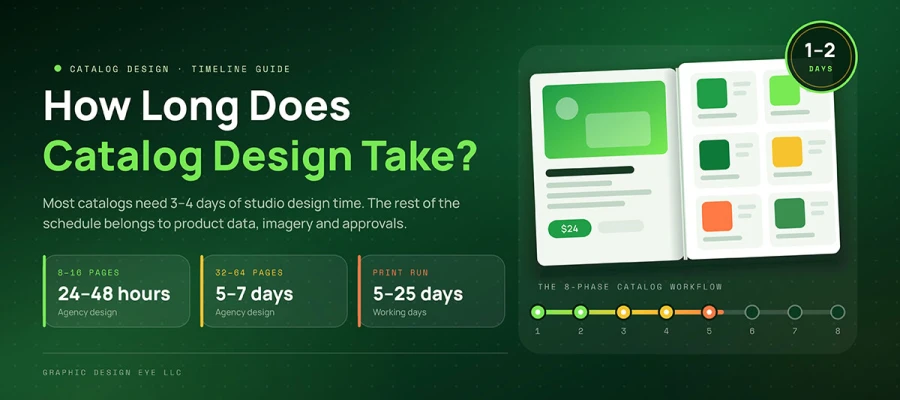
How long does catalog design take depends as much on project readiness as page count. Most catalogs need three to four days from kickoff to print-ready files. An 8–16-page catalog often takes two to four days. A 32–64-page catalog can take four to six days. Printing adds another seven to fifteen working days. Missing product data and slow approvals cause most delays.
A deadline has a sound. Anyone who has ever carried a catalog to press knows it well.
The trade show date is locked. The booth has been paid for. The printer has already asked, twice, when the files will arrive. And somewhere on a shared drive sits the product list, half spreadsheet and half memory, with three prices nobody has confirmed.
That is when a few days of design can start feeling like a much bigger problem.
The design itself is rarely the whole timeline. Product information needs to be ready. Images need to be checked. Pages need review. Someone has to approve the final proof. Then the printer needs time to produce and ship the finished catalog.
That is why the catalog design timeline can vary from one project to another. A simple 12-page catalog with approved content moves quickly. A 48-page catalog with missing images and several reviewers does not.
So this guide explains how much time a catalog design project needs from brief to print-ready files, helping you set a realistic deadline, plan approvals, and book printing in time.
Let’s dive in and keep reading!
How long does catalog design take
Catalog design time depends mainly on page count, content readiness, and how quickly decisions get approved. Change any one of these, and the schedule can shift from days to weeks. The ranges below assume the brief, content, and required assets are ready before design begins.
When the content is not ready, the numbers change quickly. Missing product details, unfinished images, late feedback, and repeated revisions can quietly add days to the schedule.
The sections below show how long does catalog design take and what each stage needs. Let’s map out the timeline.
Catalog design timeline by page count
More pages usually mean more time to design, review, and prepare for print. A short 8-page catalog may take only a few days, while a 100-page catalog needs much more coordination. Still, page count is only a starting point.
The table below shows how the timeline typically expands as a catalog grows.
Catalog size
Agency turnaround
Client-side content and approval
Print production
Total time
8 to 16 pages
24 to 48 hours
1 to 5 days
5 to 10 working days
3 to 6 weeks
16 to 32 pages
48 hours to 4 days
2 to 3 weeks
7 to 10 working days
5 to 7 weeks
32 to 64 pages
5 to 7 days
2 to 4 weeks
7 to 12 working days
6 to 9 weeks
64 to 100 pages
7 to 12 days
3 to 6 weeks
10 to 15 working days
9 to 13 weeks
100 to 200 pages
2 to 4 weeks
6 to 10 weeks
12 to 20 working days
3 to 6 months
200 pages and above
4 weeks and above
10 weeks and above
15 to 25 working days
6 months and above
Well, notice the gap between studio design time and total project time. The design itself may take only a few days, while the full catalog process can take several weeks.
Why the first two columns look so different
Design turnaround and total project time measure two different things. Design turnaround covers the studio’s work. Total project time covers everything from content preparation to the finished printed catalog.
A 10-page catalog built from supplied content might be designed in 24 hours. A 96-page book might take roughly a week. Those figures describe the design work alone.
The full project can take much longer because product data must be gathered, missing photography produced, proofs reviewed, prices verified, and pages sent to print. Design is often the fastest phase. It is simply the most visible, so it gets blamed for delays elsewhere.
The ranges look generous because page count is only part of the timeline. Two catalogs with the same page count can take very different amounts of time.
Consider two 32-page catalogs: A lifestyle lookbook with four products per spread can move quickly. A technical catalog with 40 part numbers, six specification columns, and compatibility tables needs far more checking. The pages may be identical in count, but the work behind them is not.
Photography can change the schedule too: If print-ready images already exist for every SKU, that part is done. If they do not, the project may need a photo shoot, sample shipments, retouching, and final file preparation. That can add weeks.
Approvals can add more time: One decision-maker with final authority can keep things moving. Six reviewers working from separate inboxes can add days or weeks. Nobody has to cause a delay. The process itself can create one.
That is why the table works best as a planning baseline. Page count gives the starting point, while content, photography, and approvals determine how closely the actual project follows it.
The eight phases of the catalog design process
A catalog moves through eight distinct phases before it reaches the finished page. Each phase has its own task, output, and place in the overall workflow. Seeing the full sequence makes it easier to understand what happens at each stage and where one phase hands off to the next.
Look at the phase summary at a glance:
Phase
Typical duration
Primary owner
Delay risk
1. Discovery and scoping
1 to 2 days
Shared
Medium
2. Content and product data
1 to 3 days
Client
Critical
3. Photography and image prep
3 to 5 days
Shared
Critical
4. Flat plan and architecture
3 to 5 days
Agency
Medium
5. Concept and sample spreads
1 to 3 days
Agency
High
6. Full layout production
3 days to 4 weeks
Agency
High
7. Proofing and sign-off
1 to 2 weeks
Client
Critical
8. Prepress and printing
7 to 15 working days
Printer
Medium
Phase 1. Discovery, scoping and page plan
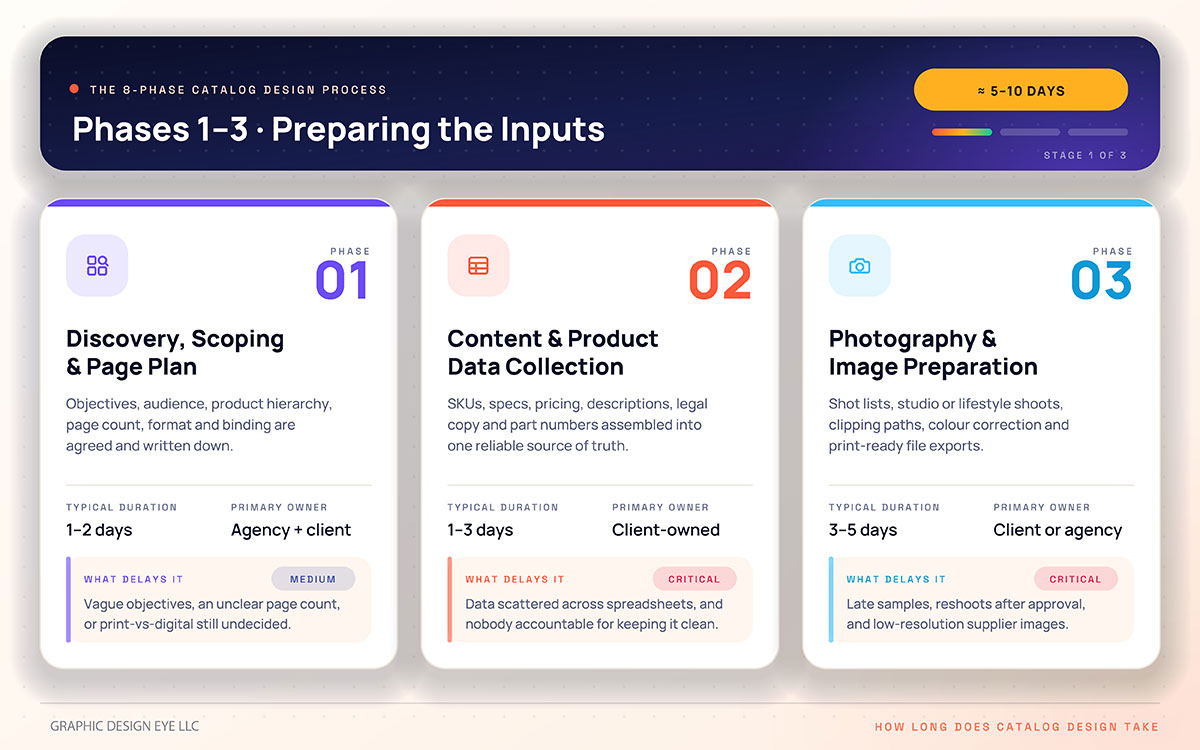
Objectives, audience, product hierarchy, estimated page count, format, binding direction, and distribution requirements are agreed and written down. None of it is glamorous. All of it is load-bearing.
What delays it: Vague objectives, an unclear page count, or an unresolved decision on whether the catalog is for print, digital, or both.
Typical duration: 1 to 2 business days for a straightforward project
Owner: Agency and client together
Phase 2. Content and product data collection
The SKU list, specifications, pricing, descriptions, category structure, legal copy, certifications, and part numbers are assembled into one reliable source of truth. This is the least admired work in the entire project, and it can decide your date.
What delays it: Data scattered across spreadsheets and system exports, inconsistent naming, missing specifications, and no single person accountable for the data.
Typical duration: 1 to 3 business days for a straightforward catalog.
Owner: Client owns the source data, with agency support.
Phase 3. Photography, retouching and image preparation
A shot list is built, studio or lifestyle photography is produced, and raw images are prepared for the catalog. Clipping paths, background removal, and color correction turn selected images into print-ready product imagery. Files are then named and exported to the required specifications.
What delays it: Samples arriving late, reshoots requested after approval, and low-resolution supplier images that look acceptable on screen but fall apart in print. Minor image corrections usually sit within a design package. Bringing several hundred SKUs to one consistent standard is separate scope, and it deserves its own place on the schedule.
Typical duration: 3 to 5 business days for a straightforward project.
Owner: Client or agency, depending on scope
Phase 4. Information architecture and flat plan
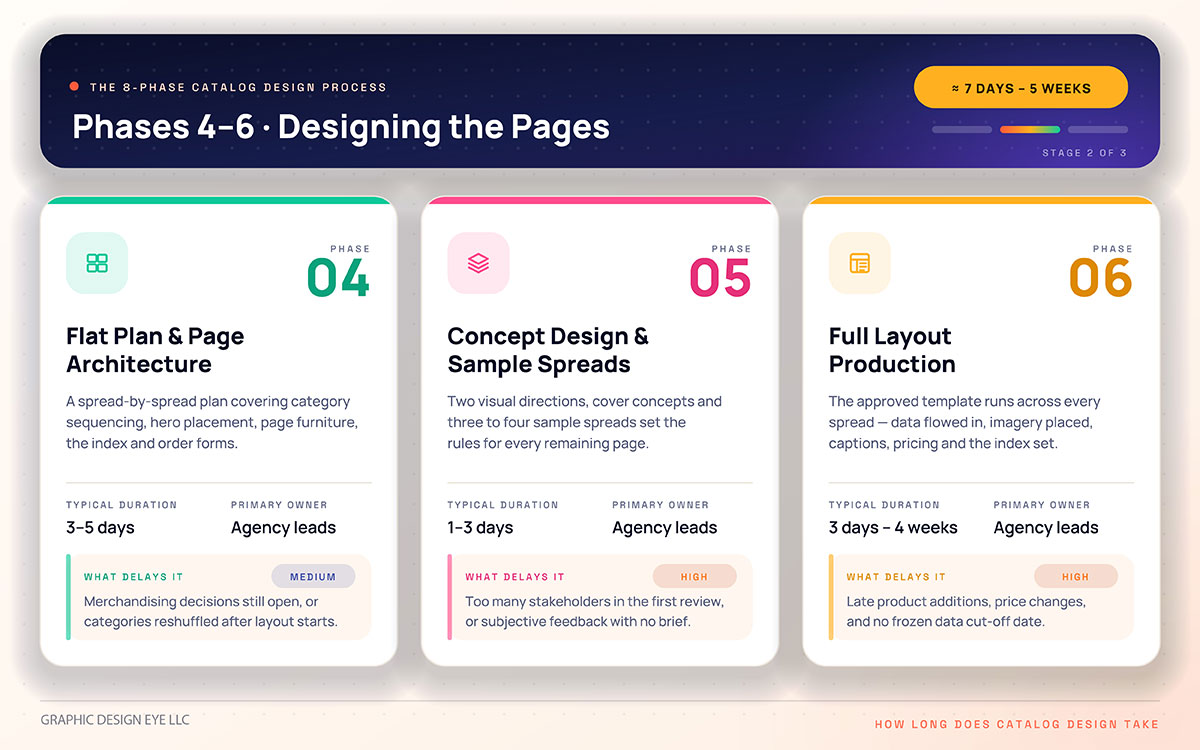
A spread-by-spread flat plan is built, covering category sequencing, hero product placement, page furniture, the index, and order forms. This is the skeleton, and it is far cheaper to change here than later.
What delays it: Merchandising decisions still open, or categories being reshuffled after layout has already begun.
Typical duration: 3 to 5 business days for a straightforward catalog
Owner: Agency leads, client approves
Phase 5. Concept design and sample spreads
Two distinct visual directions are developed alongside cover concepts and three to four representative spreads. These usually include a dense product grid and a lifestyle opener. The approved direction then sets the visual rules for the remaining catalog.
What delays it: Too many stakeholders in the first review, or subjective feedback with no clear brief to measure it against.
Typical duration: 1 to 3 business days for a straightforward catalog
Owner: Agency leads
Phase 6. Full layout production
The approved template is applied across every spread, product data is flowed in, imagery is placed, and captions and pricing are set. The index and cross-references are developed and updated as the layout takes shape. This is the phase everyone imagines is the long one. It often is not the part that determines the final delivery date.
What delays it: Late product additions, price changes during layout, and no frozen data cut-off date.
Typical duration: 3 days to 4 weeks, depending on page count and content volume
Owner: Agency leads
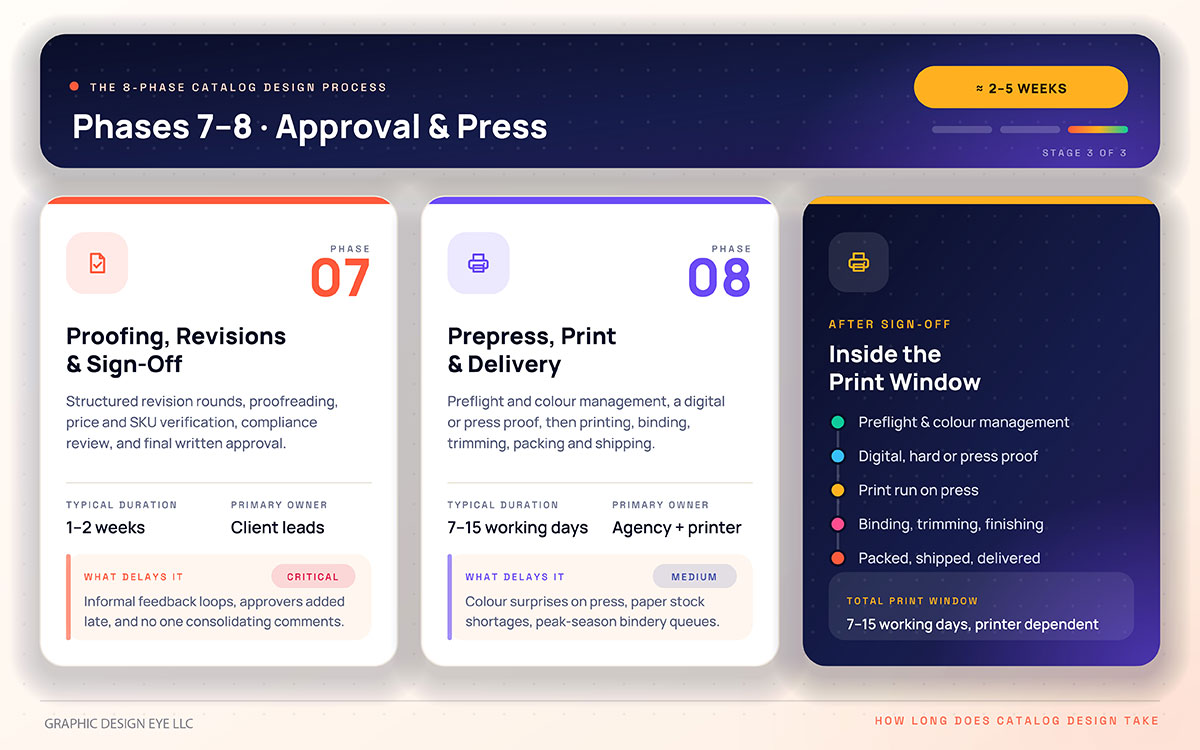
Phase 7. Proofing, revisions and sign-off
Structured revision rounds, full proofreading, price and SKU verification, legal or compliance review, and final written approval. Some design packages include unlimited revisions, but comments gathered into scheduled rounds always move faster than the same number sent one at a time.
What delays it: Informal feedback loops, approvers introduced late in the process, and no single person consolidating comments.
Typical duration: 1 to 2 weeks
Owner: Client leads, agency executes
Phase 8. Prepress, print production and delivery
Files go through preflight and color management before production. Depending on the project, a digital, hard, or press proof is reviewed before the print run begins. The finished sheets are then bound, trimmed, packed, and shipped. This is the phase in which your file becomes an object somebody can hold.
What delays it: Color surprises on press, paper stock being unavailable, and bindery queues during peak seasons.
Typical duration: 7 to 15 working days, depending on the printer and production requirements.
Owner: Agency and printer
What actually delays a catalog project
Most catalog delays happen outside the design studio. The designer can only move as quickly as the product data, images, decisions, and approvals arrive. That is worth stating plainly because it changes where the schedule needs protecting.
Three causes account for most of the delays that can push a catalog beyond its planned timeline. Let’s check!
Product data that is not ready
This is one of the most common causes, and the least visible one. Data collection so rarely appears on a project plan as a task with a name and an owner. Prices live in one system. Descriptions live in another. Dimensions sit inside a supplier PDF that nobody has opened in a year. Nobody is at fault, and yet the weeks disappear all the same.
Teams that treat keeping product data clean and current as a standing operational discipline, rather than a pre-catalog scramble, can start the project with far less cleanup. The advantage is not talent. It is housekeeping, practised early.
Approval structures without a single owner
The second cause is human, and therefore the most delicate to name. When six people review a proof independently, they can produce contradictory comments, leaving the studio waiting for someone to resolve them. Every unresolved review round can add several days to the schedule. A project with one named approver and a fixed review window will usually move faster than one managed by a committee, even when every member replies promptly.
The solution is simple on paper: name one person with final authority before the first proof goes out. Everyone else can contribute, but their comments should reach that person before they reach the studio. That keeps feedback together and prevents one revision round from becoming several.
Imagery discovered to be unusable
The third cause is imagery found far too late. A supplier image can look perfectly respectable on screen and still prove unsuitable for print. The discovery often arrives during layout, when replacing hundreds of product images can put the schedule under pressure. Nobody intended the delay. The problem simply was not visible until the pages were already being built.
Audit the image library during scoping rather than during layout. Check image quality, dimensions, backgrounds, shadows, and colour consistency before production begins. If hundreds of SKUs need the same treatment, budget for product photo editing as a separate part of the schedule. Like the other two causes, this one is far easier to fix when found early.
How to compress the timeline without damaging quality
The safest way to compress a catalog design timeline is to prepare more before design begins. Clean product data, ready images, clear decisions, and organized feedback leave fewer problems for the design stage to absorb. The eight moves below show where that preparation can save time without cutting corners on quality.
Prepare the product data sheet before contacting a designer: One clean file carrying SKU, name, description, specifications, price, and image references can remove major cleanup work from the design stage.
Audit the image library during scoping: Anything below the required print quality needs replacing or fixing. Find that problem in week one, not during the final layout.
Appoint one decision maker with genuine approval authority: Tell the wider group clearly that this person has final say. Everyone can contribute, but feedback should pass through one owner.
Agree on a written content freeze date and honour it: Late products can move to the next edition or a digital supplement. They should not keep disrupting an active layout.
Approve the flat plan before designing a single spread: Structure changes are cheap on a flat plan and far more expensive once dozens of pages are built.
Book press time when the production schedule is approved: Waiting until file delivery can leave the project behind during busy printing periods. Bindery queues do not adjust to late design schedules.
Reuse a design system instead of creating a new one every season: Templates, grids, and style rules reduce repeated setup work and make future catalogs easier to produce.
Run copywriting alongside photography rather than after it: Both need the same product information, but neither necessarily needs to wait for the other to finish.
Put these eight habits together, and the schedule starts to feel much more manageable. Instead of chasing delays later, you deal with the small problems while they are still easy to fix. On a sixty-four-page catalog, that difference can save weeks of waiting and rework. And the best part? Most of that time is won before the first page is ever laid out.
Catalog timeline and process FAQs
By this point, the timeline may have raised a few practical questions. How long should the design take? Where might those days disappear? And if the deadline is already fixed, what can still be done? Let’s answer those questions plainly, so you know what to expect and where to plan ahead.
A typical catalog design project takes several days to reach print-ready files. The exact time depends on page count, content readiness, image preparation, revisions, and approvals. A small catalog with finished materials can move quickly, while larger catalogs need more layout and review time.
Yes, a catalog can be designed within two weeks when the content and images are ready. Smaller catalogs may take only a few days. Larger projects can still fit the window with a clear scope and quick approvals. Missing content or delayed feedback can quickly consume that time.
Content preparation and approval can take longer than the actual layout work. Product data may need to be gathered, checked, organized, and approved first. Photography can add more time when images need creating or retouching. Once those materials are ready, layout can often move much faster.
Catalog printing can take about one to two weeks after artwork approval, depending on the printer and production requirements. Paper stock, binding, quantity, finishing, and production queues can all affect the schedule. It is wise to confirm the printer's turnaround before setting the final delivery date.
A second catalog is often faster because much of the groundwork already exists. The design system, page structure, product data format, and image treatment can be reused. The team spends less time establishing the system and more time updating the new edition. The actual saving depends on how much remains reusable.
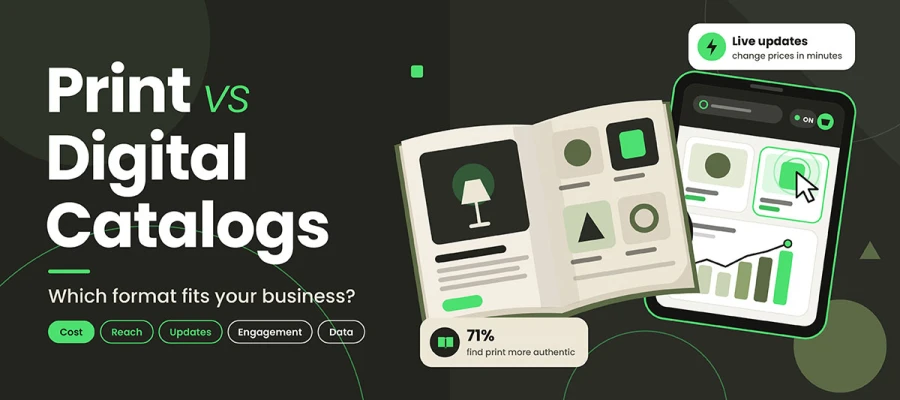
Yes, a digital catalog can take less production time because printing, binding, and physical delivery are removed. The design work may still be substantial, especially for large catalogs. Interactive links, bookmarks, search features, analytics, and file optimization can also add work to the digital version.
Endnote
So, is that deadline feeling a little less daunting now?
If you came here wondering how long does catalog design take, the biggest takeaway is simple: design may take days, but the full project needs more room. Product data, images, revisions, approvals, and printing can all affect the final date.
A well-run catalog design will tell you this at the scoping stage rather than at the proofing stage, because naming the real constraint early is the only thing that genuinely protects a date. Anyone who promises otherwise is selling comfort, not a schedule. And if the deadline is already staring back at you from the calendar, you do not have to figure it all out alone.
Graphic Design Eye can take care of the catalog design and product image preparation together, so unfinished images do not quietly push the project off schedule. Send the product list, page count, and deadline, and the team can map the work around the date you need to meet.
Send the product list, page count, and deadline, and the team can help map the work needed to get the catalog ready on time.
Meeting the date matters. Meeting it with accurate products, consistent imagery, and pages you are proud of matters more.
Now go and name your approver. Wishing you a smooth run and a catalog worth the wait. 🎉
Graphic Design Eye LLC is a full-service creative agency built for brands that demand more than design — they demand vision. From strategic branding to complete visual identity, we partner with startups, agencies, and growing businesses as a dedicated creative force. With flexible subscription and project-based models. Let's start with us today!